Enchanted Icon Selection
⚪ Last updated 2023⚠️ Install Order · 2 steps
Install in this order, then this mod last — most mods fail to load without their framework and dependencies in place.
Preview
🔍 Analysis
- 🏆 #49 of 82 User Interface mods in this game by downloads
📋 About This Mod
Enchanted Icon Selection
Enchanted item icon highlight replacement pack for TESIII: Morrowind
Updated 1 July 2004
Description
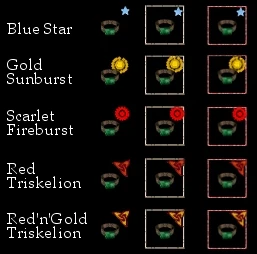
This pack offers a selection of alternative highlights to replace the blue swirl that identifies the icons of enchanted items in Morrowind.
Primarily, this still allows you to distinguish easily between enchanted and ordinary items in your inventory, but also allows you to see the individual enchanted items more clearly.
Credit goes to Andoreth for implementing the original idea in his "Blue Dot Magic Icons" mod. I have also incorporated Andoreth's 'uninstall' folder.
Installation
Take a look at the included image file "Enchanted Icons.jpg" and select one of the five types of highlight icon.
Open the folder with the same name and copy all five of the .dds files inside to your "Data Files\Textures" folder.
Typically you will find this folder at the file path:-
c:\Program Files\Bethesda Softworks\Morrowind\Data Files\Textures
Once you have copied the files, that's all there is to it.
Since this is a texture replacement pack only, it contains no .esp file and should be compatible with any version of Morrowind.
Uninstallation
If you want to try a different set of icons from the selection just go ahead and copy the new set to the same location, overwriting the earlier ones.
If you want to go back to the default blue swirl icons, you can either:-
1. Identify the replacement icons in your Textures folder and simply delete them. The filenames are:-
menu_icon_magic.dds
menu_icon_magic_barter.dds
menu_icon_magic_equip.dds
menu_icon_magic_mini.dds
menu_icon_select_magic_magic.dds
2. Copy the files in the folder called "I want the Blue Swirls back!" to your Textures folder, overwriting the replacements with default icons.
Do whichever of these you are more comfortable with.
Updates from 1. 0
Converted the replacement default files from .tga to .dds format.
This was neccessary because the Morrowind engine will use .dds textures by default, so copying the original files to the Textures folder was not restoring the default icons.
📊 Mod Details
- Game
- Morrowind Mods
- Author
- CheapShotUK
- Version
- 1.1
- Downloads
- 212
- Endorsements
- 8
- Category
- User Interface
- Created
- 3/17/2023
- Updated
- 3/17/2023
🔧 How to Install Morrowind Mods
Download from Nexus.
📖 Full step-by-step install guide for Morrowind →
Visit the official mod page for specific installation instructions for this mod.
🎮 Need cheat codes or console commands? Check ur gaming wiki for Morrowind commands, item IDs, and more.
Keep browsing — more Morrowind mods await