Dynamic Timescale
⚪ Last updated 2022⚠️ Install Order · 2 steps
Install in this order, then this mod last — most mods fail to load without their framework and dependencies in place.
Preview
🔍 Analysis
- 👍 1.9% endorsement rate — high engagement, a strong quality signal
- 🏆 #147 of 213 Immersion mods in this game by downloads
📋 About This Mod
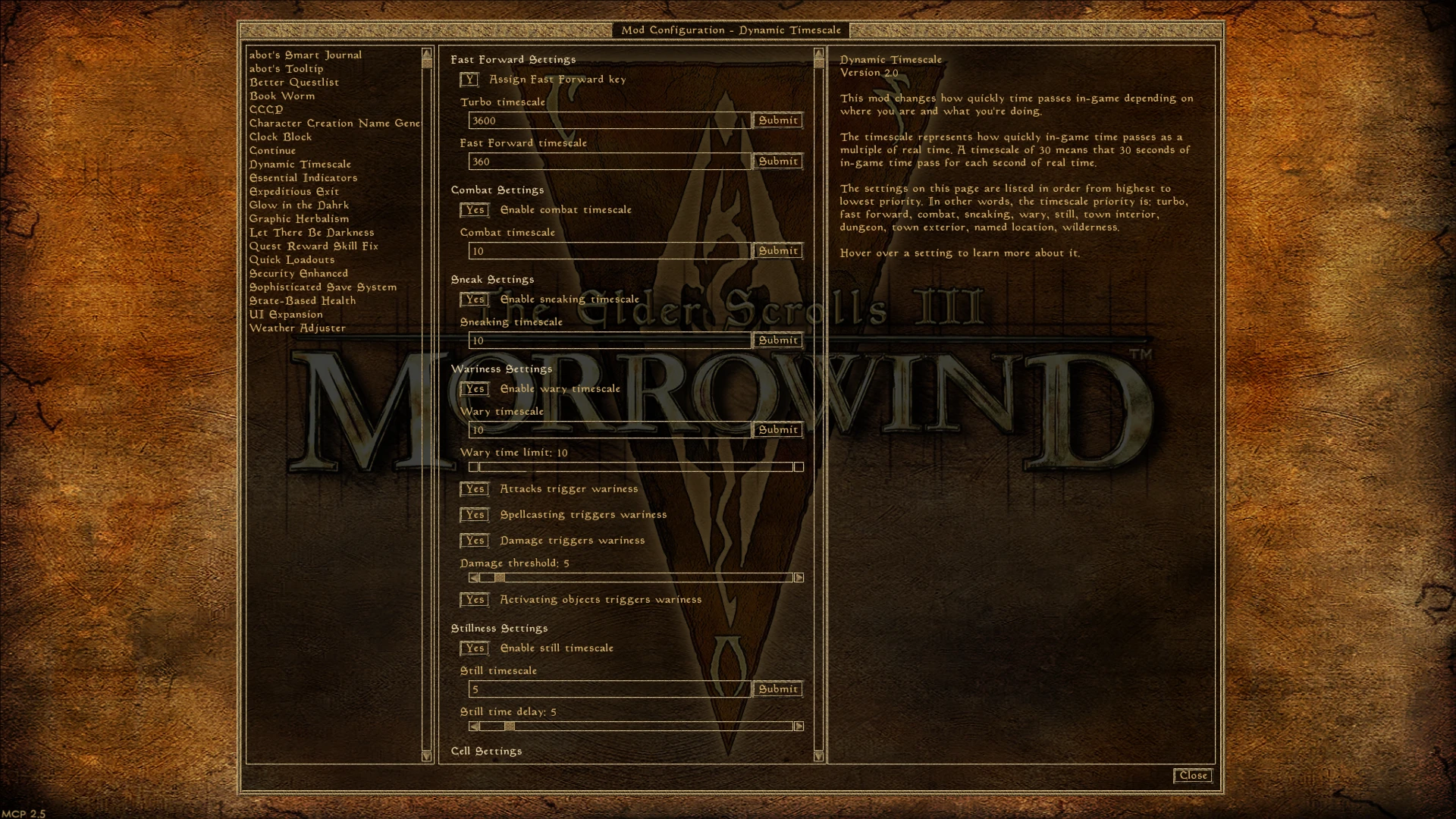
This mod changes how quickly time passes in-game depending on where you are and what you're doing. Now traveling on foot between cities will take an appropriately long amount of in-game time (since Vvardenfell is supposed to be much larger than it appears), while time slows down in other situations so days won't pass while exploring a dungeon. This mod is based roughly on the Oblivion mod of the same name.
There are different timescales for town interiors, dungeons, town exteriors, other named exterior locations and wilderness areas. There are also different timescales triggered by various activities, and you can have time pass at a different rate at night than during the day. In addition, you can significantly speed up the passage of time by holding down a configurable hotkey (use the control key as well to speed up time even more). All of these features and a number of other settings are configurable in the Mod Config Menu.
Finally, the mod includes a feature allowing other mods to temporarily disable this mod, potentially allowing for compatibility with other MWSE-lua mods that change the timescale.
Timescale Priority List
The timescale is the number of seconds of in-game time that pass per real-time second. Vanilla Morrowind uses a timescale of 30.
Timescales are applied with the following priority, from highest to lowest:
Blocked: If another MWSE-lua mod has temporarily blocked Dynamic Timescale, then this mod will do nothing, allowing the other mod to control the timescale.
Turbo Mode: If you're holding down the configurable hotkey plus the control key, the Turbo timescale will be applied. (Default: 3600, or one hour per second)
Fast Forward Mode: If you're holding down the hotkey without using control, the Fast Forward timescale will be applied. (Default: 360, or six minutes per second)
Combat: If you're in combat, the combat timescale will be used. This can be disabled entirely in the MCM. (Default: 10)
Sneaking: While you're in sneak mode. This can also be disabled. (Default: 10)
Wary: Wariness means you're paying careful attention to your surroundings. By default, the following actions trigger wariness: attacking, being attacked, casting (or attempting to cast) a spell, taking a certain amount of damage, or activating an object. (Default: 10)
The wary timescale can be disabled entirely in the MCM, and each wariness trigger can be disabled individually. You'll remain wary for a certain length of time after any of the enabled trigger events occur, and this length of time is also configurable. (Default: 10 seconds)
In addition, the amount of damage you must take in a single attack or o
Dynamic Timescale adjusts the passage of time in-game based on your location and activity, aiming to enhance immersion. With 156 endorsements and over 8,000 downloads, it's a niche utility mod for players who want more realistic time flow. Last updated in December 2022, it may require testing with current game versions.
✨ Key Features
📊 Pros & Cons
✅ Pros
- Community-tested with 156 endorsements and over 8,000 downloads.
- Simple concept that directly improves immersion for players who notice time inconsistencies.
- Lightweight and likely easy to install (based on typical mod structure).
⚠️ Cons
- Last updated in December 2022 — may be incompatible with the latest game patches.
- No detailed documentation or feature list provided by the author.
- Niche appeal; not for players who prefer fast-paced gameplay.
For immersion-focused players who want time to pass more realistically based on their actions and location. Skip if you prefer the default time flow or want a mod with more extensive features.
💡 Beginner Tips
- Check if the mod requires any specific game version or DLC before installing.
- If you use a mod manager, install through it to keep track of updates and conflicts.
- Test the mod in a new save to see if the time changes feel right for your playstyle.
📊 Mod Details
- Game
- Morrowind Mods
- Author
- Necrolesian
- Version
- 2.1
- Downloads
- 8,353
- Endorsements
- 156
- Category
- Immersion
- Created
- 6/2/2020
- Updated
- 12/1/2022
🔧 How to Install Morrowind Mods
Download from Nexus.
📖 Full step-by-step install guide for Morrowind →
Visit the official mod page for specific installation instructions for this mod.
🎮 Need cheat codes or console commands? Check ur gaming wiki for Morrowind commands, item IDs, and more.
Keep browsing — more Morrowind mods await