Distant Thunder
⚪ Last updated 2015⚠️ Install Order · 2 steps
Install in this order, then this mod last — most mods fail to load without their framework and dependencies in place.
Preview
🔍 Analysis
- 👍 4.0% endorsement rate — high engagement, a strong quality signal
- 🏆 #115 of 176 Miscellaneous mods in this game by downloads
📋 About This Mod
DISTANT THUNDER
v 1. 1 By The TheInkBunnyREQUIREMENTS -Morrowind -Bloodmoon Expansion -Tribunal Expansion
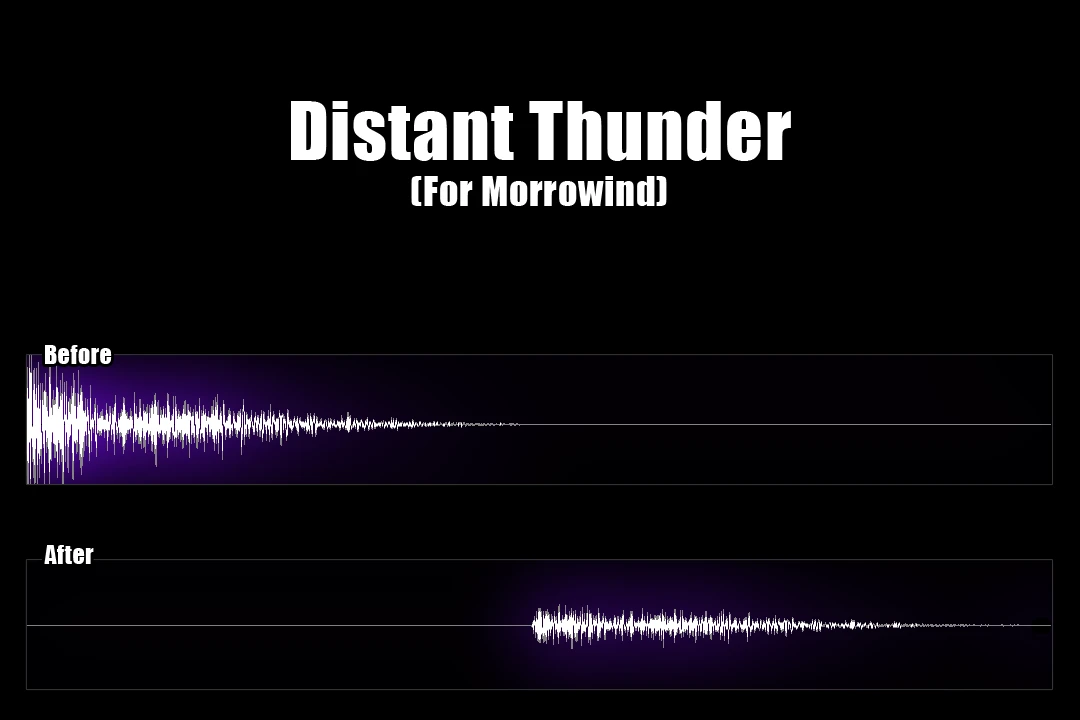
DESCRIPTION This simple tweak for Morrowind adds a bit of lead time to thunderclaps after lightning strikes for additional realism. 8 Sound files have been changed in total. Their volumes have been reduced accordingly and all delays are now between 0. 2 and 3 seconds.
INSTALLATION -Script Version Simply install as you normally would either manually or via your perfered mod manager. It's strongly recommended that you place Distant Thunder towards the beginning of your load order, so that any scripts that other mods change take precedence over DT.
- -No Script Version
- 1) This option does not change scripts, but instead requires you to manually edit your morrowind.ini file. This can be found inside your primary game directory (not the Data Files subfolder).
2) After locating morrowind.ini, replace the following entries with this new data:
Thunder Sound ID 0=Distant_Thunder_00 Thunder Sound ID 1=Distant_Thunder_01 Thunder Sound ID 2=Distant_Thunder_02 Thunder Sound ID 3=Distant_Thunder_03
3) Check that "Distant Thunder (No Scripts).esp" is active in your load order and you should be good to go.
A simple Morrowind tweak that adds randomized delay between lightning and thunder for realism. Lightweight and easy to install, with 394 endorsements and nearly 10k downloads, though it hasn't been updated since 2015.
✨ Key Features
📊 Pros & Cons
✅ Pros
- Community-trusted with 394 endorsements and nearly 10k downloads
- Does exactly what it says: adds realistic thunder delay
- Lightweight and doesn't clutter your load order
⚠️ Cons
- Last updated in 2015, so it may not be compatible with newer Morrowind versions or mods
- Only affects thunder timing—no other weather improvements
For Morrowind players who notice the instant thunder and want a touch more realism. Perfect for immersion-focused playthroughs. Skip if you're looking for a full weather overhaul—this is a tiny tweak.
💡 Beginner Tips
- Drop the file into your Morrowind Data Files folder and activate it in the launcher.
- If you use a mod manager like Wrye Mash, install it there for easy management.
- Pair with a weather mod for best results—this only tweaks thunder timing.
📊 Mod Details
- Game
- Morrowind Mods
- Author
- TheInkBunny
- Version
- 1.1
- Downloads
- 9,770
- Endorsements
- 394
- Category
- Miscellaneous
- Created
- 2/7/2015
- Updated
- 2/13/2015
🔧 How to Install Morrowind Mods
Download from Nexus.
📖 Full step-by-step install guide for Morrowind →
Visit the official mod page for specific installation instructions for this mod.
🎮 Need cheat codes or console commands? Check ur gaming wiki for Morrowind commands, item IDs, and more.
Keep browsing — more Morrowind mods await