Reduced Blue Tint LUT (Not Reshade)
🟠 Updated over a year agoPreview
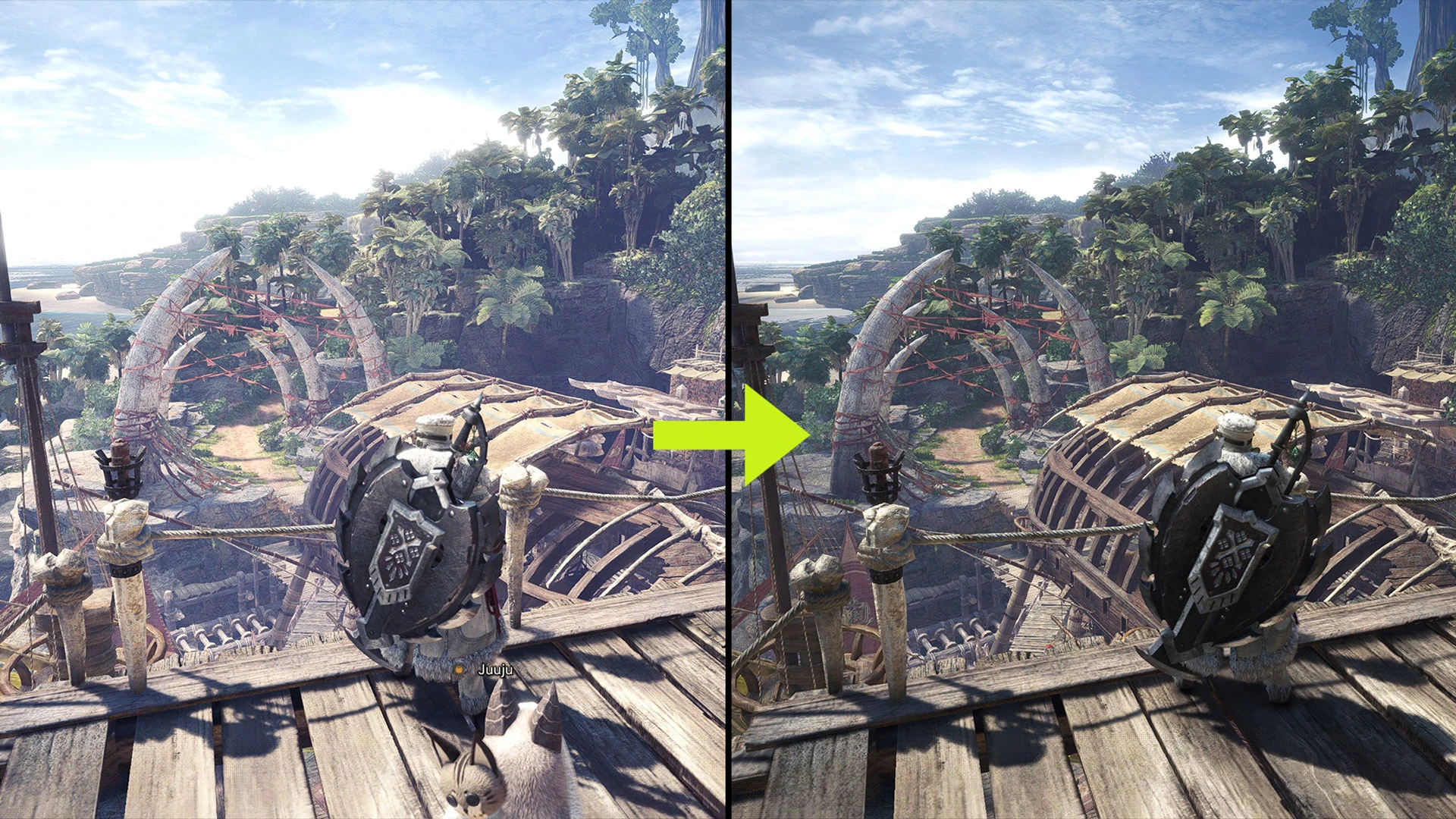
🔍 Analysis
- 👍 2.4% endorsement rate — high engagement, a strong quality signal
- 🏆 #38 of 180 Visuals and Graphics mods in this game by downloads
📋 About This Mod
This mod reduces bluish tint and overexposed light from the game default LUT. The mod is performance friendly as it only modifies game files and does not use Reshade.
Screenshots comparison with slider:
Comparison 1
Comparison 2
Installation:
Drop the nativePC folder in "Steam\Steamapps\common\Monster Hunter World\".
Please set the in-game brightness back to default and readjust the brightness to your preference.
The left and right brightness symbol guide can be ignored.
Uninstallation:
Delete the "LUT" folder in "Steam\Steamapps\common\Monster Hunter World\nativePC\light\".
Tools used in modding:
CrappyLUTStudio by AsteriskAmpersand
MHWNoChunk by JodoZT
MHW CC Studio by Dave uRrr
📊 Mod Details
- Game
- Monsterhunterworld Mods
- Author
- Teuthidaa06
- Version
- 1.4
- Downloads
- 23,246
- Endorsements
- 562
- Category
- Visuals and Graphics
- Created
- 11/16/2024
- Updated
- 1/18/2025
🔧 How to Install Monster Hunter: World Mods
Download from Nexus Mods.
📖 Full step-by-step install guide for Monster Hunter: World →
Visit the official mod page for specific installation instructions for this mod.
🎮 Need cheat codes or console commands? Check ur gaming wiki for Monster Hunter: World commands, item IDs, and more.
Keep browsing — more Monster Hunter: World mods await