Souvenir's Light Pillar
⚪ Last updated 2020Preview
🔍 Analysis
- 👍 3.0% endorsement rate — high engagement, a strong quality signal
- 🏆 #1 of 180 Visuals and Graphics mods in this game by downloads
📋 About This Mod
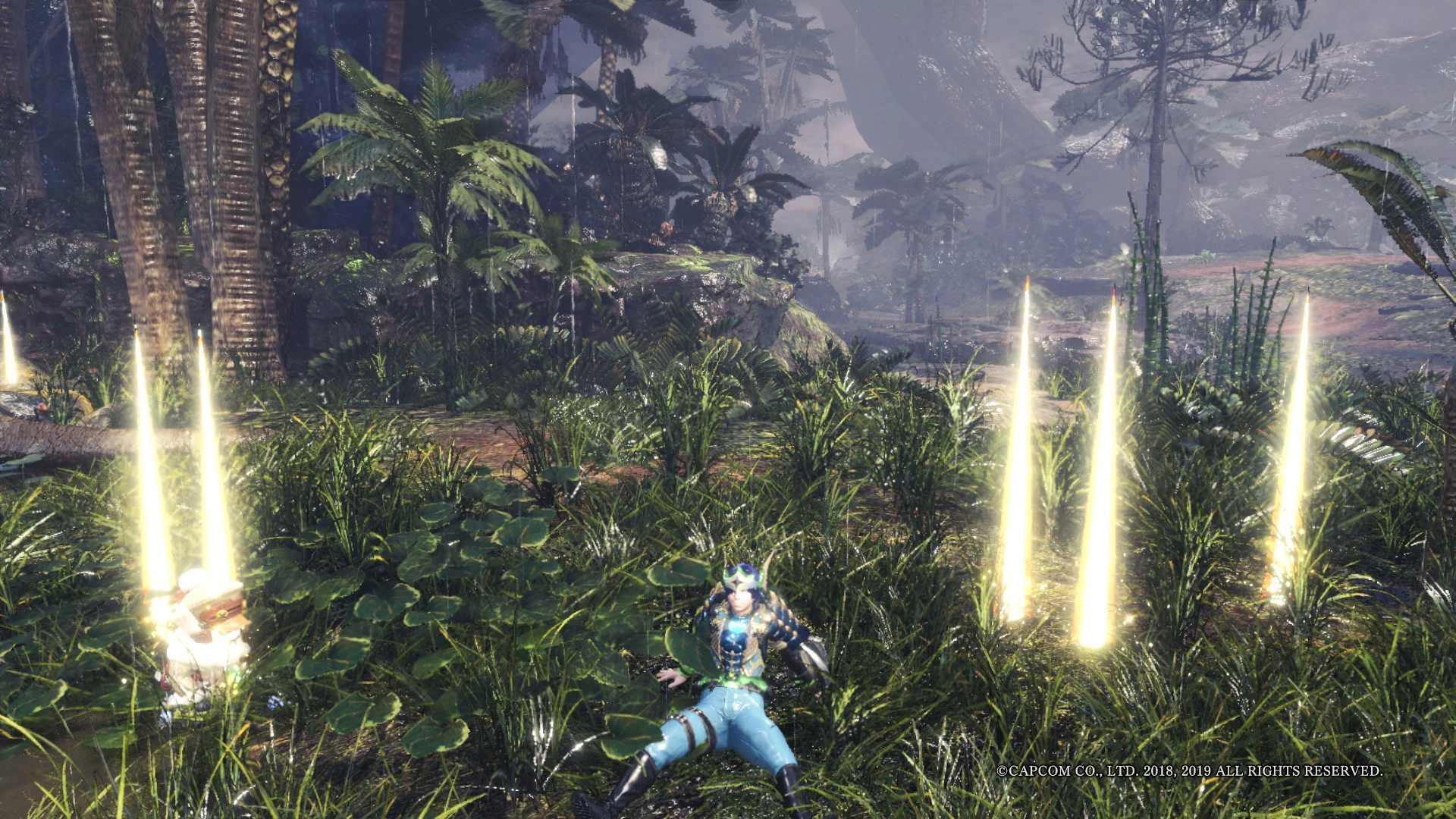
It lights up the souvenirs for making them easier to find.유실물을 찾기 쉽게 하기 위해 빛기둥을 박아넣었습니다.
Monster Hunter: World - Souvenir's Light Pillar
about this mod :
This mod simply changes the souvenir's form into light pillar.
It also suppots slingers & bandit-mantles.
Installation :
Place NativePC on the ../Steam/steamapps/common/Monster Hunter World.
If you don't want other drop's light pillar, delete this:
(Souvenir light) nativePC\Assets\gm\gm000\gm000_014 folder & files,
(Slinger light) nativePC\Assets\gm\gm000\gm000_030 folder & files,
(Bandit-mantle light) nativePC\Assets\gm\gm000\gm000_120 folder & files.
Uninstallation :
Check the contents of the mod zip file you downloaded, and delete any matches.
You can also delete empty folder.
Mod by Eisus
──────────────────────────────
몬스터 헌터: 월드 - 유실물의 빛기둥
무슨 모드인가 :
단순히 유실물의 외형을 빛기둥으로 교체했습니다.
슬링어탄과 강도복장 또한 지원합니다.
설치법 :
NativePC 폴더가 ../Steam/steamapps/common/Monster Hunter World 안에 존재하도록 옮겨넣으세요.
다른 빛기둥을 원하지 않는다면, 다음 폴더를 통째로 지우세요:
(유실물 빛기둥)nativePC\Assets\gm\gm000\gm000_014 폴더,
(슬링어 빛기둥)nativePC\Assets\gm\gm000\gm000_030 폴더,
(강도복 빛기둥)nativePC\Assets\gm\gm000\gm000_120 폴더.
제거법 :
다운로드했던 모드 압축파일의 내용물을 확인 후, 일치하는 파일들을 제거하세요.
빈 폴더 역시 지워도 됩니다.
제작자 Eisus
📊 Mod Details
- Game
- Monsterhunterworld Mods
- Author
- Eisus2589
- Version
- 1.3
- Downloads
- 1,528,046
- Endorsements
- 45,965
- Category
- Visuals and Graphics
- Created
- 9/3/2018
- Updated
- 1/17/2020
🔧 How to Install Monster Hunter: World Mods
Download from Nexus Mods.
📖 Full step-by-step install guide for Monster Hunter: World →
Visit the official mod page for specific installation instructions for this mod.
🎮 Need cheat codes or console commands? Check ur gaming wiki for Monster Hunter: World commands, item IDs, and more.
Keep browsing — more Monster Hunter: World mods await