Player's Custom Guildmarm Costume (Post-Iceborne)
⚪ Last updated 2020Preview
🔍 Analysis
- 👍 2.5% endorsement rate — high engagement, a strong quality signal
- 🏆 #17 of 183 Characters mods in this game by downloads
📋 About This Mod
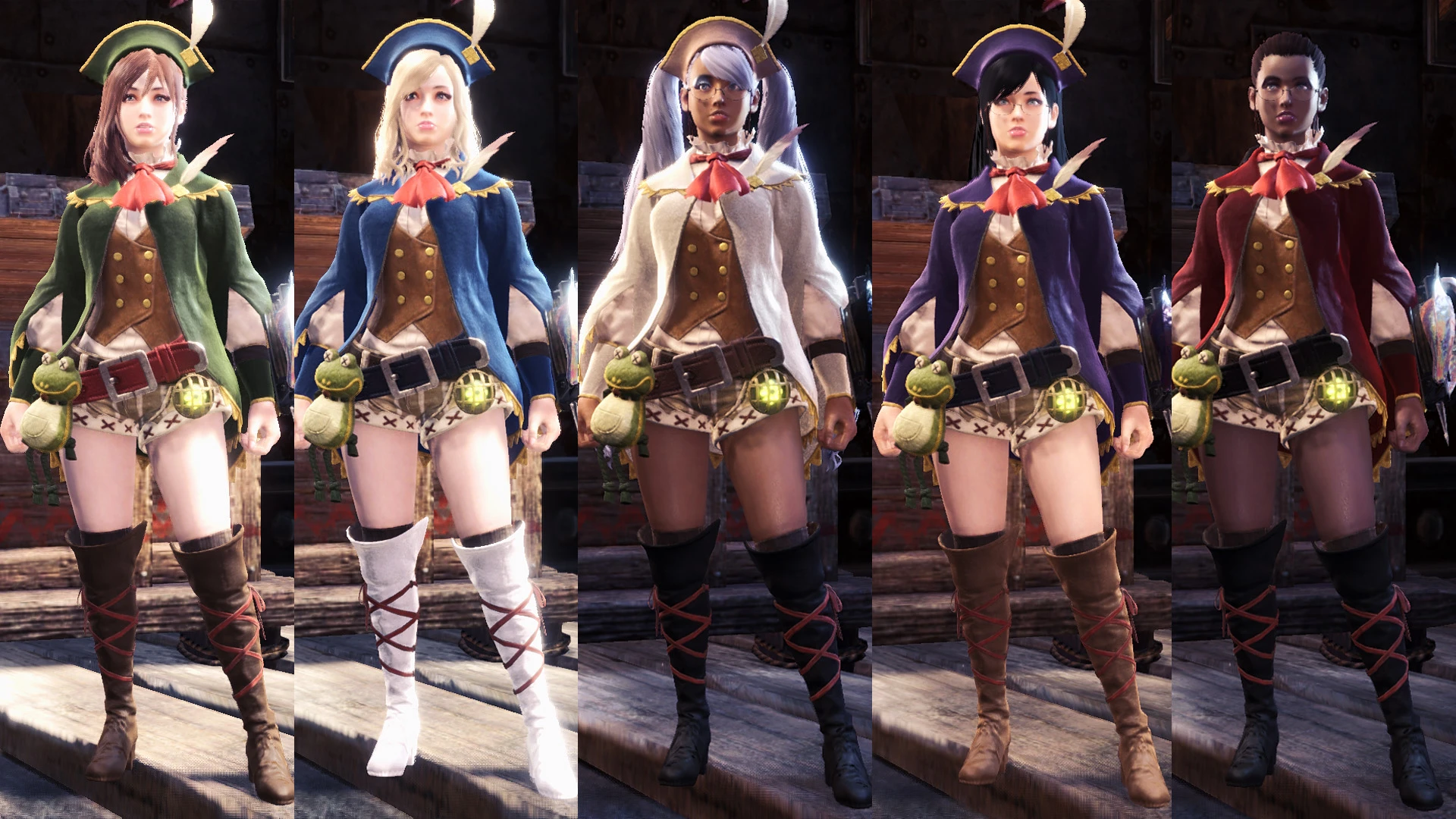
Custom-modified Guildmarm costume, now for players. Change colors in-game. Mix and match parts. Optional hat sizes and glasses.
Modifications include bustier and curvier with shorter shorts, longer legs and higher heels.
Now works in Iceborne.
Replaces the Harvest layered armor.
You do not need to have the Guildmarm costume to use this.
日本語の説明はこの下です。
- Added thin thighs/hips version.
- Fixed possible skin material problem with the optional no slinger arm.
- Accidentally wrote warning about Handler DLC in the wrong mod description. Fixed now.
- Added support for Iceborne.
- Version 2. 0+ are the Iceborne files.
- Swapping with other model files affects which color is customizable. I've prepared alternate textures to counter this. See below for instructions.
- Sleeves and coat have minor clipping.
- Default color isn't the same as the Handler's. Couldn't figure out how to change it.
- Hat variations will likely clip through the hair. The smaller version pushes the front bangs down, but that causes problems for my hair mods.
- In cutscenes, what looks like a reverse red glasses rim can be seen on the back of the head. No idea where that's coming from.
- Sometimes the belt frog's legs will stretch weird in cutscenes.
How I converted it:
- To get the helm to not implode, I pasted the start of the bone data from a helm model. maybe the first 4-5 bones or so.
- To get the slinger to work, I hex-edited the book strap bones into slinger bones, copied slinger bone index from Vaal arm, and moved the bones in Blender.
- To stop the outfit from crashing, I edited the bone map to refer to the newly created slinger bones.
- To get coloring to work, I made CMM textures and overwrote the cloth material with one from a player outfit. Then copied original values back to the bottom.
- To fix the coat distortion, I used CrazyT's tool to remove strange bone influences from the back of the coat.
- To get the skin color customization to work, it seems like the corners of a skin texture must be skin colored, or it appears white in-game. Not 100% sure.
- To separate the helm and legs mesh, I created comparison files and then manually replaced the leg vertex data with 00 bytes.
Installation:
Simply unzip the main archive (with folders) into Steam\Steamapps\common\Monster Hunter World\
Optional files go in the same location, overwriting the main archive's files
📊 Mod Details
- Game
- Monsterhunterworld Mods
- Author
- UberGrainy
- Version
- 2.0
- Downloads
- 101,443
- Endorsements
- 2,555
- Category
- Characters
- Created
- 10/24/2018
- Updated
- 1/27/2020
🔧 How to Install Monster Hunter: World Mods
Download from Nexus Mods.
📖 Full step-by-step install guide for Monster Hunter: World →
Visit the official mod page for specific installation instructions for this mod.
🎮 Need cheat codes or console commands? Check ur gaming wiki for Monster Hunter: World commands, item IDs, and more.
Keep browsing — more Monster Hunter: World mods await