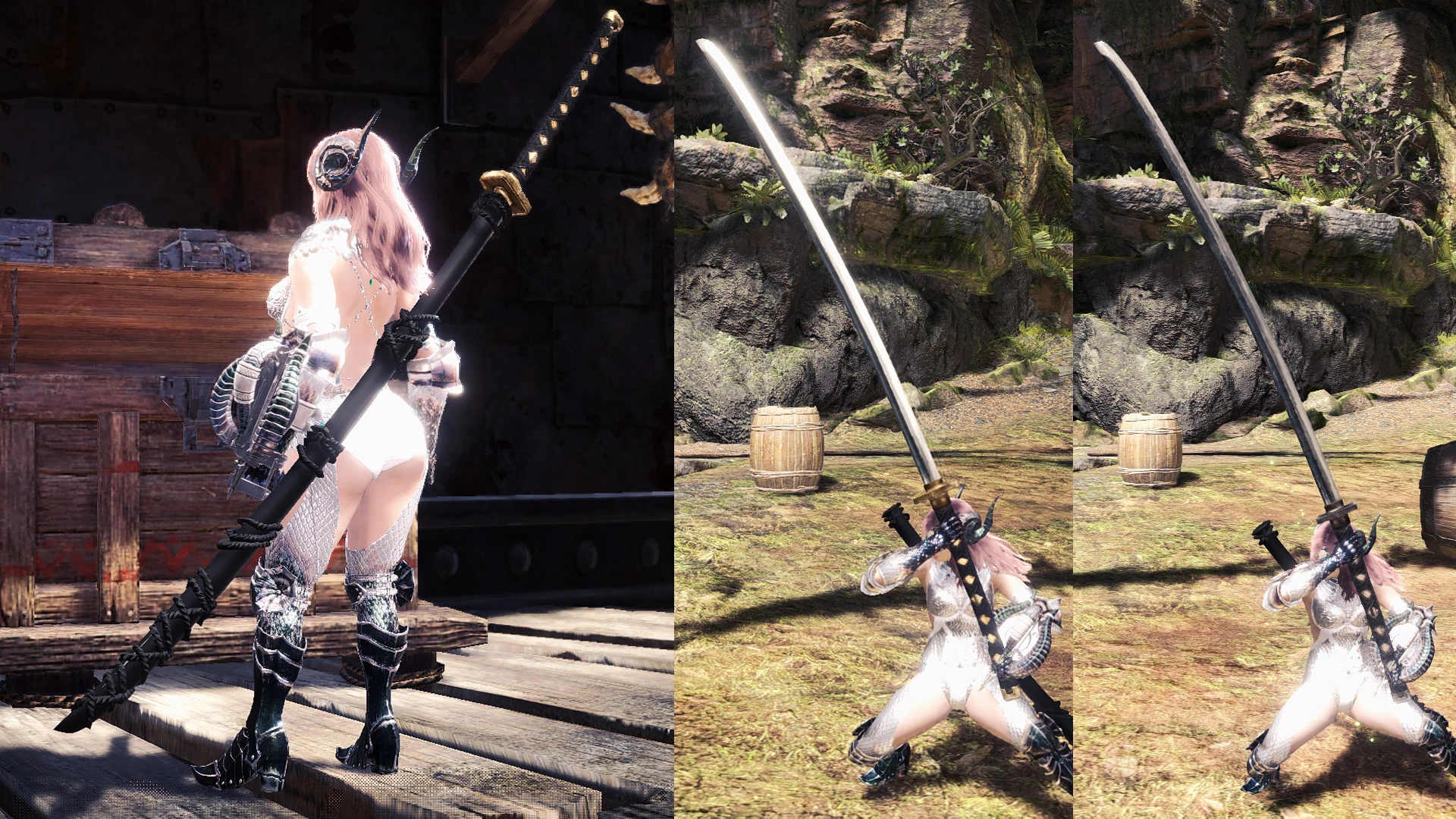
Odachi Samurai Long Sword
⚪ Last updated 2018Preview
🔍 Analysis
- 👍 3.8% endorsement rate — high engagement, a strong quality signal
- 🏆 #54 of 716 Weapons mods in this game by downloads
📋 About This Mod
No longer works after the Iceborne patch. Please download the new version here.
アイスボーンのパッチ後、もう使えなくなりました。新しい版をここからDLしてください。
Resembles Sephiroth's Masamune. Optional circular guard, worn textures and invisible scabbard. Includes replacements for all current Long Swords.
Modified from the Felyne Samurai Sword and Divine Slasher scabbard.
日本語の説明はこの下です。
- Fixed default guard shape not being square.
- Fixed slight clipping through scabbard.
- Fixed scabbard UV.
- Updated scabbard texture to remove the pattern because it looked much worse than I imagined.
- Handle part is incorrect because I just scaled it, but it'd take a lot of work to redo the textures, so I decided to release it as-is.
- Too lazy to add the guard parts to make it look like Sephiroth's.
Known weapon folder list:
bs_swo07 = Taroth
bs_swo08 = Taroth
swo01 = Divine Slasher
swo09 = Deviljho
You can check which is which by renaming folders and then re-opening the Workshop Greatsword crafting list (it'll update).
Installation:
Download one of the main archives. Choose which folders you wish to extract. "BS_swo000x" are weapons that have attached parts. If you extract these, you'll need to extract the parts folders to hide those parts. "Swo000x" are unique weapon models. You must extract the folder "mod_wp_odachiLS" for the textures. If you see any floating emblem, you'll need to make sure you've extracted the "emblem" folder to hide the emblem.
All files and folders go into Steam\Steamapps\common\Monster Hunter World\
Optional archives extract to the same folder (overwrite).
Uninstallation:
If you want to revert to the original, simply delete the mod files in these folders:
NativePC\pl\wp\swo\mod_pl_odachiLS\
NativePC\pl\wp\swo\ whatever folders you decided to extract.
Thanks to Vuze for the unpacking tools, daemon1's raw texture converter (correct offset values are usually around 100 to 118), FineNerd's MHWTexConvert for converting DDS to BC7, MT Framework tools by Predator for importing as reference, CrazyT's BlenderMhwModelImporter and JodoZT's Better MHW Texture Converter.
Special thanks to the people reporting problems, and helping others out in the forum.
Mods used in screenshots:
Custom Taroth Armor
Sexy Berserker Vaal Hazak Armor
Subtle Clarity Reshade
Simple Female Face Texture
Canine Palico
Longer Twin-Tails
Handler's Side-Part Hairstyle
📊 Mod Details
- Game
- Monsterhunterworld Mods
- Author
- UberGrainy
- Version
- 1.1
- Downloads
- 22,710
- Endorsements
- 858
- Category
- Weapons
- Created
- 11/10/2018
- Updated
- 11/12/2018
🔧 How to Install Monster Hunter: World Mods
Download from Nexus Mods.
📖 Full step-by-step install guide for Monster Hunter: World →
Visit the official mod page for specific installation instructions for this mod.
🎮 Need cheat codes or console commands? Check ur gaming wiki for Monster Hunter: World commands, item IDs, and more.
Keep browsing — more Monster Hunter: World mods await