MHW Texture Converter by Jodo
⚪ Last updated 2021Preview
🔍 Analysis
- 👍 5.2% endorsement rate — high engagement, a strong quality signal
- 🏆 #56 of 116 Utilities mods in this game by downloads
📋 About This Mod
A wildly used MHW Texture converter.
MHWTextureConverter By Jodo:
It's a two way converter of .tex and .dds files in MHW.
Source code published on github: Link (Star project if you like this tool, thanks LOL)
Works on Iceborne.
v1. 3. 0 Fixed error due to the format difference between linear and srgb. Changed output file prefix. Add support to R8G8B8A8 textures.
v1. 2. 3 fixed the error while converting BC6H formatted texture.
v1. 2. 2 support multi-files converting.
v1. 2. 1 fixed the error while converting BC4U formatted texture.
The tool is developed based on .net framework 4. 0.
Drag and drop the .tex or .dds file onto the icon of the .exe file. Then it will auto generate the output file to same directory as the input file.
If the suffix is .tex, the output file will add a prefix of it's type of compression.
You have to install a photoshop plugin like Intel Texture workshop or Nvidia texture tool to edit the .dds files by photoshop. Or use any other program that supports .dds files like GIMP.
Links to the plugins:
Intel: http://gametechdev.github.io/Intel-Texture-Works-Plugin/
Nvidia: https://developer.nvidia.com/nvidia-texture-tools-adobe-photoshop
If you have installed both tools above, ps will defaultly use the Intel tool to open .dds file.
To save .dds file after edited:
If the prefix of the output .dds is:
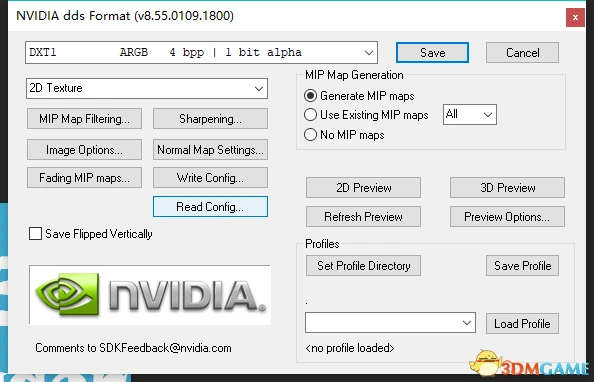
DXT1L: Linear DXT1/BC1. Better use Nvidia tool and compression type: DXT1 ARGB 4bpp | 1bit alpha, other configs stay default. If you want to keep your alpha channel(only 1 bit alpha) with DXT1 compression you have to use Nvidia tool because the intel tool doesn't support alpha channel in DXT1.
R8G8B8A8: Use intel texture workshop. Save options: Color + Alpha, none 32bpp
BC1S: sRGB DXT1/BC1. Use intel texture workshop. Save options: Color, BC1 4bpp(SRGB)
BC4U: use Intel tool and save options: Color, BC4 4bpp(Linear, Grayscale)
BC5U: use Intel tool and save options: Normal Map, BC5 8bpp(Linear, 2 Channel tangent map)
BC6H: use intel tool and save options: Color, BC6H 8bpp Fine(Linear, DX11+)
BC7L: Linear BC7. Use Intel tool and save options: Color + Alpha, BC7 8bpp Fine(Linear, DX11+)
BC7S: sRGB BC7. Use Intel tool and save options: Color + Alpha, BC7 8bpp Fine(sRGB, DX11+)
Notice that if the texture you are editing does not contain mipmap(eg. icons of monsters), you should not generate the mip maps. Instead, select None but not Auto Generate as Mip Maps generation option in the Intel tool.
📊 Mod Details
- Game
- Monsterhunterworld Mods
- Author
- Jodo - DMQW Modding Group
- Version
- v1.3.0
- Downloads
- 15,939
- Endorsements
- 829
- Category
- Utilities
- Created
- 10/27/2018
- Updated
- 2/1/2021
🔧 How to Install Monster Hunter: World Mods
Download from Nexus Mods.
📖 Full step-by-step install guide for Monster Hunter: World →
Visit the official mod page for specific installation instructions for this mod.
🎮 Need cheat codes or console commands? Check ur gaming wiki for Monster Hunter: World commands, item IDs, and more.
Keep browsing — more Monster Hunter: World mods await