FreeCam Plus (MHW CC Studio)
🟠 Updated over a year agoPreview
🔍 Analysis
- 👍 4.2% endorsement rate — high engagement, a strong quality signal
- 🏆 #50 of 116 Utilities mods in this game by downloads
📋 About This Mod
The Power of DayNight, Free Cam, Perspective Cam, and custom Camera Settings all in one.
Description
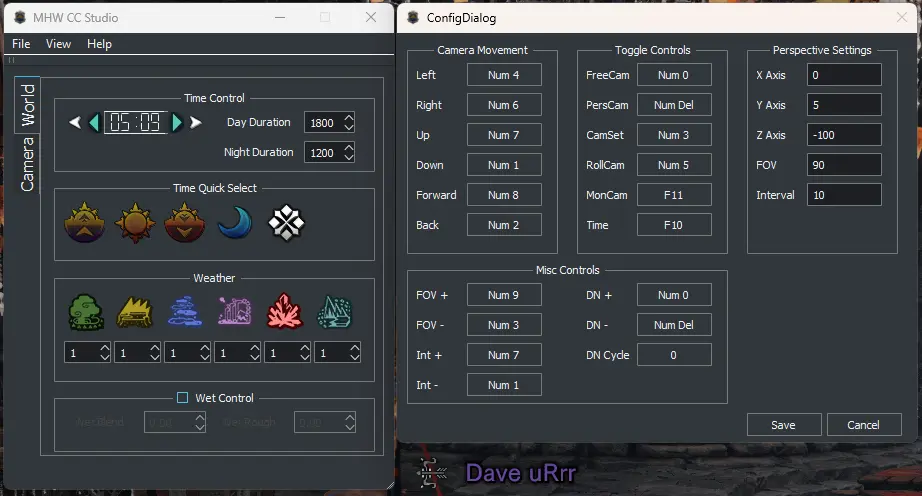
This mod allows you to experience control of DayNight, Free Cam, Perspective Cam, First Person Cam, and Custom Camera Settings. I've provided an JSON file so you can change the keybindings to what you want with an Integer representation of the Virtual Key Codes. You can find it here Virtual-Key Codes. Do understand that the values in the JSON files are represented as Integers not HEX values.
If you are still a little confused on how to use it you can watch a short tutorial video here MHW CC Studio (Tutorial)
Version 3. 0. 0
-
[]Monster Camera Mode. It's a Toggle when you activate it with the same Key (Default F11). It toggles between Monster 1, 2, and 3. If there is only 1 Monster the other slots will point the Camera avertedly at {0,0,0}. To adjust the Camera Position Manually, you need to use the Distance (Plus/Minus) and Height (Plus/Minus) Keys. I have them as / - + on the Numpad by Default.
[]TimeControl Mode. You can adjust the Game Cycle in the UI. This allows you to freely move the Camera when in Free Cam while the whole game is paused.
Version 4. 0. 0
-
[]Added Weather Control for Expedition Stages. Setting the stage to 1 makes the stage have a clear day, setting it to 2 which add the weather effect of the stage i.e. Rain, Sandstorm, Turbulence, Acid Rain, Blizzard, etc. The changes take effect once you change stages, the table get's updated after you enter a stage in Expedition. I was going to add the Guiding Lands but upon researching it's effects I found nothing actually changed and the guiding lands doesn't have any true weather effects. I will be doing more testing to see if I can create it seeing that there is an actually slot for weather changes for the guiding lands but I can't make any promises here. I fee like Capcom missed an opportunity here.
[]Added the Day and Night Duration. This allows you to either shorten or extend the duration of the day and night cycles. By default they are set to 1800 seconds for Day and 1200 seconds for night.
Version 5. 0. 0
-
[]Overhaul of the application via UI and code base for better performance
[]Removal of the Real Time Clock for in game time
[]Removal of First Person Shooter mode but can implement via Perspective Camera Mode and Camera Settings
[]Additional Camera value edits via ui for precision editing allowing to recreate a preset.
[]Please review the new Config.json as some of the values have been changed/removed.
Version 5. 1. 0
-
[]I've added a "Point of View" feature that locks the camera when using the Aim button. You can choose which axis to lock and works on all modes and by itself.
Future Plans
It will be a while till I add in new features.
[
]RAIL Camera
-
[]I've added a "Point of View" feature that locks the camera when using the Aim button. You can choose which axis to lock and works on all modes and by itself.
-
[]Overhaul of the application via UI and code base for better performance
-
[]Added Weather Control for Expedition Stages. Setting the stage to 1 makes the stage have a clear day, setting it to 2 which add the weather effect of the stage i.e. Rain, Sandstorm, Turbulence, Acid Rain, Blizzard, etc. The changes take effect once you change stages, the table get's updated after you enter a stage in Expedition. I was going to add the Guiding Lands but upon researching it's effects I found nothing actually changed and the guiding lands doesn't have any true weather effects. I will be doing more testing to see if I can create it seeing that there is an actually slot for weather changes for the guiding lands but I can't make any promises here. I fee like Capcom missed an opportunity here.
📊 Mod Details
- Game
- Monsterhunterworld Mods
- Author
- Dave uRrr
- Version
- 5.4.0
- Downloads
- 21,321
- Endorsements
- 886
- Category
- Utilities
- Created
- 2/10/2020
- Updated
- 5/20/2025
🔧 How to Install Monster Hunter: World Mods
Download from Nexus Mods.
📖 Full step-by-step install guide for Monster Hunter: World →
Visit the official mod page for specific installation instructions for this mod.
🎮 Need cheat codes or console commands? Check ur gaming wiki for Monster Hunter: World commands, item IDs, and more.
Keep browsing — more Monster Hunter: World mods await