Cleaner Handler Face Texture
⚪ Last updated 2018Preview
🔍 Analysis
- 👍 6.3% endorsement rate — high engagement, a strong quality signal
- 🏆 #53 of 180 Visuals and Graphics mods in this game by downloads
📋 About This Mod
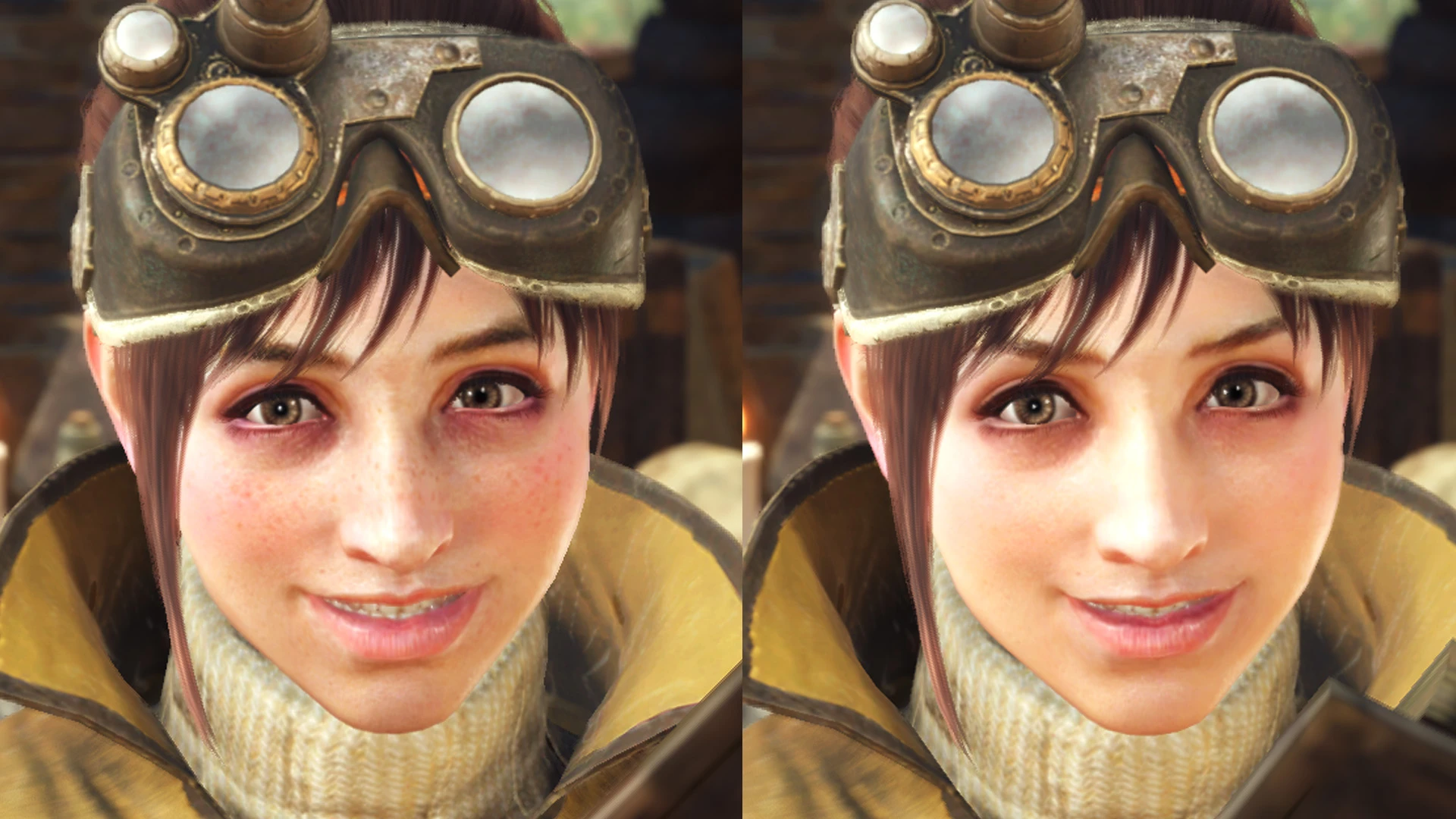
A cleaner face texture for the Handler. I combined her face with the Serious Handler's face texture (thinner eyebrows, different lips), softened the details such as skin pores, lightened the face slightly and added a little more soft color. I think it makes her look slightly better and less scary-looking. This should apply to all of her outfits.
If anyone's wondering why I didn't just swap files with other characters, it's because:
1. Inner mouth becomes bright when swapping with other main NPCs (eg. Serious Handler). Needs model/material editing, I think.
2. Lesser NPCs don't have their own models, they use the player face model. Swapping player face model onto main NPCs implodes the face.
Installation:
Simply unzip the files (with folders) into Steam\Steamapps\common\Monster Hunter World\
Uninstallation:
If you want to revert to the original, simply delete the mod files in NativePC\npc\npc02
Thanks to Vuze for the unpacking tools, and daemon1 for the TEX converter.
I haven't posted a mod for a very long time. Feel free to let me know if I've screwed up somewhere.
Rough explanation of how I did it: (I forgot some exact details)
1. Convert TEX to DDS using this tool. Every texture seems to use a different type. This Handler face texture was DXT1 (BC1).
2. Edit the texture in Photoshop.
3. I think I exported using Intel Texture Works, no mipmaps, and set to BC1_Unorm. Try both BC1 options if you have any problems.
4. Open the DDS in a hex editor, remove everything before "TEX". Save as . TEX extension.
5. Open the original TEX file, copy everything before the second E1D1 (0x00000900) and overwrite paste it over the edited texture.
6. In Photoshop, the texture may be misaligned (ie. right part appears on the left). Manually fix that.
7. Export the realigned DDS with mipmaps.
8. Note that the mipmaps in the original seem to start at 0x00080110, which is slightly different from the Photoshop export.
9. Copy paste the extra data so that both the original and edited version match the same starting address for mipmaps.
10. Copy paste the mipmap data from the realigned edited mipmap, over the edited non mipmap texture.
As you can see, this was a very "roundabout" solution. I'm sure it'll become obsolete when more tools are released (I can't make tools). Basically, there are some values in the original TEX header that don't seem to be carried over when exporting from Photoshop (ie. texture just shows up plain white or black). And what I'm assuming to be the mipmap index is also different. That's why you have to copy paste those parts over. There's also slight difference in addresses later on in the file (presumably the mipmaps).
You can tell the mipmaps are broken if the texture appears strange/greatly misaligne
📊 Mod Details
- Game
- Monsterhunterworld Mods
- Author
- UberGrainy
- Version
- 1.0
- Downloads
- 15,725
- Endorsements
- 993
- Category
- Visuals and Graphics
- Created
- 8/18/2018
- Updated
- 8/18/2018
🔧 How to Install Monster Hunter: World Mods
Download from Nexus Mods.
📖 Full step-by-step install guide for Monster Hunter: World →
Visit the official mod page for specific installation instructions for this mod.
🎮 Need cheat codes or console commands? Check ur gaming wiki for Monster Hunter: World commands, item IDs, and more.
Keep browsing — more Monster Hunter: World mods await