Blue Archive - ARIS and MOMOMIDO mod (POST-ICEBORNE)
⚪ Last updated 2024Preview
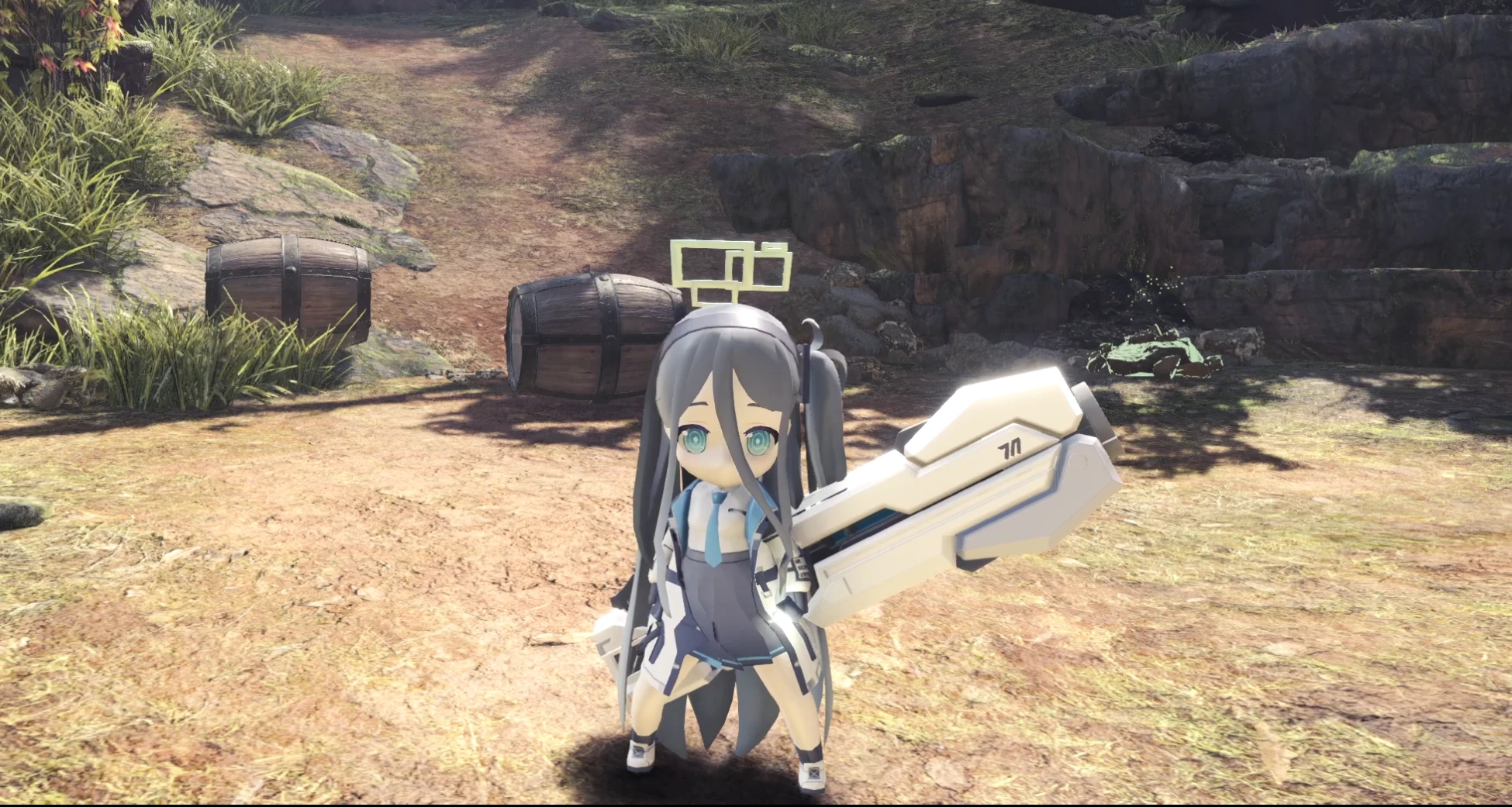
🔍 Analysis
- 👍 1.9% endorsement rate — high engagement, a strong quality signal
- 🏆 #175 of 183 Characters mods in this game by downloads
📋 About This Mod
1. replace layered armor to blue archive Aris.2. replace kirin heavy bowgun to aris`s light saber.
== Changelog ==
- 1. 0 (240329)
- initial release
== Description ===
1. replace layered armor to blue archive Aris.
2. replace kirin heavy bowgun to aris`s light saber.
3. replace kirin dual blade to momoi and midori.
1. 레이아 a 덧입기를 아리스로 교체합니다.
2. 키린 헤비보우건을 아리스의 빛의 검으로 교체합니다.
3. 키린 쌍검을 모모이/미도리로 교체합니다.
== Installation ==
Unzip the file.
Copy and paste the folder (nativePC) into the directory where MHW is installed.(Usually located at C:\Program Files (x86)\Steam\steamapps\common\Monster Hunter World where the .exe is located)
Enjoy the game.
== Uninstallation==
Remove the following files/folders:
- NativePC/pl/f_equip/pl021_0000/
- NativePC/pl/f_equip/ba_texture/
== Known Issues ==
- face model not disappearing.
== Credit ==
FlourBiscuit
www.youtube.com/@FlourBiscuit
github.com/Hangeol-Chang
this mod has minor errors.
i`m trying to fix this issus, but it isn`t goting well as i expected.
Therefore, I am always receptive to your assistance with this mod.
If you'd like to offer assistance, please feel free to contact me anytime via the Discord profile below.
- hihangeol#4479
📊 Mod Details
- Game
- Monsterhunterworld Mods
- Author
- FlourBiscuit
- Version
- v.10
- Downloads
- 2,864
- Endorsements
- 53
- Category
- Characters
- Created
- 3/29/2024
- Updated
- 3/29/2024
🔧 How to Install Monster Hunter: World Mods
Download from Nexus Mods.
📖 Full step-by-step install guide for Monster Hunter: World →
Visit the official mod page for specific installation instructions for this mod.
🎮 Need cheat codes or console commands? Check ur gaming wiki for Monster Hunter: World commands, item IDs, and more.
Keep browsing — more Monster Hunter: World mods await