Sorted Decorations - Sorted Gems
🟡 Updated this yearPreview
🔍 Analysis
- 👍 3.1% endorsement rate — high engagement, a strong quality signal
- 🏆 #61 of 97 Miscellaneous mods in this game by downloads
📋 About This Mod
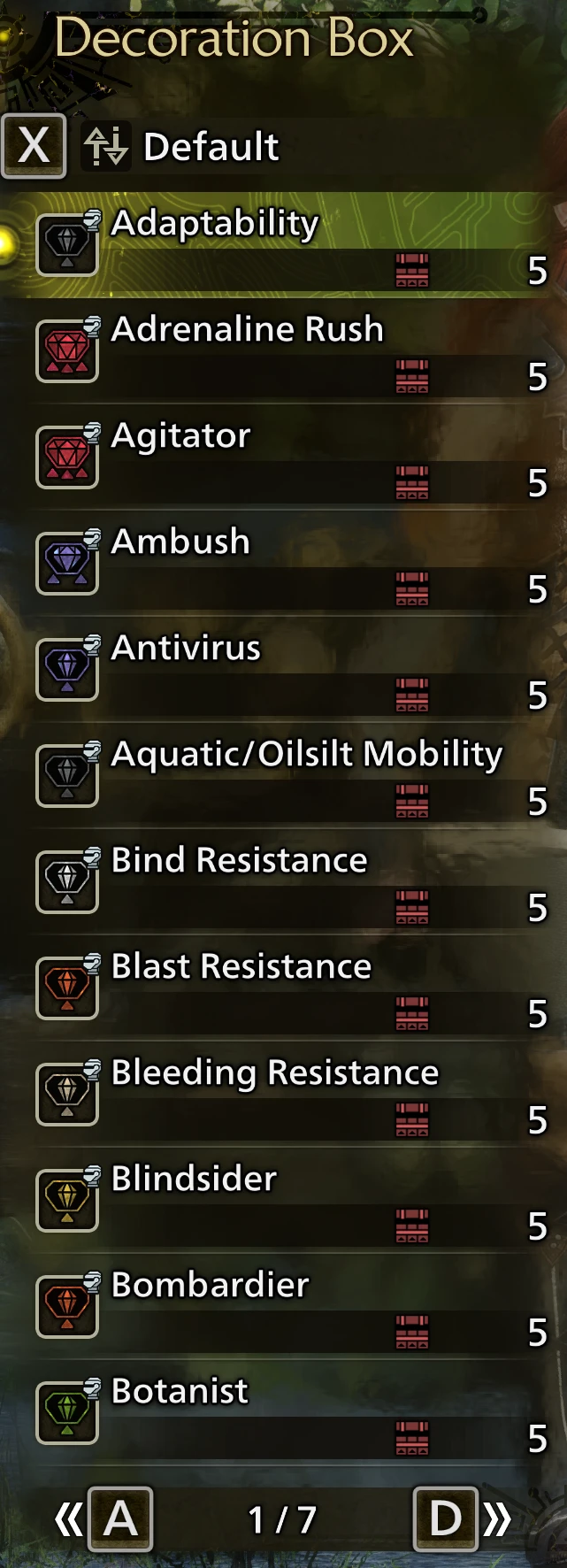
Options to resort decos by skill or deco name.
ONLY ACTIVATE ONE OPTION! YES, THEY CONFLICT WITH ONE ANOTHER!
-
[]Sort by Deco Name
[
]Sort by Skill Name[](Skill1, Skill2) - For multi-skill decos, sorts by the first skill, then the second.
[](Skill2, Skill1) - Same deal but sorts by the second skill first.
There's currently no REF (LUA) version. I have something that works~ish for REF, but it doesn't fix decos being sorted by size before name. The PAK versions do, so the REF versions have been omitted for now. Fixing this isn't high on my priority list since this isn't likely to cause any conflicts with other mods, and even then, it would need to be remade if anything is added to resort with new decos.
Multiple languages are covered. The sort orders in the files are pre-sorted by language, so use whichever you prefer, just remember all options conflict.
If there's text sorting issues in a non-English language, let me know, but BE AS DESCRIPTIVE AS POSSIBLE. GIVE EXAMPLES, etc. I cannot read other languages and don't know how things are supposed to be sorted there! I need example of what isn't sorted right in them and how it should have been sorted, etc. The more data, the better!
You can ignore the "Sorting language" entry in the final sub-menu. It exists because I wouldn't be able to create the second-sub menu without it, it's just a dummy entry; a 'mod' with no files. Activating it does nothing.
Installation Instructions
-
[]Install REFramework. (Nightly 1207 or later!)
[
]The loose file loader must be enabled BEFORE THE GAME HAS STARTED for these loose assets to be loaded.[]Either enable it in the overlay or through the config (re2_fw_config.txt): `LooseFileLoader_Enabled`
[]The setting in REF's overlay is only saved WHEN THE OVERLAY IS CLOSED.
[]Install Fluffy Mod Manager.
- [
[]Or place the archive into `.....\Fluffy Mod Manager\Games\MonsterHunterWilds\Mods` WITHOUT EXTRACTING!
[]If you wanna install it manually, have at it, but I'm not gonna support or give instructions for it. Too much user error.
Uninstallation Instructions
-
[]Remove the files. Turning it off in FMM is usually sufficient. Yeah. That's it.
[
]If it's still active in-game, then the files are still in the game directory, no matter what your mod manager says.
I've seen others given the incorrect solution of "delete PAK patch 002". THIS DOESN'T REMOVE THE MODDED FILES
-
[]Install REFramework. (Nightly 1207 or later!)
📊 Mod Details
- Game
- Monsterhunterwilds Mods
- Author
- LordGregory
- Version
- 1.2
- Downloads
- 2,381
- Endorsements
- 75
- Category
- Miscellaneous
- Created
- 3/18/2025
- Updated
- 12/22/2025
🔧 How to Install Monster Hunter Wilds Mods
Download from Nexus Mods.
📖 Full step-by-step install guide for Monster Hunter Wilds →
Visit the official mod page for specific installation instructions for this mod.
🎮 Need cheat codes or console commands? Check ur gaming wiki for Monster Hunter Wilds commands, item IDs, and more.
Keep browsing — more Monster Hunter Wilds mods await