Weapon Transmog Tool
⚪ Last updated 2020⚠️ Install Order · 1 step
Install in this order, then this mod last — most mods fail to load without their framework and dependencies in place.
Preview
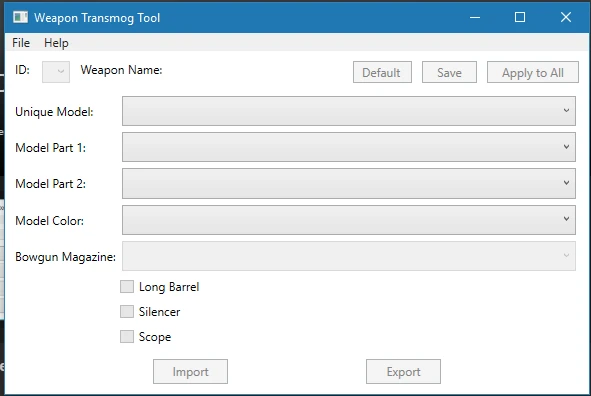
🔍 Analysis
- 👍 3.5% endorsement rate — high engagement, a strong quality signal
- 🏆 #33 of 64 Utilities mods in this game by downloads
📋 About This Mod
Use files from the Iceborne chunk (ChunkG2 as of now.)
Wp_dats edited by the bugged 5. 0. 1 release are corrupted, please delete them and re-extract the files.
ABSOLUTELY REQUIRES USING STRACKER'S LOADER. WILL NOT WORK WITHOUT IT.
Requested by Asterisk to help make custom models easily selectable by people with limited modding experience.
1- Extract the wp_dat files from your chunk file using Vuze's WorldChunkToolor Jodo'sMHWNoChunk. They should be located in common\equip.
2- Install STRACKER'S LOADER.
3- Place the extracted WP_Dats in nativePC\common\equip. If that folder doesn't exist, create it.
4-Open up the Weapon Transmog Tool.
5-Click File.
6-Click Open.
7-Go To nativePC\common\equip.
8-Select the file you want to edit.
9-Change the things you want to change,
10-Click Save before moving to the next weapon.
11- Play the game.
Written Guide by @Nardo Envinagrado#8396 from the modding discord
https://docs.google.com/document/d/1yoMfJmi3YwxuhTPd1a5w9GanmIPANla0Jm6uHZ8_Yc4
Picture Guide made by Asterisk (old/outdated)
Picture Guide:
Q: Can other people see the changes online?
A:
No.
OTHER PEOPLE ONLINE WILL SEE NORMAL, UNCHANGED WEAPONS.Q: Where do I find wp_dat and wp_dat_g files?
A: In chunk3. Updates might make it chunk5 or something. Chunk 7 for lance, dual blades, and hammer, chunk 5 for the other weapons. Chunk 10 for SnS, LS, and DB, Chunk 9 for the rest. ALWAYS USE WP_DAT AND WP_DAT_G FROM THE NEWEST POSSIBLE CHUNK TO AVOID CRASHES. THE TOOL SHOULD BE FUTURE-PROOF UNLESS CAPCOM CHANGES SOMETHING BIG IN THE WP_DAT FILES. This should no longer be necessary, the tool should be able to update your wp_dat on its own. Iceborne means that you HAVE to use the newest chunk files.
Q: Why does the tool crash when I try to change the fourth KT weapons?
A:
Because you used a chunk0 wp_dat or wp_dat_g.
Q: How can I get more custom models?
A:
Make them, or download Asterisk or Ezekial's packs.
Q: How do I make more custom models?
A: I don't know. You're on your own.
Q: Can you make Armor and/or ammo tools?/Can I get one of the tools you've made hidden?
A: No.
Known Issues:
Custom Models don't have functional sound. If you find a way to fix that, please let us know.
MHVuze - For the WorldChunkTool.
Stracker- For the glorious mod restoration.
Freschu - MHW equipment docs.
ZephyAlurus - Models Wiki. Saved me a couple of hours of work.
FusionR - for creating Cirilla and for help with Freschu's wiki. The export to csv option is how I got the weapon's names.
Hexhexhex for all his help on the discord in general and with Freschu's wiki.
Bar0th and stratas for contributing to Freschu's wiki.
Asterisk for the idea of using custom Models instead of overriding existing ones.
Ezekial for letting me use his dual blades pack for demonstration purposes.
AllStarTech, Monsieur Snake VII, and Dallagen - beta testing.
Additional thanks to Envy from the fearlessrevolution forums for letting me use his spreadsheet for weapons' names in the older versions of this tool.
Join us on the Monster Hunter World Modding Discord:
Weapon Transmog Tool is a utility for editing weapon model data in wp_dat and wp_dat_g files, allowing players to change weapon appearances. With 1,480 endorsements and 42,426 downloads, it's a popular tool for modding enthusiasts. Last updated in March 2020, it may require manual file editing.
✨ Key Features
📊 Pros & Cons
✅ Pros
- Community favorite with 1,480 endorsements and 42k downloads
- Directly edits game files for precise control over weapon models
- Fills a niche for players who want to customize weapon looks without replacing entire mods
⚠️ Cons
- Last updated in March 2020 — may not work with current game versions
- Requires manual file editing, which can be intimidating for beginners
- No detailed instructions provided, so you'll need to figure out the byte editing yourself
For modders and tech-savvy players who want to change weapon models by directly editing game files. If you're comfortable with hex editing or file manipulation, this tool gives you deep control. Skip if you prefer simple drag-and-drop mods or want a user-friendly interface.
💡 Beginner Tips
- Back up your wp_dat and wp_dat_g files before using the tool, as incorrect edits can corrupt your game data.
- Test the tool on a single weapon first to understand the byte mapping before making bulk changes.
- Check the mod's comments or forums for user-created guides on byte offsets, since the description lacks detailed instructions.
📊 Mod Details
- Game
- Monster Hunter World Mods
- Author
- Aradi147
- Version
- 5.0.3alpha
- Downloads
- 42,426
- Endorsements
- 1,479
- Category
- Utilities
- Created
- 11/10/2018
- Updated
- 3/12/2020
🔧 How to Install MHW Mods
Install Stracker\
📖 Full step-by-step install guide for MHW →
Visit the official mod page for specific installation instructions for this mod.
🎮 Need cheat codes or console commands? Check ur gaming wiki for MHW commands, item IDs, and more.
Keep browsing — more MHW mods await