BalancedBright
🟡 Updated this year🖼️ Gallery (1 images)
🔍 Analysis
- 🏆 #6 of 17 core-shaders mods in this game by downloads
📋 About This Mod
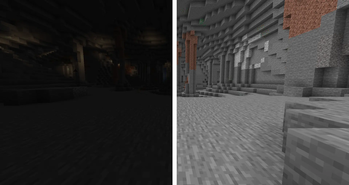
# BalancedBright **Original Minecraft Java Resource Pack** Smooth • Lightweight • Natural permanent brightness (Night-Vision style) **Version**: 1.0.0 **Target**: Minecraft Java 1.21+ (including 26.x year-based versions) ## What it does Replaces the vanilla core lightmap shader so every light level becomes brighter in a controlled way. Feels like a permanent, polished Night Vision effect that works in: - Caves & abandoned mineshafts - Nighttime surface - Underwater - Dense forests - Mountains & interiors - Deep Dark - The Nether - The End Colors stay natural. No neon, no heavy wash-out. ## Performance - Zero FPS impact - Zero extra memory - Zero lag - Only one shader file is overridden - Fully compatible with **Vanilla**, **Sodium**, **Iris** (when no external shaderpack is loaded), and **OptiFine** ## Installation 1. Download the zip 2. Put it in `.minecraft/resourcepacks` 3. Options → Resource Packs → move **BalancedBright** to Selected 4. Keep it **above** any other packs that touch shaders 5. Set in-game Brightness to Bright / 100% for maximum effect 6. Press F3+T to reload ## Compatibility Notes | Environment | Status | |--------------------------|---------------------------------| | Vanilla | Fully supported | | Sodium | Fully supported | | Iris (no shaderpack) | Fully supported | | OptiFine (no shaderpack) | Fully supported | | External shaderpacks | Effect is overridden (expected) | | Other resource packs | Works – put BalancedBright higher | ## Technical Overrides only `assets/minecraft/shaders/core/lightmap.fsh`. Block textures, models, fog and UI remain 100% vanilla. ## Credits Completely original. Shader logic derived from public vanilla lightmap.fsh and re-balanced for natural appearance.
# BalancedBright
Original Minecraft Java Resource Pack Smooth • Lightweight • Natural permanent brightness (Night-Vision style)
Version: 1. 0. 0 Target: Minecraft Java 1. 21+ (including 26.x year-based versions)
## What it does Replaces the vanilla core lightmap shader so every light level becomes brighter in a controlled way. Feels like a permanent, polished Night Vision effect that works in:
- Caves & abandoned mineshafts
- Nighttime surface
- Underwater
- Dense forests
- Mountains & interiors
- Deep Dark
- The Nether
- The End
Colors stay natural. No neon, no heavy wash-out.
## Performance - Zero FPS impact - Zero extra memory - Zero lag - Only one shader file is overridden - Fully compatible with Vanilla, Sodium, Iris (when no external shaderpack is loaded), and OptiFine
## Installation 1. Download the zip 2. Put it in `.minecraft/resourcepacks` 3. Options → Resource Packs → move BalancedBright to Selected 4. Keep it above any other packs that touch shaders 5. Set in-game Brightness to Bright / 100% for maximum effect 6. Press F3+T to reload
## Compatibility Notes | Environment | Status | |--------------------------|---------------------------------| | Vanilla | Fully supported | | Sodium | Fully supported | | Iris (no shaderpack) | Fully supported | | OptiFine (no shaderpack) | Fully supported | | External shaderpacks | Effect is overridden (expected) | | Other resource packs | Works – put BalancedBright higher |
## Technical Overrides only `assets/minecraft/shaders/core/lightmap.fsh`. Block textures, models, fog and UI remain 100% vanilla.
## Credits Completely original. Shader logic derived from public vanilla lightmap.fsh and re-balanced for natural appearance.
📊 Mod Details
- Game
- Minecraft Resource Packs
- Author
- BalancedGlow
- Version
- 1.0.0
- Downloads
- 237
- Endorsements
- 2
- Category
- core-shaders
- Created
- 8/10/2026
- Updated
- 8/9/2026
- Game Versions
- 1.21, 1.21.1, 1.21.2, 1.21.3, 1.21.4
- Tags
- core-shaders, tweaks, vanilla-like
🔧 How to Install Minecraft Resource Packs Mods
Download from Modrinth. Use Prism Launcher or drop into your mods folder.
📖 Full step-by-step install guide for Minecraft Resource Packs →
Visit the official mod page for specific installation instructions for this mod.
🎮 Need cheat codes or console commands? Check ur gaming wiki for Minecraft Resource Packs commands, item IDs, and more.
❓ Frequently Asked Questions
Which Minecraft Resource Packs versions does BalancedBright support?
The author lists 1.21, 1.21.1, 1.21.2, 1.21.3, 1.21.4, 1.21.5. Other versions may work but are untested by the author.
What is the latest version of BalancedBright?
Version 1.0.0, published 2026-08-09 with 237 downloads recorded at the source.
Keep browsing — more Minecraft Resource Packs mods await