All Bits No Chisel
🟠 Updated over a year ago🖼️ Gallery (4 images)
🔍 Analysis
- 🏆 #8 of 17 core-shaders mods in this game by downloads
📋 About This Mod
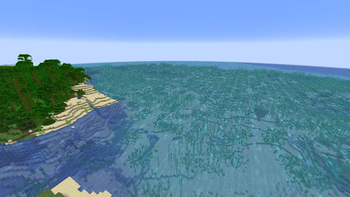
This is a mostly experimental resource pack that uses core shaders for a Level-of-Detail effect.
# Overview Blocks near the player look normal, but as they get further away, their textures are scaled more, so that far away blocks are textured with a single pixel.
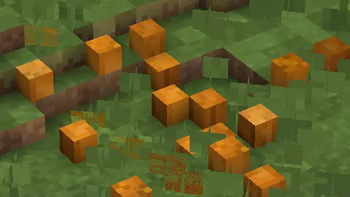
With the default settings, faraway blocks look blockier: !(https://cdn.modrinth.com/data/cached_images/5e98326d423f4034e8f25b48e6f9fdfc513dc69c.png)
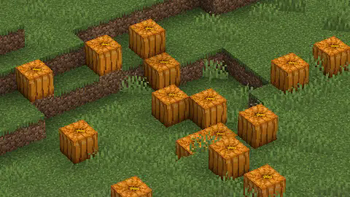
While closer blocks look normal: !(https://cdn.modrinth.com/data/cached_images/64fb3250861333e686e1a440c4e1c04b90892b82.png)
Through the config file, the ranges and zoom levels can be changed. Enabling the max zoom level at all times makes the world look like it was created with the Chisels and Bits mod: !(https://cdn.modrinth.com/data/cached_images/f09818975bb2bf5594074c2a779cdd48b010f0e8.png)
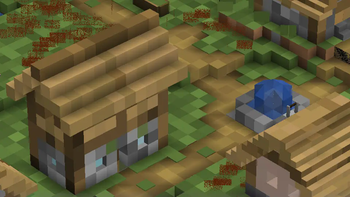
Alternatively, mega-structures can be made to look like normal blocks: !(https://cdn.modrinth.com/data/cached_images/24062dda133ca73574628725af407579857e2148.png)
# Config Shader settings can be edited by editing the values in `assets/abnc/shaders/include/config.glsl`.
`BLOCK_MAX_SIZE`, `BLOCK_MID_SIZE`, and `BLOCK_MIN_SIZE` controls the block scale at different distances. Block sizes can technically be any positive value, but powers of 2 work best. At scale size 1, blocks look normal. At scale size 16, a 16x16x16 cube of a block will look like a single normally textured block.
`BLOCK_MID_START`, `BLOCK_MID_END`, `BLOCK_MAX_START`, and `BLOCK_MAX_END` controls the distances the different scales start at. Blocks between `START` and `END` values will fade between the two scales.
`BLOCK_STILL_WATER`, `BLOCK_FLOW_WATER`, `BLOCK_STILL_LAVA`, `BLOCK_FLOW_LAVA`, and `BLOCK_ALL_BLOCKS` control which blocks are scaled. Set them to 1 to enable, or 0 to disable. While having all blocks turned on is fun to mess around with, just having water and lava enabled actually just looks nice!
Flowing water is kind of borked right now, so you may want to disable it and leave the other water on.
📊 Mod Details
- Game
- Minecraft Resource Packs
- Author
- dqwertyc.dev
- Version
- 1.0
- Downloads
- 230
- Endorsements
- 10
- Category
- core-shaders
- Created
- 4/22/2025
- Updated
- 4/18/2025
- Game Versions
- 1.21.5
- Tags
- core-shaders
🔧 How to Install Minecraft Resource Packs Mods
Download from Modrinth. Use Prism Launcher or drop into your mods folder.
📖 Full step-by-step install guide for Minecraft Resource Packs →
Visit the official mod page for specific installation instructions for this mod.
🎮 Need cheat codes or console commands? Check ur gaming wiki for Minecraft Resource Packs commands, item IDs, and more.
❓ Frequently Asked Questions
Which Minecraft Resource Packs versions does All Bits No Chisel support?
The author lists 1.21.5. Other versions may work but are untested by the author.
What is the latest version of All Bits No Chisel?
Version 1.0, published 2025-04-18 with 230 downloads recorded at the source.
Keep browsing — more Minecraft Resource Packs mods await