AZOTH Cobblemon Minimap Icons
🟡 Updated this year🖼️ Gallery (3 images)

🔍 Analysis
- 👍 0.2% endorsement rate
- 🏆 #143 of 150 entities mods in this game by downloads
📋 About This Mod
!(https://cdn.modrinth.com/data/cached_images/60a086b3aef6cb9c3950ff3257813edb62a9a28c.png)
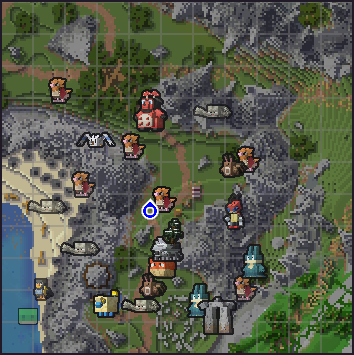
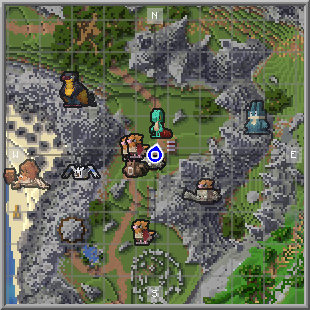
This Resource Pack adds Cobblemon-style icons for modeled Pokémon in either JourneyMap or Xaero's Minimap.

## Journeymap Guide
### Enable Pokémon Icons 1. Open the in-game menu and go to Journeymap Settings (`J` key by default). 2. Click Options from the button list on the lower part of your screen. 3. Select Minimap Preset or Full Map Preset depending on your preferences. 4. Set Mob Display → Outlined Icons. 5. Adjust Entity Icon Size as desired.
## Xaero’s Minimap Guide
### Enable Pokémon Icons 1. Open the in-game menu and go to Xaero's Minimap Settings (`Y` key by default). 2. Select Entity Radar Settings. 3. Change Display Icons to Always. 4. Adjust Entity Icon Scale as desired.
📊 Mod Details
- Game
- Minecraft Resource Packs
- Author
- konohadaze
- Version
- 1.1.0
- Downloads
- 15,707
- Endorsements
- 26
- Category
- entities
- Created
- 8/26/2025
- Updated
- 5/2/2026
- Game Versions
- 1.21, 1.21.1
- Tags
- entities, gui, modded
🔧 How to Install Minecraft Resource Packs Mods
Download from Modrinth. Use Prism Launcher or drop into your mods folder.
📖 Full step-by-step install guide for Minecraft Resource Packs →
Visit the official mod page for specific installation instructions for this mod.
🎮 Need cheat codes or console commands? Check ur gaming wiki for Minecraft Resource Packs commands, item IDs, and more.
❓ Frequently Asked Questions
Which Minecraft Resource Packs versions does AZOTH Cobblemon Minimap Icons support?
The author lists 1.21, 1.21.1. Other versions may work but are untested by the author.
What is the latest version of AZOTH Cobblemon Minimap Icons?
Version 1.1.0, published 2026-05-02 with 15,707 downloads recorded at the source.
Keep browsing — more Minecraft Resource Packs mods await