Eclectic Trove (Legendary Tooltips)
🟠 Updated over a year ago🖼️ Gallery (2 images)
🔍 Analysis
- 👍 0.1% endorsement rate
- 🏆 #22 of 256 gui mods in this game by downloads
📋 About This Mod
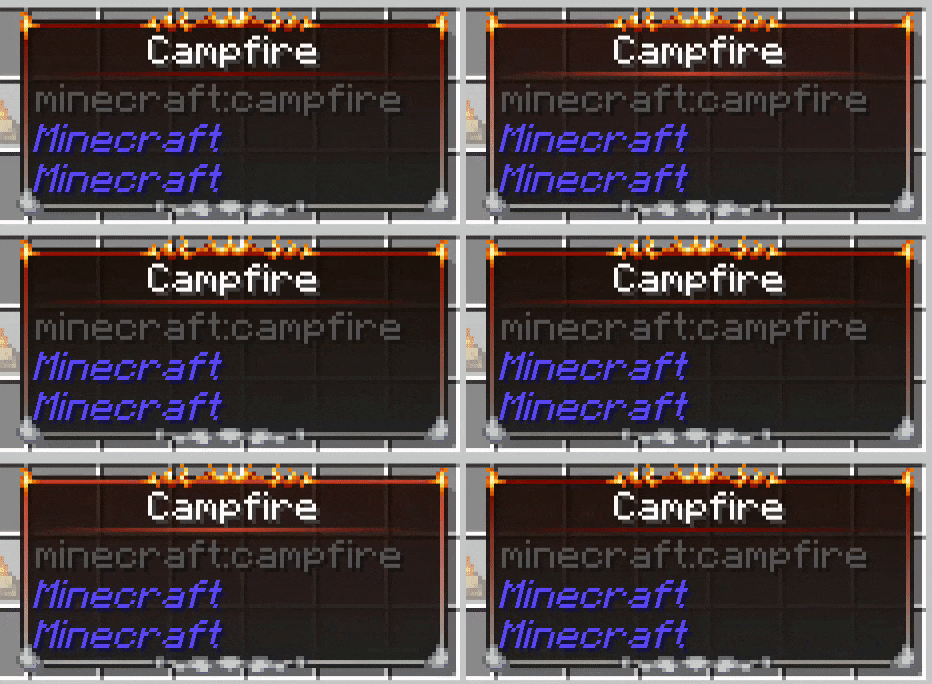
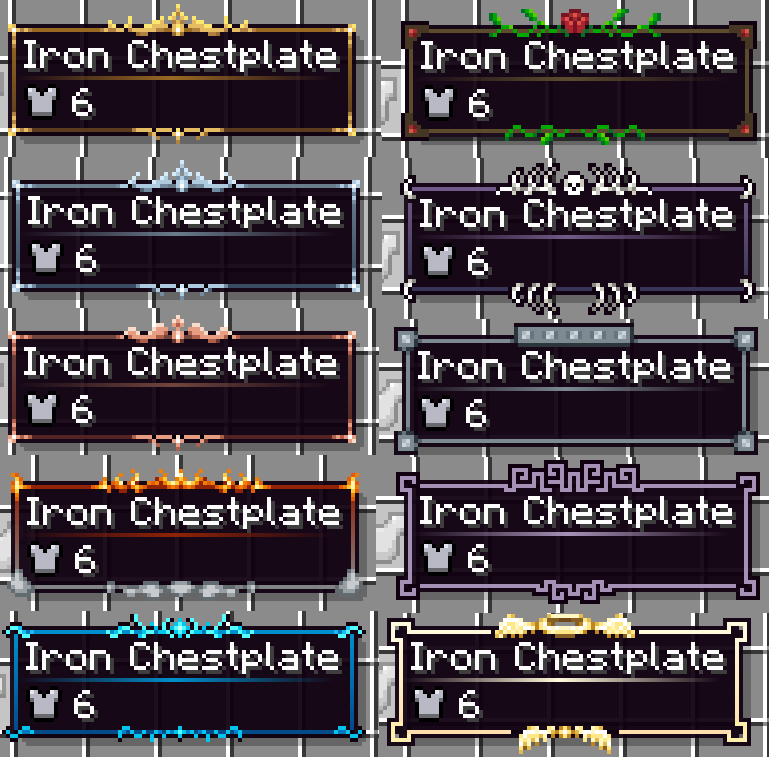
<p>This resource pack <span style="font-size: 14px;"><strong>requires</strong></span> the mod <em>Legendary Tooltips</em>. Download it here:</p> <p><a href="https://modrinth.com/mod/legendary-tooltips">https://modrinth.com/mod/legendary-tooltips</a></p> <p>This resource pack replaces the default "level 0" border built into Legendary Tooltips, and provides 9 additional custom borders for use as you see fit for your game/modpack. If you would like to use this resource pack without worrying about configuration, download the "noconfig" version of the pack. This version contains a built-in configuration that works well for vanilla and some mods.</p> <p>If you would like more granular control over what items show what borders, please note that you will need to configure Legendary Tooltips yourself. Documentation can be found <a href="https://github.com/AHilyard/LegendaryTooltips/wiki/Configuration-Instructions">here</a>, <strong>please</strong> read that first.</p> <p> </p> <p>The borders in this pack are quite varied (see images). Here are all of the borders included, with their associated configuration numbers:</p> <p><strong>0.</strong> Gold frame<br /> <strong>1.</strong> Silver frame<br /> <strong>2.</strong> Copper frame<br /> <strong>3.</strong> Smoke and flames<br /> <strong>4.</strong> Water / Ice<br /> <strong>5.</strong> Rose and vines<br /> <strong>6.</strong> Bones / death<br /> <strong>7.</strong> Iron plating / machinery<br /> <strong>8.</strong> Purple geometric motif<br /> <strong>9.</strong> Holy (halo / wings)</p> <p> </p> <p>The suggested border colors are as follows. I highly suggest these are used--copy / paste this section into the border colors section of Legendary Tooltips' configuration file.</p> <p> </p> <details> <summary>FORGE</summary><p> <details> <summary>Legendary Tooltips version 1.3 and later</summary><p> <p> level0_colors = <br /> level1_colors = <br /> level2_colors = <br /> level3_colors = <br /> level4_colors = <br /> level5_colors = <br /> level6_colors = <br /> level7_colors = <br /> level8_colors = <br /> level9_colors = </p> </p></details> <details> <summary>Minecraft 1.16.5 and later</summary><p> <div> #Range: 0 ~ 4294967295</div> <div> level0_start_color = 4288244002</div> <div> #Range: 0 ~ 4294967295</div> <div> level0_end_color = 4284168989</div> <div> #Range: 0 ~ 4294967295</div> <div> level1_start_color = 4285103244</div> <div> #Range: 0 ~ 4294967295</div> <div> level1_end_color = 4282010721</div> <div> #Range: 0 ~ 4294967295</div> <div> level2_start_color = 4285547837</div> <div> #Range: 0 ~
This resource pack requires the mod Legendary Tooltips. Download it here:
https://modrinth.com/mod/legendary-tooltips
This resource pack replaces the default "level 0" border built into Legendary Tooltips, and provides 9 additional custom borders for use as you see fit for your game/modpack. If you would like to use this resource pack without worrying about configuration, download the "noconfig" version of the pack. This version contains a built-in configuration that works well for vanilla and some mods.
If you would like more granular control over what items show what borders, please note that you will need to configure Legendary Tooltips yourself. Documentation can be found here, please read that first.
The borders in this pack are quite varied (see images). Here are all of the borders included, with their associated configuration numbers:
0. Gold frame 1. Silver frame 2. Copper frame 3. Smoke and flames 4. Water / Ice
5. Rose and vines 6. Bones / death
7. Iron plating / machinery 8. Purple geometric motif
9. Holy (halo / wings)
The suggested border colors are as follows. I highly suggest these are used--copy / paste this section into the border colors section of Legendary Tooltips' configuration file.
level0_colors =
["20_#FF996922_#FF996922_#FF996922_#FF996922_#FF996922_#FF996922_#FF996922_#FF996922_#FF996922_#FF996922_#FF996922_#FF996922_#FF996922+v64-s32_#FF996922",
"20_#FF5A3A1D_#FF5A3A1D_#FF5A3A1D_#FF5A3A1D_#FF5A3A1D_#FF5A3A1D_#FF5A3A1D_#FF5A3A1D_#FF5A3A1D_#FF5A3A1D_#FF5A3A1D_#FF5A3A1D_#FF5A3A1D_#FF996922+v64-s32",
"#D0996922-v155", "#F45A3A1D-v55"]
level1_colors =
["20_#FF697C8C_#FF697C8C_#FF697C8C_#FF697C8C_#FF697C8C_#FF697C8C_#FF697C8C_#FF697C8C_#FF697C8C_#FF697C8C_#FF697C8C_#FF697C8C_#FF697C8C+v48-s16_#FF697C8C",
"20_#FF3A4C61_#FF3A4C61_#FF3A4C61_#FF3A4C61_#FF3A4C61_#FF3A4C61_#FF3A4C61_#FF3A4C61_#FF3A4C61_#FF3A4C61_#FF3A4C61_#FF3A4C61_#FF3A4C61_#FF3A4C61+v48-s16",
"#D0697C8C-v155", "#F43A4C61-v65"]
level2_colors =
["20_#FF70453D_#FF70453D_#FF70453D_#FF70453D_#FF70453D_#FF70453D_#FF70453D_#FF70453D_#FF70453D_#FF70453D_#FF70453D_#FF70453D_#FF70453D+v64-s32_#FF70453D",
"20_#FF542323_#FF542323_#FF542323_#FF542323_#FF542323_#FF542323_#FF542323_#FF542323_#FF542323_#FF542323_#FF542323_#FF542323_#FF542323_#FF542323+v64-s32",
"#D070453D-v155", "#F4542323-v60"]
level3_colors =
["30_#FF912307_orangered-s45-v25_#FF912307+v50_#FF912307+r25+s50-v55",
"30_#FF818385-v15_#FF818385+r5+g5+v45_#FF818385-v45_#FF818385+r25+g25", "30_#FF912307-v105-a36_#F0120A00",
"#F8818385-v100"]
level4_colors = ["24_#FF008FCC-v25_#FF008FCC+s25+v85",
"24_#FF044B8A-v30_#FF044B8A+s25+v55", "#D0008FCC-v160", "#F8044B8A-v75"]
level5_colors =
["#FF5C4C2D", "#FF5C4C2D", "#F0160A00", "#F0160A00"]
level6_colors = ["#FF705A87",
"#FF705A87-v70+s15", "#E8705A87-v85+s15", "#F4705A87-v120+s35"]
level7_colors =
["#FF7D8A91", "#FF7D8A91", "#F07D8A91-v125+s35", "#F47D8A91-v100+s55"]
level8_colors =
["#FFA591B6", "#FFA591B6", "#E4A591B6-v155+s35", "#F4A591B6-v145+s35"]
level9_colors =
["15_#FFFFFADB-v20+s35_#FFFFFADB+v30-s20", "15_#FFFFDFAD-v20+s35_#FFFFDFAD+v30-s20", "#D8FFFADB-v245",
"#F4FFDFAD-v210+s90"]FORGE
Legendary Tooltips version 1. 3 and later
Minecraft 1. 16. 5 and later
📊 Mod Details
- Game
- Minecraft Resource Packs
- Author
- Grend
- Version
- 1.3.0-noconfig
- Downloads
- 503,004
- Endorsements
- 451
- Category
- gui
- Created
- 11/16/2022
- Updated
- 2/19/2025
- Game Versions
- 1.20, 1.20.1
- Tags
- gui, modded, themed
🔧 How to Install Minecraft Resource Packs Mods
Download from Modrinth. Use Prism Launcher or drop into your mods folder.
📖 Full step-by-step install guide for Minecraft Resource Packs →
Visit the official mod page for specific installation instructions for this mod.
🎮 Need cheat codes or console commands? Check ur gaming wiki for Minecraft Resource Packs commands, item IDs, and more.
❓ Frequently Asked Questions
Which Minecraft Resource Packs versions does Eclectic Trove (Legendary Tooltips) support?
The author lists 1.20, 1.20.1. Other versions may work but are untested by the author.
What is the latest version of Eclectic Trove (Legendary Tooltips)?
Version 1.3.0-noconfig, published 2025-02-19 with 503,004 downloads recorded at the source.
Keep browsing — more Minecraft Resource Packs mods await