Anti Leak Texturepack
🟡 Updated this year🖼️ Gallery (4 images)
🔍 Analysis
- 👍 0.0% endorsement rate
- 🏆 #202 of 220 blocks mods in this game by downloads
📋 About This Mod
# Magic Anti Leak Stop your base, your ores, and your farms from showing up on camera. Magic Anti Leak is a lightweight, no-mod-required resource pack that flattens every "leaking" block in your world down to plain `stone`, `deepslate`, or `dirt` - so screen recordings, clips, and stream snipers can't read your base layout, ore veins, or spawner farms just by looking at your screen. ## What it hides - **Bedrock** - disguised as `deepslate`, so the bottom of the world doesn't give away your depth. - **All ores** - `coal`, `iron`, `copper`, `gold`, `redstone`, `lapis`, `diamond`, `emerald`, and both nether ores, including every `deepslate` variant. All of them blend into their surrounding stone. - **Odd stone types** - `andesite`, `diorite`, `granite`, `tuff`, and `end_stone` are normalized to plain stone so terrain doesn't hint at depth or biome. - **Mob spawners** - blended into stone so farm locations can't be spotted at a glance. - **Dirt variants** - `coarse_dirt`, `mycelium`, `podzol`, and `rooted_dirt` all read as plain dirt, so unusual dirt types can't be used to guess your biome or base entrances. - **Gravel, clay, and tuff** - reworked with natural texture variation so they don't tile in an obviously "disguised" way. - **Grass, foliage, and water color** - fixed to a constant color instead of the normal biome tint, so your surroundings can't be used to narrow down your location. - **Villagers and zombie villagers** - every biome variant (`desert`, `jungle`, `savanna`, `snow`, `swamp`, `taiga`) uses the same plain default look, so a village's biome can't be guessed just from the villagers standing in it. - **Concrete powder, soul sand, dirt paths, and lily pads** - locked against other resource packs applying detectable randomized variants to them, so combined packs can't accidentally give away a disguised block. ## Why it matters On anarchy-style servers, a single frame from a stream or clip can be enough for someone to identify your biome, your depth, or the shape of a farm. Magic Anti Leak closes those visual tells without touching gameplay - blocks and villagers still behave exactly the way vanilla expects, only their appearance changes. ## Load order - put this pack on top Minecraft applies resource packs from the bottom of the `Selected` list upward - the pack sitting **highest** in that list wins any conflict. If you also run a high-res texture pack or one with custom villager models, Magic Anti Leak needs to sit **above** it in the list, otherwise the other pack's textures will show through instead of these fixes. 1. Open `Options → Resource Packs`. 2. Drag Magic Anti Leak into the `Selected` column. 3. Drag it to the **top** of that column, above any other pack you're using. ## Install 1. Download the pack. 2. Drop it into your `resourcepacks` folder. 3. Enable it in Minecraft's resource pack menu and place it at the top of the list (see above). No mods, no config, no setup - everything above is on by default the moment you enable the pack. **Made by MagicClutch.**
# Magic Anti Leak
Stop your base, your ores, and your farms from showing up on camera. Magic Anti Leak is a lightweight, no-mod-required resource pack that flattens every "leaking" block in your world down to plain `stone`, `deepslate`, or `dirt` - so screen recordings, clips, and stream snipers can't read your base layout, ore veins, or spawner farms just by looking at your screen.
## What it hides
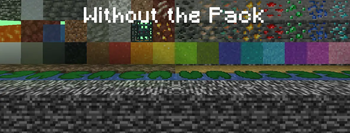
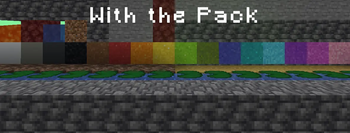
- Bedrock - disguised as `deepslate`, so the bottom of the world doesn't give away your depth.
- All ores - `coal`, `iron`, `copper`, `gold`, `redstone`, `lapis`, `diamond`, `emerald`, and both nether ores, including every `deepslate` variant. All of them blend into their surrounding stone.
- Odd stone types - `andesite`, `diorite`, `granite`, `tuff`, and `end_stone` are normalized to plain stone so terrain doesn't hint at depth or biome.
- Mob spawners - blended into stone so farm locations can't be spotted at a glance.
- Dirt variants - `coarse_dirt`, `mycelium`, `podzol`, and `rooted_dirt` all read as plain dirt, so unusual dirt types can't be used to guess your biome or base entrances.
- Gravel, clay, and tuff - reworked with natural texture variation so they don't tile in an obviously "disguised" way.
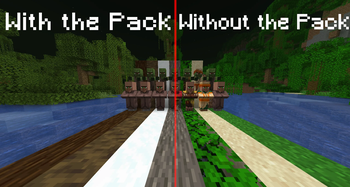
- Grass, foliage, and water color - fixed to a constant color instead of the normal biome tint, so your surroundings can't be used to narrow down your location.
- Villagers and zombie villagers - every biome variant (`desert`, `jungle`, `savanna`, `snow`, `swamp`, `taiga`) uses the same plain default look, so a village's biome can't be guessed just from the villagers standing in it.
- Concrete powder, soul sand, dirt paths, and lily pads - locked against other resource packs applying detectable randomized variants to them, so combined packs can't accidentally give away a disguised block.
## Why it matters
On anarchy-style servers, a single frame from a stream or clip can be enough for someone to identify your biome, your depth, or the shape of a farm. Magic Anti Leak closes those visual tells without touching gameplay - blocks and villagers still behave exactly the way vanilla expects, only their appearance changes.
## Load order - put this pack on top
Minecraft applies resource packs from the bottom of the `Selected` list upward - the pack sitting highest in that list wins any conflict. If you also run a high-res texture pack or one with custom villager models, Magic Anti Leak needs to sit above it in the list, otherwise the other pack's textures will show through instead of these fixes.
1. Open `Options → Resource Packs`. 2. Drag Magic Anti Leak into the `Selected` column. 3. Drag it to the top of that column, above any other pack you're using.
1. Download the pack. 2. Drop it into your `resourcepacks` folder. 3. Enable it in Minecraft's resource pack menu and place it at the top of the list (see above).
No mods, no config, no setup - everything above is on by default the moment you enable the pack.
Made by MagicClutch.
📊 Mod Details
- Game
- Minecraft Resource Packs
- Author
- MagicClutchYT
- Version
- 3
- Downloads
- 16,714
- Endorsements
- 3
- Category
- blocks
- Created
- 4/11/2026
- Updated
- 8/22/2026
- Game Versions
- 1.14, 1.14.1, 1.14.2, 1.14.3, 1.14.4
- Tags
- blocks, environment, tweaks
🔧 How to Install Minecraft Resource Packs Mods
Download from Modrinth. Use Prism Launcher or drop into your mods folder.
📖 Full step-by-step install guide for Minecraft Resource Packs →
Visit the official mod page for specific installation instructions for this mod.
🎮 Need cheat codes or console commands? Check ur gaming wiki for Minecraft Resource Packs commands, item IDs, and more.
❓ Frequently Asked Questions
Which Minecraft Resource Packs versions does Anti Leak Texturepack support?
The author lists 1.14, 1.14.1, 1.14.2, 1.14.3, 1.14.4, 1.15. Other versions may work but are untested by the author.
What is the latest version of Anti Leak Texturepack?
Version 3, published 2026-08-22 with 16,714 downloads recorded at the source.
Keep browsing — more Minecraft Resource Packs mods await