X-Commands
🟡 Updated this year🖼️ Gallery (2 images)
🔍 Analysis
- 👍 0.3% endorsement rate
- 🏆 #82 of 1452 bukkit mods in this game by downloads
📋 About This Mod
<div align="center"> (https://img.shields.io/badge/Available%20on-SpigotMC-orange?style=for-the-badge&logo=spigotmc&logoColor=white)](https://www.spigotmc.org/resources/132155/) (https://img.shields.io/badge/Wiki-Documentation-blue?style=for-the-badge&logo=readme&logoColor=white)](https://wiki-x-proyects.vercel.app/) (https://img.shields.io/badge/Discord-Community-7289da?style=for-the-badge&logo=discord&logoColor=white)](https://discord.xproyects.qzz.io/) <br> </div> **Manage your custom commands easily and visually.** X-Commands is a simple yet powerful plugin that allows you to create, edit, and manage custom commands for your server directly from an intuitive GUI or via advanced CLI commands. ## ✨ Features - **🚀 Folia & Paper Ready:** Built for modern high-performance servers. - **🎨 Modern Color Support:** Native support for **MiniMessage**, RGB (`&#RRGGBB`), and Legacy (`&`). - **🖥 Visual & CLI Management:** Create and edit commands using the GUI or the new command line interface. - **📜 Unified Language System:** All messages centralized in root language files. Support for EN, ES, PT, RU, JA. - **🛠 Advanced Action System:** Execute messages, titles, sounds, particles, and more in a sequential order. - **💰 Vault Integration:** Full economy support (give/take money) using Vault. - **⏱ Timed Commands:** Execute actions automatically every X seconds using intervals. - **🌐 Proxy Support:** Send players to other servers using or tags. - **⚡ Highly Optimized:** Designed for high performance with minimal resource usage. ## 🛠 Commands | Command | Description | | :--- | :--- | | `/xc help` | Shows the help menu | | `/xc -gui` | Opens the visual editor | | `/xc create <name>` | Creates a new custom command | | `/xc delete <name>` | Deletes an existing command | | `/xc list` | Lists all your custom commands | | `/xc info <name>` | Shows details about a command | | `/xc edit <cmd> <attr> <val>` | Modifies an attribute via CLI | | `/xc reload` | Reloads the configuration and languages | | `/xc locate <lang>` | Changes the plugin language | | `/xc update` | Checks for updates | | `/xc version` | Shows plugin and server info | ## 🔐 Permissions | Permission | Description | | :--- | :--- | | `xcommands.admin.*` | Full access to all features (Default: OP) | | `xcommands.admin.gui` | Access to the GUI editor | | `xcommands.admin.create` | Permission to create new commands | | `xcommands.admin.delete` | Permission to delete commands | | `xcommands.admin.edit` | Permission to edit existing commands | | `xcommands.admin.reload` | Use the reload command | | `xcommands.admin.locate` | Use the locate command | | `xcommands.admin.update` | Use the update command and join notifications | | `xcommands.admin.version` | Use the version command | ## ⚡ Actions & Conditions Actions are executed following a **sequential order**. If a condition is not met, the following action is skipped. - **Key Actions:** Messages, Titles, Sounds, Effects, Commands, Teleport, Particles, Bungee, Vault, etc. - **Smart Conditions:** Permissions, Money, OP, Worlds, Chance.
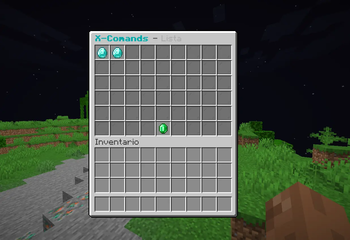
Manage your custom commands easily and visually.
X-Commands is a simple yet powerful plugin that allows you to create, edit, and manage custom commands for your server directly from an intuitive GUI or via advanced CLI commands.
## ✨ Features - 🚀 Folia & Paper Ready: Built for modern high-performance servers. - 🎨 Modern Color Support: Native support for MiniMessage, RGB (`&#RRGGBB`), and Legacy (`&`). - 🖥 Visual & CLI Management: Create and edit commands using the GUI or the new command line interface. - 📜 Unified Language System: All messages centralized in root language files. Support for EN, ES, PT, RU, JA. - 🛠 Advanced Action System: Execute messages, titles, sounds, particles, and more in a sequential order. - 💰 Vault Integration: Full economy support (give/take money) using Vault. - ⏱ Timed Commands: Execute actions automatically every X seconds using intervals. - 🌐 Proxy Support: Send players to other servers using or tags. - ⚡ Highly Optimized: Designed for high performance with minimal resource usage.
## 🛠 Commands
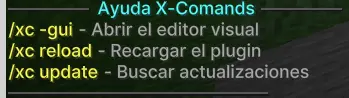
| Command | Description |
| :--- | :--- |
| `/xc help` | Shows the help menu |
| `/xc -gui` | Opens the visual editor |
| `/xc create
## 🔐 Permissions | Permission | Description | | :--- | :--- | | `xcommands.admin.*` | Full access to all features (Default: OP) | | `xcommands.admin.gui` | Access to the GUI editor | | `xcommands.admin.create` | Permission to create new commands | | `xcommands.admin.delete` | Permission to delete commands | | `xcommands.admin.edit` | Permission to edit existing commands | | `xcommands.admin.reload` | Use the reload command | | `xcommands.admin.locate` | Use the locate command | | `xcommands.admin.update` | Use the update command and join notifications | | `xcommands.admin.version` | Use the version command |
## ⚡ Actions & Conditions Actions are executed following a sequential order. If a condition is not met, the following action is skipped. - Key Actions: Messages, Titles, Sounds, Effects, Commands, Teleport, Particles, Bungee, Vault, etc. - Smart Conditions: Permissions, Money, OP, Worlds, Chance.
📊 Mod Details
- Game
- Minecraft Plugins
- Author
- Fabian767689
- Version
- 2.8
- Downloads
- 987
- Endorsements
- 3
- Category
- bukkit
- Created
- 2/2/2026
- Updated
- 7/13/2026
- Game Versions
- 1.18.2, 1.19, 1.19.1, 1.19.2, 1.19.3
- Tags
- management, utility
🔧 How to Install Minecraft Plugins Mods
Download from Modrinth. Use Prism Launcher or drop into your mods folder.
📖 Full step-by-step install guide for Minecraft Plugins →
Visit the official mod page for specific installation instructions for this mod.
🎮 Need cheat codes or console commands? Check ur gaming wiki for Minecraft Plugins commands, item IDs, and more.
❓ Frequently Asked Questions
Which Minecraft Plugins versions does X-Commands support?
The author lists 1.18.2, 1.19, 1.19.1, 1.19.2, 1.19.3, 1.19.4. Other versions may work but are untested by the author.
What is the latest version of X-Commands?
Version 2.8, published 2026-07-13 with 987 downloads recorded at the source.
Keep browsing — more Minecraft Plugins mods await