WorldEdit Selection Viewer
⚪ Last updated 2023🖼️ Gallery (1 images)
🔍 Analysis
- 👍 0.5% endorsement rate
- 🏆 #7 of 131 management mods in this game by downloads
📋 About This Mod
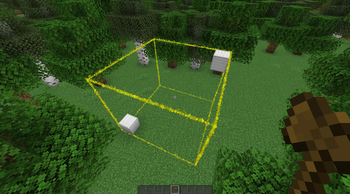
# WorldEdit Selection Viewer A simple plugin with no config that adds particle borders for viewing one's selected (https://enginehub.org/worldedit) region. _Note: While (https://modrinth.com/plugin/fastasyncworldedit/) is not officially supported, it does seem to work_ !(https://raw.githubusercontent.com/funnyboy-roks/worldedit-selection-viewer/main/img/screenshot.gif) ## Setup 1. Download the jar 2. Put it into your `plugins` folder 3. Profit! -- No configuration necessary! ## Commands - `/wesv colour <colour|#hex>` - Change the colour of the selection border - `/wesv visibility <always|never|holding-tool>` - Change when the selection is visible - `always` - Always show the selection - `never` - Never show the selection - `holding-tool` - Show the selection when holding the select tool (default: Wooden Axe) ## Permissions - `worldedit-selection-viewer.view` - If the player can see the borders - Default: Enabled for all players - `worldedit-selection-viewer.command` - If the player can run the `/wesv` command - Default: Enabled for all players
# WorldEdit Selection Viewer
A simple plugin with no config that adds particle borders for viewing one's selected (https://enginehub.org/worldedit) region.
_Note: While (https://modrinth.com/plugin/fastasyncworldedit/) is not officially supported, it does seem to work_
!(https://raw.githubusercontent.com/funnyboy-roks/worldedit-selection-viewer/main/img/screenshot.gif)
1. Download the jar 2. Put it into your `plugins` folder 3. Profit! -- No configuration necessary!
## Commands
- `/wesv colour
- `/wesv visibility
- - `always` - Always show the selection
- - `never` - Never show the selection
- - `holding-tool` - Show the selection when holding the select tool (default: Wooden Axe)
## Permissions
- `worldedit-selection-viewer.view` - If the player can see the borders
- - Default: Enabled for all players
- `worldedit-selection-viewer.command` - If the player can run the `/wesv` command
- - Default: Enabled for all players
📊 Mod Details
- Game
- Minecraft Plugins
- Author
- funnyboy-roks
- Version
- 1.5
- Downloads
- 19,425
- Endorsements
- 104
- Category
- management
- Created
- 11/13/2022
- Updated
- 6/13/2023
- Game Versions
- 1.19, 1.19.1, 1.19.2, 1.19.3, 1.19.4
- Tags
- management, utility
🔧 How to Install Minecraft Plugins Mods
Download from Modrinth. Use Prism Launcher or drop into your mods folder.
📖 Full step-by-step install guide for Minecraft Plugins →
Visit the official mod page for specific installation instructions for this mod.
🎮 Need cheat codes or console commands? Check ur gaming wiki for Minecraft Plugins commands, item IDs, and more.
❓ Frequently Asked Questions
Which Minecraft Plugins versions does WorldEdit Selection Viewer support?
The author lists 1.19, 1.19.1, 1.19.2, 1.19.3, 1.19.4, 1.20. Other versions may work but are untested by the author.
What is the latest version of WorldEdit Selection Viewer?
Version 1.5, published 2023-06-13 with 19,425 downloads recorded at the source.
Keep browsing — more Minecraft Plugins mods await