Mapify
🟡 Updated this year🖼️ Gallery (1 images)
🔍 Analysis
- 👍 0.4% endorsement rate
- 🏆 #248 of 1560 bukkit mods in this game by downloads
📋 About This Mod
# Mapify Mapify is a plugin that is used to convert your images into Minecraft maps that can be placed in item frames or held in hand. To install the plugin, you need to add it into your `plugins/` folder and start the server. This will generate a `config.yml` that you can change and then reload with `/mapify reload`. > For support, join my Discord: <https://discord.gg/qsUP2t5VpW> !(https://raw.githubusercontent.com/funnyboy-roks/mapify/main/img/screenshot.png) > Original photo is (https://unsplash.com/photos/brown-and-black-mountain-under-white-clouds-80x3QULJDN4) by Tetiana Grypachevska ## Commands There are two commands: `/mapify` and `/refreshmaps`. ### `/mapify` **Usage:** `/mapify <url> ` This will take a url and convert it into a set of maps, depending on the dimensions. Dimensions are provided using the format `WIDTHxHEIGHT` (in terms of blocks). Your images will be stretched to fit into the desired size. ### `/mapify reload` Reload config file ### `/refreshmaps ` Refresh the maps in your inventory or in item frames within a given radius. ## Config - Configurable whitelist using raw strings or regular expressions. - Regular Expressions are in the form of `REGEXP:.*\.example\.com` - Whitelist can be treated as a blacklist with the `whitelist-is-blacklist` field. - Configurable cooldown - Https only toggle ## Permissions - `mapify.command.mapify` - Permission to use the `/mapify` command - Default: OP - `mapify.command.mapify.reload` - Permission to use the `/mapify reload` command - Default: OP - `mapify.command.refreshmaps` - Permission to use the `/refreshmaps` command - Default: OP - `mapify.operator` - Permission to determine whether mapify should treat a player as an operator - Default: OP ## FAQ ### Error message of "This is not a valid domain..." By default, the whitelist in the `config.yml` needs to have every domain from which a map should be allowed to be loaded. If you're a server admin, you can run `/mapify config whitelist add <domain>` as suggested in the command. This is to help with security on your server as having untrusted domains can allow users to download malicious software on your server. If you don't want this protection, set `whitelist-disabled` to `true` in the configuration. ### Error message of "An internal error occurred while attempting to perform this command" Please join my Discord and give me the following information: - The large error message that was printed in the server console - The output of `/version` - The version of Mapify that you are using
Mapify is a plugin that is used to convert your images into Minecraft maps that can be placed in item frames or held in hand.
To install the plugin, you need to add it into your `plugins/` folder and start the server. This will generate a `config.yml` that you can change and then reload with `/mapify reload`.
> For support, join my Discord:
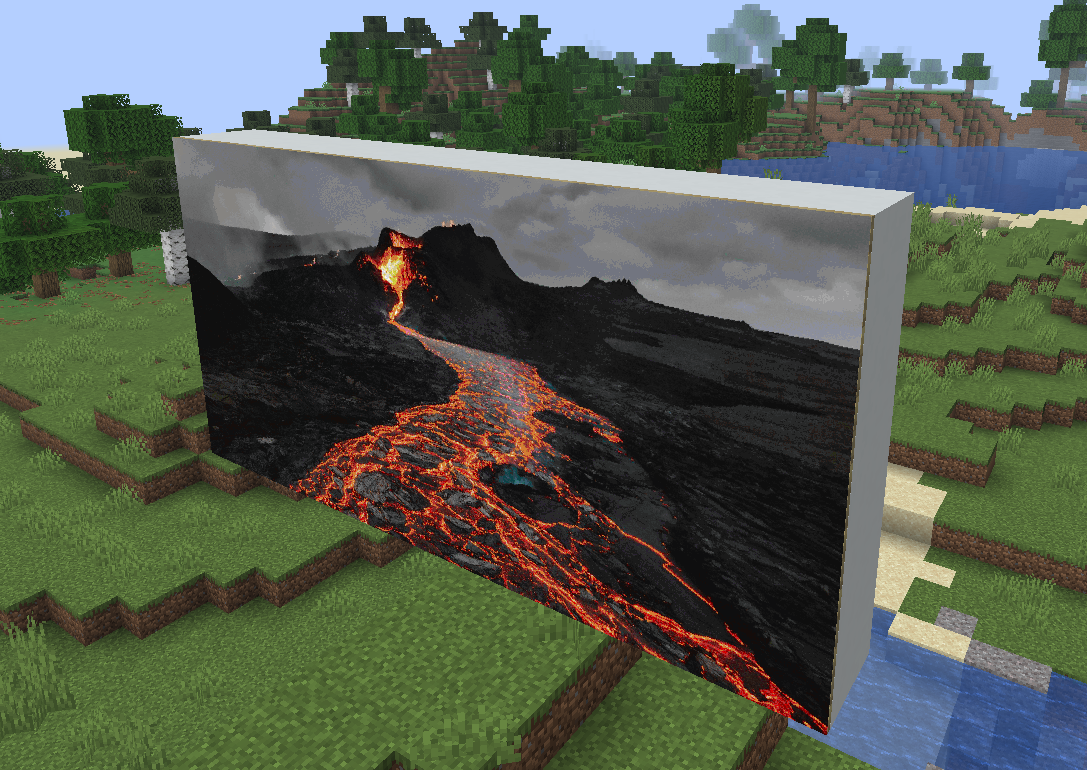 > Original photo is ["brown and black mountain under white clouds"](https://unsplash.com/photos/brown-and-black-mountain-under-white-clouds-80x3QULJDN4) by Tetiana Grypachevska
## Commands
There are two commands: `/mapify` and `/refreshmaps`.
### `/mapify`
Usage: `/mapify `
This will take a url and convert it into a set of maps, depending on the dimensions.
Dimensions are provided using the format `WIDTHxHEIGHT` (in terms of blocks).
Your images will be stretched to fit into the desired size.
### `/mapify reload`
Reload config file
### `/refreshmaps `
Refresh the maps in your inventory or in item frames within a given radius.
- Configurable whitelist using raw strings or regular expressions.
- - Regular Expressions are in the form of `REGEXP:.*\.example\.com`
- - Whitelist can be treated as a blacklist with the
- `whitelist-is-blacklist` field.
- Configurable cooldown
- Https only toggle
## Permissions
- `mapify.command.mapify` - Permission to use the `/mapify` command - Default: OP
- `mapify.command.mapify.reload` - Permission to use the `/mapify reload` command - Default: OP
- `mapify.command.refreshmaps` - Permission to use the `/refreshmaps` command - Default: OP
- `mapify.operator` - Permission to determine whether mapify should treat a player as an operator - Default: OP
### Error message of "This is not a valid domain..."
By default, the whitelist in the `config.yml` needs to have
every domain from which a map should be allowed to be loaded. If you're
a server admin, you can run `/mapify config whitelist add
This is to help with security on your server as having untrusted domains can allow users to download malicious software on your server. If you don't want this protection, set `whitelist-disabled` to `true` in the configuration.
### Error message of "An internal error occurred while attempting to perform this command"
Please join my Discord and give me the following information: - The large error message that was printed in the server console - The output of `/version` - The version of Mapify that you are using
📊 Mod Details
- Game
- Minecraft Plugins
- Author
- funnyboy-roks
- Version
- 1.9
- Downloads
- 18,457
- Endorsements
- 74
- Category
- bukkit
- Created
- 12/11/2022
- Updated
- 10/22/2025
- Game Versions
- 1.17, 1.17.1, 1.18, 1.18.2, 1.19
- Tags
- decoration, utility
🔧 How to Install Minecraft Plugins Mods
Download from Modrinth. Use Prism Launcher or drop into your mods folder.
📖 Full step-by-step install guide for Minecraft Plugins →
Visit the official mod page for specific installation instructions for this mod.
🎮 Need cheat codes or console commands? Check ur gaming wiki for Minecraft Plugins commands, item IDs, and more.
❓ Frequently Asked Questions
Which Minecraft Plugins versions does Mapify support?
The author lists 1.17, 1.17.1, 1.18, 1.18.2, 1.19, 1.19.1. Other versions may work but are untested by the author.
What is the latest version of Mapify?
Version 1.9, published 2025-10-22 with 18,457 downloads recorded at the source.
Keep browsing — more Minecraft Plugins mods await