webplugin
🟡 Updated this year🖼️ Gallery (1 images)
🔍 Analysis
- 🏆 #177 of 599 bukkit mods in this game by downloads
📋 About This Mod
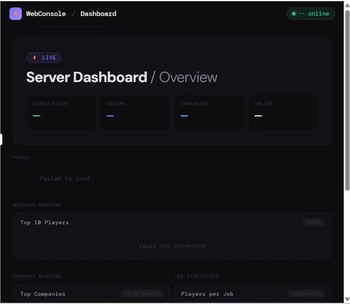
# WebConsolePlugin A web-based dashboard plugin for Paper servers. Access a **public status page** and a **password-protected admin panel** from any browser — no client-side mods required. --- ## 📦 What's Included ### 🌐 Main Menu A homepage automatically served at your server's IP and port. Displays server status and links to any subpages you add to the `public_html/` folder. Adding a new folder creates a new card on the homepage automatically — **no restart needed**. ### 🔐 Admin Panel <details> <summary>Player Management</summary> - Ban, kick, unban players - Give, take, or set player balance *(requires Vault)* </details> <details> <summary>Online Monitor</summary> - View all online players with coordinates, HP, ping, and game mode in real time </details> <details> <summary>Console</summary> - Execute server commands directly from the browser - Command history saved for quick re-use </details> <details> <summary>Whitelist</summary> - Toggle whitelist on/off - Add and remove players </details> <details> <summary>Server Log Viewer</summary> - View `logs/latest.log` with keyword filtering - Auto-refresh mode *(updates every 3 seconds)* </details> <details> <summary>Action Log</summary> - Every admin action is recorded with timestamp and operator - Persisted to disk — survives server restarts - Individual entries can be selected and deleted *(owner role only)* </details> <details> <summary>Login History & Fail Alerts</summary> - Records every successful login with username and timestamp *(up to 500 entries)* - Records failed login attempts with IP address </details> <details> <summary>Scheduled Messages & Emergency Kick</summary> - Set up recurring broadcast messages at custom intervals - Kick all online players at once with a custom message </details> --- ## 👑 Role System Two roles are available: `admin` and `owner`. | Feature | admin | owner | |:--------|:-----:|:-----:| | All management features | ✅ | ✅ | | Delete action log entries | ❌ | ✅ | | Clear login history | ❌ | ✅ | ### Setting Up Accounts and Roles Edit `plugins/WebConsole/config.yml`: ```yaml admin: session-expire-minutes: 60 accounts: - username: "alice" password: "yourpassword" role: "admin" # Regular administrator - username: "bob" password: "ownerpassword" role: "owner" # Full privileges ``` > Run `/wc reload` to apply changes — **no restart required**. > You can add as many accounts as you need. --- ## ⚙️ Setup **1.** Drop the `.jar` into `plugins/` and start the server. **2.** Set your port in `plugins/WebConsole/config.yml`: ```yaml port: 8080 # Change to a port that is open on your server ``` > ⚠️ Make sure the port is open in your firewall or hosting panel. **3.** Set up admin accounts *(see Role System above)*. **4.** Open in your browser: - **Main menu:** `http://your-server-ip:PORT/` - **Admin panel:** `http://your-server-ip:PORT/admin/` --- ## ⌨️ Commands | Command | Description | |:--------|:------------| | `/wc reload` | Reload `config.yml` | | `/wc bridges` | List active plugin bridges | | `/wc modules` | List registered admin modules | **Permission:** `webconsole.admin` *(default: OP)* --- ## 🔌 Optional Dependencies > All are soft dependencies — the plugin works without them. - **Vault** — Balance display and management - **JobsReborn** — Job statistics - **CompanyPlugin** — Company rankings - **MarketPlugin** — Item market prices --- --- # WebConsolePlugin(日本語) Paper サーバー向けの Web ダッシュボードプラグインです。 **公開ステータスページ**と**パスワード保護された管理者パネル**をブラウザからアクセスできます。クライアント側の Mod は不要です。 --- ## 📦 同封されるもの ### 🌐 メインメニュー サーバーの IP とポートにアクセスすると表示されるトップページです。 サーバーの稼働状況と、`public_html/` フォルダに追加したサブページへのリンクを表示します。 フォルダを追加するだけで自動的にカードが生成されます — **再起動不要**。 ### 🔐 管理者パネル <details> <summary>プレイヤー管理</summary> - BAN・キック・BAN解除 - 残高の付与・徴収・セット *(Vault 必須)* </details> <details> <summary>オンライン監視</summary> - 全オンラインプレイヤーの座標・HP・Ping・ゲームモードをリアルタイム表示 </details> <details> <summary>コンソール実行</summary> - ブラウザからサーバーコマンドを実行 - コマンド履歴を保存して素早く再実行 </details> <details> <summary>ホワイトリスト管理</summary> - ホワイトリストの ON/OFF 切り替え - プレイヤーの追加・削除 </details> <details> <summary>サーバーログ閲覧</summary> - `logs/latest.log` をキーワードで絞り込んで閲覧 - 3秒ごとの自動更新モードあり </details> <details> <summary>操作ログ</summary> - すべての管理操作を日時・操作者とともに記録 - ディスクに永続保存(サーバー再起動後も保持) - エントリを選択して個別削除可能 *(owner ロールのみ)* </details> <details> <summary>ログイン履歴・失敗アラート</summary> - ログイン成功のたびにユーザー名と日時を記録 *(最大500件・永続化)* - ログイン失敗時のIPアドレスを記録 </details> <details> <summary>定期メッセージ・緊急キック</summary> - 指定した間隔でサーバー全体に自動ブロードキャスト - 全オンラインプレイヤーを任意のメッセージと一括キック </details> --- ## 👑 ロール管理 `admin`(通常管理者)と `owner`(オーナー)の2段階です。 | 機能 | admin | owner | |:-----|:-----:|:-----:| | すべての管理機能 | ✅ | ✅ | | 操作ログの個別削除 | ❌ | ✅ | | ログイン履歴の削除 | ❌ | ✅ | ### アカウントとロールの設定方法 `plugins/WebConsole/config.yml` を編集します: ```yaml admin: session-expire-minutes: 60 accounts: - username: "alice" password: "パスワード" role: "ad
# WebConsolePlugin
A web-based dashboard plugin for Paper servers. Access a public status page and a password-protected admin panel from any browser — no client-side mods required.
## 📦 What's Included
### 🌐 Main Menu A homepage automatically served at your server's IP and port. Displays server status and links to any subpages you add to the `public_html/` folder. Adding a new folder creates a new card on the homepage automatically — no restart needed.
### 🔐 Admin Panel
Player Management
- Ban, kick, unban players
- Give, take, or set player balance (requires Vault)
Online Monitor
- View all online players with coordinates, HP, ping, and game mode in real time
Console
- Execute server commands directly from the browser
- Command history saved for quick re-use
Whitelist
- Toggle whitelist on/off
- Add and remove players
Server Log Viewer
- View `logs/latest.log` with keyword filtering
- Auto-refresh mode (updates every 3 seconds)
Action Log
- Every admin action is recorded with timestamp and operator
- Persisted to disk — survives server restarts
- Individual entries can be selected and deleted (owner role only)
Login History & Fail Alerts
- Records every successful login with username and timestamp (up to 500 entries)
- Records failed login attempts with IP address
Scheduled Messages & Emergency Kick
- Set up recurring broadcast messages at custom intervals
- Kick all online players at once with a custom message
## 👑 Role System
Two roles are available: `admin` and `owner`.
| Feature | admin | owner | |:--------|:-----:|:-----:| | All management features | ✅ | ✅ | | Delete action log entries | ❌ | ✅ | | Clear login history | ❌ | ✅ |
### Setting Up Accounts and Roles
Edit `plugins/WebConsole/config.yml`:
```yaml admin: session-expire-minutes: 60 accounts: - username: "alice" password: "yourpassword" role: "admin" # Regular administrator - username: "bob" password: "ownerpassword" role: "owner" # Full privileges ```
> Run `/wc reload` to apply changes — no restart required. > You can add as many accounts as you need.
## ⚙️ Setup
1. Drop the `.jar` into `plugins/` and start the server.
2. Set your port in `plugins/WebConsole/config.yml`:
```yaml port: 8080 # Change to a port that is open on your server ```
> ⚠️ Make sure the port is open in your firewall or hosting panel.
3. Set up admin accounts (see Role System above).
4. Open in your browser: - Main menu: `http://your-server-ip:PORT/` - Admin panel: `http://your-server-ip:PORT/admin/`
## ⌨️ Commands
| Command | Description | |:--------|:------------| | `/wc reload` | Reload `config.yml` | | `/wc bridges` | List active plugin bridges | | `/wc modules` | List registered admin modules |
Permission: `webconsole.admin` (default: OP)
## 🔌 Optional Dependencies
> All are soft dependencies — the plugin works without them.
- Vault — Balance display and management
- JobsReborn — Job statistics
- CompanyPlugin — Company rankings
- MarketPlugin — Item market prices
# WebConsolePlugin(日本語)
Paper サーバー向けの Web ダッシュボードプラグインです。 公開ステータスページとパスワード保護された管理者パネルをブラウザからアクセスできます。クライアント側の Mod は不要です。
## 📦 同封されるもの
### 🌐 メインメニュー サーバーの IP とポートにアクセスすると表示されるトップページです。 サーバーの稼働状況と、`public_html/` フォルダに追加したサブページへのリンクを表示します。 フォルダを追加するだけで自動的にカードが生成されます — 再起動不要。
### 🔐 管理者パネル
プレイヤー管理
- BAN・キック・BAN解除
- 残高の付与・徴収・セット (Vault 必須)
オンライン監視
- 全オンラインプレイヤーの座標・HP・Ping・ゲームモードをリアルタイム表示
コンソール実行
- ブラウザからサーバーコマンドを実行
- コマンド履歴を保存して素早く再実行
ホワイトリスト管理
- ホワイトリストの ON/OFF 切り替え
- プレイヤーの追加・削除
サーバーログ閲覧
- `logs/latest.log` をキーワードで絞り込んで閲覧
- 3秒ごとの自動更新モードあり
操作ログ
- すべての管理操作を日時・操作者とともに記録
- ディスクに永続保存(サーバー再起動後も保持)
- エントリを選択して個別削除可能 (owner ロールのみ)
ログイン履歴・失敗アラート
- ログイン成功のたびにユーザー名と日時を記録 (最大500件・永続化)
- ログイン失敗時のIPアドレスを記録
定期メッセージ・緊急キック
- 指定した間隔でサーバー全体に自動ブロードキャスト
- 全オンラインプレイヤーを任意のメッセージと一括キック
## 👑 ロール管理
`admin`(通常管理者)と `owner`(オーナー)の2段階です。
| 機能 | admin | owner | |:-----|:-----:|:-----:| | すべての管理機能 | ✅ | ✅ | | 操作ログの個別削除 | ❌ | ✅ | | ログイン履歴の削除 | ❌ | ✅ |
### アカウントとロールの設定方法
`plugins/WebConsole/config.yml` を編集します:
```yaml admin: session-expire-minutes: 60 accounts: - username: "alice" password: "パスワード" role: "ad
📊 Mod Details
- Game
- Minecraft Plugins
- Author
- otyagames09
- Version
- 1.3.0
- Downloads
- 26
- Endorsements
- 0
- Category
- bukkit
- Created
- 5/12/2026
- Updated
- 5/11/2026
- Game Versions
- 1.21, 1.21.1, 1.21.2, 1.21.3, 1.21.4
- Tags
- management, technology
🔧 How to Install Minecraft Plugins Mods
Download from Modrinth. Use Prism Launcher or drop into your mods folder.
📖 Full step-by-step install guide for Minecraft Plugins →
Visit the official mod page for specific installation instructions for this mod.
🎮 Need cheat codes or console commands? Check ur gaming wiki for Minecraft Plugins commands, item IDs, and more.
❓ Frequently Asked Questions
Which Minecraft Plugins versions does webplugin support?
The author lists 1.21, 1.21.1, 1.21.2, 1.21.3, 1.21.4, 1.21.5. Other versions may work but are untested by the author.
What is the latest version of webplugin?
Version 1.3.0, published 2026-05-11 with 26 downloads recorded at the source.
Keep browsing — more Minecraft Plugins mods await