WarpStones
🟡 Updated this year🖼️ Gallery (3 images)

🔍 Analysis
- 🏆 #14 of 59 equipment mods in this game by downloads
📋 About This Mod
!(https://cdn.modrinth.com/data/cached_images/50b0cbf94e82af6aff205e18c056171e6615a692.png) ---
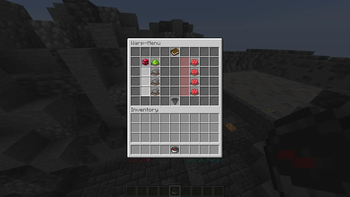
WarpStones is a Paper plugin for Minecraft 1. 21. X that introduces a fully custom warp system built around a personal Warp-Menu — a compass item each player carries that opens their own GUI. Players collect Warp Stones (custom player-head items) and place them into their menu to permanently unlock `/warp` destinations.
Every player progresses at their own pace: the first four slots are free, while additional slots must be purchased through an economy system. Extra pages can be unlocked for players with the appropriate permission. The plugin integrates seamlessly with EssentialsX for warp teleportation, Vault for economy-based slot purchasing, and PlaceholderAPI for scoreboard & tablist support.
## Features
### 🧭 Personal Warp-Menu - Each player receives a Warp-Menu compass that opens their own private GUI - Right-clicking a bare Warp Stone in hand shows a preview of its destination without opening the menu - Optionally given automatically on first join, configurable via `give-menu-on-join` - Hotbar slot is configurable via `menu-slot`
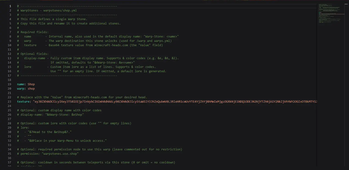
### 💎 Warp Stones - Collectible player-head items with custom textures, names, and lore - Each stone is tied to a specific `/warp` destination and optional category - Players place a stone into their Warp-Menu to permanently unlock that warp - Fully custom display names and lore with `&` color codes, or clean defaults - Optional permission node per stone to restrict who can use it (e.g. `warpstones.use.vip_lounge`) - Optional per-stone cooldown in seconds between teleports
### 🔒 Slot System - Page 1 starts with 4 slots unlocked for free; slots 5–8 require a purchase - Slots must be unlocked in order — the next purchasable slot shows its price; others show a "Unlock previous first" hint - Each page holds up to 8 warp destinations - Sort button in the GUI rearranges placed stones alphabetically (A→Z) with a single click - Collection progress item shows how many stones are placed and how many slots are unlocked on the current page
### 📄 Multi-Page Support - Players can unlock additional pages with the `warpstones.extrapage` permission - The total number of pages is defined by `upgrades.yml` — no hardcoded limit - Customizable navigation arrow textures for prev/next page buttons
### ⏱️ Teleport Cooldowns - Set a cooldown (in seconds) per Warp Stone via the `cooldown:` field - Players receive a clear message with the remaining time if on cooldown - Cooldown is enforced both via GUI button and direct `/warp` command
### ✨ Teleport Effects - Configurable sound and particle effect on every teleport - Fully adjustable: sound name, volume, pitch, particle type, and particle count - Set either to `""` to disable
### 🗂️ Categories - Assign a `category:` to each Warp Stone (e.g. `Economy`, `Towns`, `Resources`) - Category is shown in the placed-stone lore inside the GUI - Helps players visually organize their warps at a glance
### 🎨 GUI Layout - Clean 54-slot GUI (6 rows) with stone slots and action slots side by side - Book progress indicator in the top center - Hopper sort button in the bottom center - Unlocked & filled slots show the Warp Stone head and a green Teleport button - Unlocked & empty slots show a white pane and a gray Empty Slot hint - Locked slots display a red pane with a buy button or a "locked" indicator
### 🔌 Developer API - Three custom Bukkit events: `WarpStoneTeleportEvent`, `WarpStoneUnlockEvent`, `WarpStonePlaceEvent` — all cancellable - Other plugins can hook into warp, unlock, and place/remove actions
### 🛠️ Admin Commands
- `/warpstones create
## How It Works
1. Obtain a Warp-Menu — players receive one on join (if enabled) or via `/warpstones give menu` 2. Collect Warp Stones — distributed by admins via command, or placed in shops/loot tables 3. Preview a stone — right-click it in hand to see the destination, category, and instructions 4. Place a stone — open the Warp-Menu and drag the stone into an unlocked slot to permanently register that warp 5. Use `/warp` — the plugin checks that the player has the stone placed, the required permission, and is not on cooldown 6. Sort & organize — click the Sort button to arrange placed s
📊 Mod Details
- Game
- Minecraft Plugins
- Author
- cripwalktutorial
- Version
- 1.0.0
- Downloads
- 26
- Endorsements
- 0
- Category
- equipment
- Created
- 5/31/2026
- Updated
- 5/26/2026
- Game Versions
- 1.21, 1.21.1, 1.21.2, 1.21.3, 1.21.4
- Tags
- equipment, game-mechanics, utility
🔧 How to Install Minecraft Plugins Mods
Download from Modrinth. Use Prism Launcher or drop into your mods folder.
📖 Full step-by-step install guide for Minecraft Plugins →
Visit the official mod page for specific installation instructions for this mod.
🎮 Need cheat codes or console commands? Check ur gaming wiki for Minecraft Plugins commands, item IDs, and more.
❓ Frequently Asked Questions
Which Minecraft Plugins versions does WarpStones support?
The author lists 1.21, 1.21.1, 1.21.2, 1.21.3, 1.21.4, 1.21.5. Other versions may work but are untested by the author.
What is the latest version of WarpStones?
Version 1.0.0, published 2026-05-26 with 26 downloads recorded at the source.
Keep browsing — more Minecraft Plugins mods await