VortexPacks
🟡 Updated this year🖼️ Gallery (5 images)

🔍 Analysis
- 🏆 #52 of 55 decoration mods in this game by downloads
📋 About This Mod
!(https://vortexdevelopment.net/api/plugins/vortexpacks/images/d2865cf8-9540-4450-9dbf-2eff4e11e576.png)
Text Description
# VortexPacks
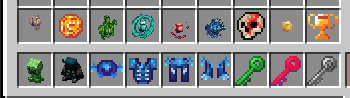
VortexPacks is a server-side resource pack management and content distribution plugin for Spigot/Paper Minecraft servers. It allows server administrators to create, compile, and distribute custom blocks, furniture, items, glyphs, custom equipment, custom sound files, and shaders to players without requiring any client-side mods.
## Why Choose VortexPacks?
Server owners often face challenges when introducing custom textures, 3D models, or user interface modifications: Version Mismatches: Players joining on older or newer clients may experience broken models or red error screens due to resource pack format changes across Minecraft versions. VortexPacks solves this by dynamically generating and serving tailored resource packs for each player's client version (from 1. 18. 2 to 1. 21. 11+). Complex Setup Processes: Manually editing JSON files, managing Atlases, matching CustomModelData, or writing shaders is time-consuming and error-prone. VortexPacks automates the pack compilation process (including Atlas configuration and sprite alignment) based on simple configuration files. Visual Consistency: It includes on-the-fly packet rewriting to translate modern item components back into legacy CustomModelData for older clients, ensuring visual consistency across all connected versions.
## Key Features
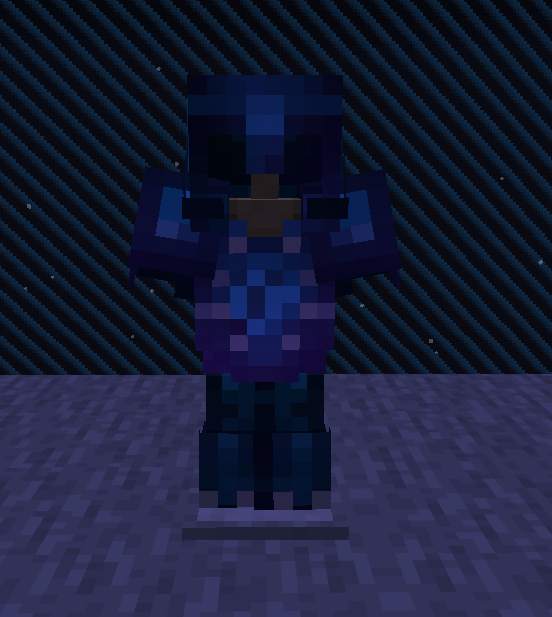
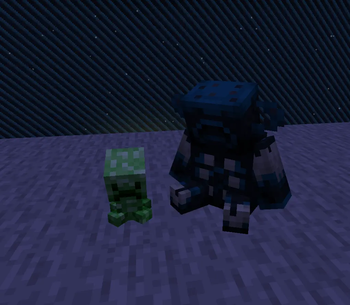
### Custom Content Generation Advanced Custom Blocks: Defines custom blocks using unused Note Block states (supporting break animations and custom sound profiles). Custom Furniture: Allows creation of decorative items with custom hitboxes, seat mechanics, and collision barriers. Modern Equipment Assets (1. 21. 2+): Natively supports Minecraft's new equipment asset system to automatically generate custom armor sets and textures. Dynamic 3D Models: Automatically optimizes and compiles custom JSON models and textures into the server's resource pack. UI & Glyph Mapping: Bakes custom fonts, emojis, and textures directly into client interfaces and chat displays. Positional Audio: Supports custom `.ogg` sound files with configurable categories, subtitles, and 3D spatial positioning.
### Compatibility & Version Translation Dynamic Version Branching: Detects the player's client version using ViaVersion or ProtocolLib, then generates and serves a resource pack with the matching `pack_format` header (supporting client formats from 1. 18. 2 up to 1. 21. 11+). Packet Rewriting (Netty Interception): Intercepts incoming/outgoing network packets at runtime to rewrite modern `item_model` components into legacy `CustomModelData` for players on versions below 1. 21. 4. Atlas Normalization: Automatically builds Minecraft Atlases (`assets/minecraft/atlases/items.json` and `blocks.json`) and handles split item/block atlases on 1. 21. 6+ clients to prevent duplicate-sprite loading errors. Legacy Armor Shaders: For clients below 1. 21. 2 (which do not support the modern equipment system), VortexPacks compiles and bundles shaders to render custom armor textures and animations on leather armor overlays. Dynamic Text Shaders: Packages text shaders (`rendertype_text`) mapped to custom color codes to apply animations (waving, skewing, glowing) and gradient cycles to in-game text. Universal Importer: Provides a built-in importer command to migrate existing assets and configurations from Oraxen or other legacy resource systems.
### Performance Optimization MSPT-Optimized Handling: Specifically optimized for Paper servers by utilizing native configurations (like `disable-interaction` for Note Blocks) to minimize block right-click processing overhead.
## How It Works
### Player Experience When a player joins the server, the plugin detects their client version. The plugin prompts the player to download the resource pack generated specifically for their version branch. * The player sees custom blocks, furniture, armor, and UI elements natively, with no client-side mods needed.
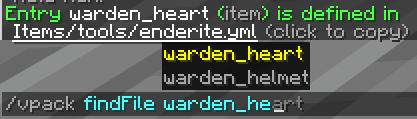
### Administrator Management 1. Configuration: Define custom items, blocks, armor, and audio in the plugin's configuration folders. 2. Compilation: Run `/packs generate` to compile assets, register glyphs, build atlases, and update the generated versioned packs. 3. Distribution: Run `/packs upload` to copy the generated zip files to the configured pack host server. 4. Reload: Run `/packs reload` to reload configuration files and caches on the server.
## System Requirements & Depe
📊 Mod Details
- Game
- Minecraft Plugins
- Author
- VortexDevelopment
- Version
- 1.0.0-SNAPSHOT
- Downloads
- 34
- Endorsements
- 0
- Category
- decoration
- Created
- 6/19/2026
- Updated
- 5/23/2026
- Game Versions
- 1.18.2, 1.19, 1.19.1, 1.19.2, 1.19.3
- Tags
- decoration, management, utility
🔧 How to Install Minecraft Plugins Mods
Download from Modrinth. Use Prism Launcher or drop into your mods folder.
📖 Full step-by-step install guide for Minecraft Plugins →
Visit the official mod page for specific installation instructions for this mod.
🎮 Need cheat codes or console commands? Check ur gaming wiki for Minecraft Plugins commands, item IDs, and more.
❓ Frequently Asked Questions
Which Minecraft Plugins versions does VortexPacks support?
The author lists 1.18.2, 1.19, 1.19.1, 1.19.2, 1.19.3, 1.19.4. Other versions may work but are untested by the author.
What is the latest version of VortexPacks?
Version 1.0.0-SNAPSHOT, published 2026-05-23 with 34 downloads recorded at the source.
Keep browsing — more Minecraft Plugins mods await