VortexGens
🟡 Updated this year🖼️ Gallery (2 images)
🔍 Analysis
- 🏆 #11 of 129 economy mods in this game by downloads
📋 About This Mod
!(https://vortexdevelopment.net/api/plugins/vortexgens/images/a4ee92dd-2b7d-4583-a1f8-e7428e2bc2ca.png)
# VortexGens
VortexGens is a fully customizable generator plugin designed for modern Minecraft servers. It allows server administrators to create custom blocks that produce resources, items, entities, or run console commands. Players can place, upgrade, and stack these generators to build optimized resource production setups for their bases.
## Why Choose VortexGens?
Managing generator-based economies (such as in Skyblock, Factions, or Prison servers) often comes with significant drawbacks: Performance Concerns: Traditional plugins that spawn separate entities or execute excessive checks for every single generator can cause severe server lag. VortexGens solves this by offering a native block-based stacking system that allows players to stack identical generators on a single block. Gameplay Flexibility: Instead of forcing your server into a single style of play, VortexGens supports both Manual Mode (where players mine blocks that regenerate after a cooldown) and Auto Mode (where resources are passively dropped or generated into the world). Deep Customization: You can define unique progression paths with custom upgrade costs (using Vault money or EXP), visual holographic displays, and seamless integrations with custom item and block plugins like Oraxen, Nexo, and MMOItems.
## Key Features
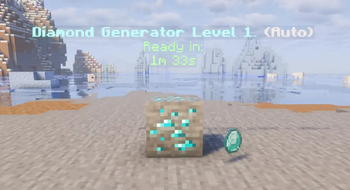
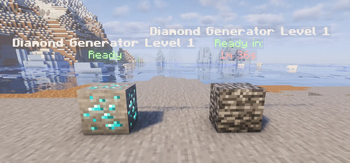
Dual Generator Modes: Manual Mode: Classic Prison-style regenerating blocks. Once mined, the block turns into a placeholder material (like Bedrock) and reverts back when the cooldown finishes. Supports Fortune and Silk Touch. Auto Mode: Passive resource generation. Generators automatically drop rewards, spawn mobs, or run commands at set intervals. Smart Generator Stacking: Players can stack multiple generators of the same level and type on a single block, saving base space and significantly improving server performance by reducing individual block ticking. Interactive Upgrade GUI: A clean, built-in menu allows players to inspect their generator (owner, stack size, cooldowns), upgrade its level, or retrieve individual or entire stacks of generators. Native 3D Holograms: Displays real-time status updates directly above each generator (such as owner name, level, stack size, and remaining cooldown seconds) using native armor stands without needing external hologram plugins. LuckPerms Integration: Define custom placement limits per rank/group (e.g., Default players can place up to 10 generators, VIPs can place 25, etc.). Custom Item/Block Support: Out-of-the-box support for custom blocks and rewards from Oraxen, Nexo, and MMOItems. Flexible Databases: Supports H2 (local file-based storage) and MySQL/MariaDB for larger multi-server networks.
## How It Works
### For Players 1. Placement: Place a generator block on the ground to activate it (subject to your group limit). 2. Management: Right-click the placed generator block to open the GUI. Here, you can pay to upgrade the generator's level or pick it up back into your inventory. 3. Stacking: Right-click an existing generator block while holding an identical one to stack them.
### For Administrators
1. Creation: Define your generators in the `generators/` configuration folder. You can configure the item, ready/regenerating blocks, levels, upgrade costs, cooldowns, and reward lists.
2. Commands: Use `/vortexgens give
## System Requirements & Dependencies
### Compatibility Platforms: Spigot, Paper, or compatible forks. Minecraft Versions: 1. 18. 2 and above.
### Dependencies Vault & any Vault-compatible economy plugin (Optional - required for money-based upgrades). LuckPerms (Optional - required for rank-based placement limits). Oraxen, Nexo, or MMOItems (Optional - required to use custom items/blocks). Jet315 Minions (Optional - Add proper hook for minion block breaks).
📊 Mod Details
- Game
- Minecraft Plugins
- Author
- VortexDevelopment
- Version
- 2.0.3
- Downloads
- 74
- Endorsements
- 1
- Category
- economy
- Created
- 5/31/2026
- Updated
- 8/22/2026
- Game Versions
- 1.18.2, 1.19, 1.19.1, 1.19.2, 1.19.3
- Tags
- economy, game-mechanics, technology
🔧 How to Install Minecraft Plugins Mods
Download from Modrinth. Use Prism Launcher or drop into your mods folder.
📖 Full step-by-step install guide for Minecraft Plugins →
Visit the official mod page for specific installation instructions for this mod.
🎮 Need cheat codes or console commands? Check ur gaming wiki for Minecraft Plugins commands, item IDs, and more.
❓ Frequently Asked Questions
Which Minecraft Plugins versions does VortexGens support?
The author lists 1.18.2, 1.19, 1.19.1, 1.19.2, 1.19.3, 1.19.4. Other versions may work but are untested by the author.
What is the latest version of VortexGens?
Version 2.0.3, published 2026-08-22 with 74 downloads recorded at the source.
Keep browsing — more Minecraft Plugins mods await