VolleyBall UPDATE
🟠 Updated over a year ago🖼️ Gallery (1 images)
🔍 Analysis
- 👍 1.0% endorsement rate
- 🏆 #164 of 214 game-mechanics mods in this game by downloads
📋 About This Mod
# VolleyBall UPDATE > _1.21.x support | No Dependencies_ Updating the "VolleyBall" plugin. This simple plugin is designed specifically for private servers. It allows you to create a ball and interact with it in the open world of minecraft. !(https://github.com/IEnumerablee/Volleyball/blob/master/volleyball.gif?raw=true) # ⭐ Key Features ⭐ ## Full Customixzable Physics - 360 degree rotation - Realistic bounces with adjustable energy loss - Unique block interactions (ice,slime, honey blocks) - Fine-tune gravity and speed ## Your Own Ball Skins - Use any Minecraft head textures - Easy setup via skins.yml (supports Minecraft-Heads format) ## Permission-Based Skins - Create exclusive skins with permission locks - Create your own permission - Custom deny messages ## Unique Crafting System - Interactive crafting: Right-click pufferfish + 8 leathers - Visual effects when creating balls ## No Dependencies! - Works standalone - no extra libraries needed - Minimal server performance impact - The old version required library compilation # ✨ Usage ✨ To create a ball, right-click on a live pufferfish while holding 8 pieces of leather in your hand. Throw the ball: Left-click (LMB). Throw the ball harder: Left-click (LMB) while running or jumping. Throw power slider: Hold SHIFT. Pick up the ball: Press SHIFT near the ball. # ⚡ Commands ⚡ /ballskin - Open skin selection menu /ballsreload: Reload configs(volleyball.reload required) /ballsummon: Spawn a ball (volleyball.summon required) # ⚙️ Configs ⚙️ <details> <summary>config.yml</summary> ```# All speed is measured in BPS - blocks per second # Config VolleyBall Plugin Update ENABLE_BALL_CRAFTING: true IPT: 20 # Number of physics processing iterations per tick. Not recommended to change GRAVITY: -0.05 # Gravity DEFAULT_BOUNCE_ENERGY_LOSS: 2 # Default energy loss on bounce. Energy / DEFAULT_BOUNCE_ENERGY_LOSS MAX_SPEED: 40 # Maximum ball speed MAX_ROT_SPEED: 100 # Maximum ball rotation speed ROT_BREAKING_SPEED: 1000 # Maximum rotation braking speed ROT_SPEED_PROPORTION: 1000 # Rotation acceleration proportion based on speed. Applied when the ball bounces THROW_CHECKING_SPEED: 0.06 # Throw power slider speed MAX_THROW_POWER: 19 # Maximum throw power (in BPS) MIN_THROW_POWER: 8 # Minimum throw power (in BPS) DESPAWN_TIME: 10000 # Time (in ticks) after which a stationary ball will despawn DEFAULT_SKULLSKIN: ball # Default ball skin # Block settings BLOCKS_ENERGY_LOSSES: # Custom energy losses for specific blocks WATER: 5 SLIME_BLOCK: 1 MOSS_BLOCK: 3 HAY_BLOCK: 5 HONEY_BLOCK: 100 ICE: 1.2 PACKED_ICE: 1.1 BLUE_ICE: 0.9 TRANSPARENT_BLOCKS: # Blocks that the ball can pass through && Most transparent blocks are automatically enabled - PINK_PETALS TEXT: SKIN_MENU_TITLE: ">> Skin Selection <<" SKIN_ALREADY_SELECTED: "The skin has already been selected" CLICK_TO_SELECT: "Click to select this skin" SOUND: SOUND_ID: "BLOCK_BAMBOO_BREAK" VOLUME: 6.0 PITCH: 1.0 ``` </details> <details> <summary>skins.yml</summary> ``` # skin: # name: <name> # url: <Insert the ending of the link from the official Minecraft API for the head. You can use the site https://minecraft-heads.com/> example: http://textures.minecraft.net/texture/93c2f1c5d2c8f0e33730c14dca1c1d1e1abd8596b0839d6738d18f46432b6fa6 - insert only the hash at the end # perm: <Permission for the ball> You can create your own *Optional # lock_msg: <Message under the ball for those who don't have permission> *Optional # Config VolleyBall Plugin Update # Use "§" for the default colors. ball: name: §fBall url: 93c2f1c5d2c8f0e33730c14dca1c1d1e1abd8596b0839d6738d18f46432b6fa6 premium_ball: name: §dPremium Ball url: a794284953646833c49db0bae137cc93a774cb6ec8c53d1bcef6cd124a5a71ca perm: volleyball.premiumball lock_msg: "§cYou can't use this ball!" ``` </details> # ⛏️ New Ball Skin ⛏️ <details> <summary>Spoiler</summary> The plugin uses the official Minecraft API, so you need to use official Minecraft heads. For example, you can use a site like Minecraft-Heads. In the "url" field, you need to insert the set of characters at the end of the link. For example, for the link: ``` http://textures.minecraft.net/textu...0c14dca1c1d1e1abd8596b0839d6738d18f46432b6fa6 ``` in the "url" field, insert: ``` 93c2f1c5d2c8f0e33730c14dca1c1d1e1abd8596b0839d6738d18f46432b6fa6 ``` You can also set a permission requirement for using a specific ball skin. To do this, use the optional parameters perm and lock_msg. In perm, specify any permission, and in lock_msg, write the message that will be displayed if a player does not have access to this skin. </details>
# VolleyBall UPDATE > _1. 21.x support | No Dependencies_
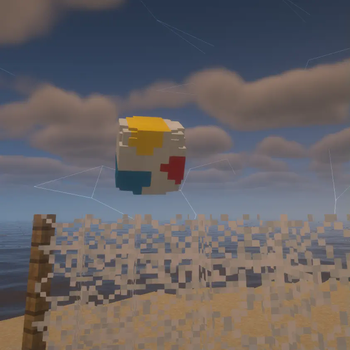
Updating the "VolleyBall" plugin. This simple plugin is designed specifically for private servers. It allows you to create a ball and interact with it in the open world of minecraft.
!(https://github.com/IEnumerablee/Volleyball/blob/master/volleyball.gif?raw=true) # ⭐ Key Features ⭐
## Full Customixzable Physics - 360 degree rotation - Realistic bounces with adjustable energy loss - Unique block interactions (ice,slime, honey blocks) - Fine-tune gravity and speed
## Your Own Ball Skins - Use any Minecraft head textures - Easy setup via skins.yml (supports Minecraft-Heads format)
## Permission-Based Skins - Create exclusive skins with permission locks - Create your own permission - Custom deny messages
## Unique Crafting System - Interactive crafting: Right-click pufferfish + 8 leathers - Visual effects when creating balls
## No Dependencies! - Works standalone - no extra libraries needed - Minimal server performance impact - The old version required library compilation
# ✨ Usage ✨
To create a ball, right-click on a live pufferfish while holding 8 pieces of leather in your hand. Throw the ball: Left-click (LMB). Throw the ball harder: Left-click (LMB) while running or jumping. Throw power slider: Hold SHIFT. Pick up the ball: Press SHIFT near the ball.
# ⚡ Commands ⚡
/ballskin - Open skin selection menu /ballsreload: Reload configs(volleyball.reload required) /ballsummon: Spawn a ball (volleyball.summon required)
# ⚙️ Configs ⚙️
config.yml
```# All speed is measured in BPS - blocks per second
# Config VolleyBall Plugin Update
ENABLE_BALL_CRAFTING: true
IPT: 20 # Number of physics processing iterations per tick. Not recommended to change
GRAVITY: -0. 05 # Gravity
DEFAULT_BOUNCE_ENERGY_LOSS: 2 # Default energy loss on bounce. Energy / DEFAULT_BOUNCE_ENERGY_LOSS
MAX_SPEED: 40 # Maximum ball speed MAX_ROT_SPEED: 100 # Maximum ball rotation speed ROT_BREAKING_SPEED: 1000 # Maximum rotation braking speed ROT_SPEED_PROPORTION: 1000 # Rotation acceleration proportion based on speed. Applied when the ball bounces
THROW_CHECKING_SPEED: 0. 06 # Throw power slider speed MAX_THROW_POWER: 19 # Maximum throw power (in BPS) MIN_THROW_POWER: 8 # Minimum throw power (in BPS)
DESPAWN_TIME: 10000 # Time (in ticks) after which a stationary ball will despawn DEFAULT_SKULLSKIN: ball # Default ball skin
# Block settings BLOCKS_ENERGY_LOSSES: # Custom energy losses for specific blocks WATER: 5 SLIME_BLOCK: 1 MOSS_BLOCK: 3 HAY_BLOCK: 5 HONEY_BLOCK: 100 ICE: 1. 2 PACKED_ICE: 1. 1 BLUE_ICE: 0. 9
TRANSPARENT_BLOCKS: # Blocks that the ball can pass through && Most transparent blocks are automatically enabled - PINK_PETALS
TEXT: SKIN_MENU_TITLE: ">> Skin Selection <<" SKIN_ALREADY_SELECTED: "The skin has already been selected" CLICK_TO_SELECT: "Click to select this skin"
SOUND: SOUND_ID: "BLOCK_BAMBOO_BREAK" VOLUME: 6. 0 PITCH: 1. 0 ```
skins.yml
```
# skin:
# name:
# Config VolleyBall Plugin Update
# Use "§" for the default colors.
ball: name: §fBall url: 93c2f1c5d2c8f0e33730c14dca1c1d1e1abd8596b0839d6738d18f46432b6fa6
premium_ball: name: §dPremium Ball url: a794284953646833c49db0bae137cc93a774cb6ec8c53d1bcef6cd124a5a71ca perm: volleyball.premiumball lock_msg: "§cYou can't use this ball!" ```
# ⛏️ New Ball Skin ⛏️
Spoiler
The plugin uses the official Minecraft API, so you need to use official Minecraft heads. For example, you can use a site like Minecraft-Heads. In the "url" field, you need to insert the set of characters at the end of the link. For example, for the link:
``` http://textures.minecraft.net/textu... 0c14dca1c1d1e1abd8596b0839d6738d18f46432b6fa6 ```
in the "url" field, insert:
``` 93c2f1c5d2c8f0e33730c14dca1c1d1e1abd8596b0839d6738d18f46432b6fa6 ```
You can also set a permission requirement for using a specific ball skin. To do this, use the optional parameters perm and lock_msg. In perm, specify any permission, and in lock_msg, write the message that will be displayed if a player does not have access to this skin.
📊 Mod Details
- Game
- Minecraft Plugins
- Author
- NeoVai
- Version
- 1.4
- Downloads
- 1,534
- Endorsements
- 15
- Category
- game-mechanics
- Created
- 6/8/2025
- Updated
- 7/8/2025
- Game Versions
- 1.19, 1.19.1, 1.19.2, 1.19.3, 1.19.4
- Tags
- game-mechanics, minigame, social
🔧 How to Install Minecraft Plugins Mods
Download from Modrinth. Use Prism Launcher or drop into your mods folder.
📖 Full step-by-step install guide for Minecraft Plugins →
Visit the official mod page for specific installation instructions for this mod.
🎮 Need cheat codes or console commands? Check ur gaming wiki for Minecraft Plugins commands, item IDs, and more.
❓ Frequently Asked Questions
Which Minecraft Plugins versions does VolleyBall UPDATE support?
The author lists 1.19, 1.19.1, 1.19.2, 1.19.3, 1.19.4, 1.20. Other versions may work but are untested by the author.
What is the latest version of VolleyBall UPDATE?
Version 1.4, published 2025-07-08 with 1,534 downloads recorded at the source.
Keep browsing — more Minecraft Plugins mods await