TablePlays
🟡 Updated this year🖼️ Gallery (10 images)
🔍 Analysis
- 👍 2.0% endorsement rate — high engagement, a strong quality signal
- 🏆 #1368 of 1560 bukkit mods in this game by downloads
📋 About This Mod
# TablePlays **TablePlays** is a plugin designed for small/private servers that gives the playes the ability to play different tabletop games! ### Note that every player who will want to use the plugin **should** have a resource pack installed ## Features - Русский перевод. - Compatible with Minecraft 1.21 up to 26.2 (fully tested on 1.21, 1.21.1, 1.21.4, 1.21.11 and 26.2). - Easy to use translation system allowing you to translate the plugin to your language. - Ability to change resouce pack without worrying about compatability with the original - Easy creation of any custom items for your games _(kinda)_ - Support for server-side saving allowing you to create **very** big bundles ## Items & Crafting TablePlays allows you to create custom items, but also features some default ones: <details> <summary>Click!</summary> - **(https://en.wikipedia.org/wiki/French-suited_playing_cards)** 3 different card decks of 36(2-5 excluded), (https://en.wikipedia.org/wiki/Standard_52-card_deck) and 54(+2 jokers) cards !(https://cdn.modrinth.com/data/cached_images/b304feb7b1712f4b1f2329f8ade3cc390a40f1e6_0.webp) - **(https://en.wikipedia.org/wiki/Dice)** Stackable to 4 regular D6. - !(https://cdn.modrinth.com/data/cached_images/9cb79bb393f463fb65a483bbdb86441f361a64c8_0.webp) - **(https://en.wikipedia.org/wiki/Dominoes)** !(https://cdn.modrinth.com/data/cached_images/f849f2ff0d1f06a58163ec9057fc4e71fc5d95bd_0.webp) - **(https://en.wikipedia.org/wiki/Chessboard)** !(https://cdn.modrinth.com/data/cached_images/0fd2bfeaceb0ee96298a2d201abe6cf9f8829faf_0.webp) - **(https://en.wikipedia.org/wiki/Chess_piece)** !(https://cdn.modrinth.com/data/cached_images/fdbcbcabc54d8b40e14697096616f067c7e90005_0.webp) - **(https://en.wikipedia.org/wiki/Checkers)** !(https://cdn.modrinth.com/data/cached_images/3a6e890fc830cf7c08a13c7512380d62b6182763_0.webp) - **(https://en.wikipedia.org/wiki/Long_Nardy)** !(https://cdn.modrinth.com/data/cached_images/59e1dd8458c55f7906f732479e1a176d38fc5c33.png) !(https://cdn.modrinth.com/data/cached_images/15d2179afa445b8f87aecf5858fa08b134852880.png) - **(https://en.wikipedia.org/wiki/Casino_chip)** There are 8 variation of a chip, all of which may be uncrafted to its original material, the default craft is this: !(https://cdn.modrinth.com/data/cached_images/6dcf07a7cbd900d2112e88fd2e5984182beb9b2f_0.webp) To uncraft the chip to its materal you need to place it in the crafting grid, and it will decraft instantly. You can see all 8 variants below: <details> <summary>all chips</summary> !(https://cdn.modrinth.com/data/cached_images/5ac37dba0895647419a60a78c29b0ed469609e9b_0.webp) </details> - **Chip bundles** Chip bundle allows you to store different chips in one item. There are 9 variation of a chip bundle, the default craft is this: !(https://cdn.modrinth.com/data/cached_images/ae24421fbce85b9018404eb9a5238c5d2166f83c_0.webp) You can replace the top nugget with a dye to craft it with different texture: <details> <summary>chip bundles</summary> !(https://cdn.modrinth.com/data/cached_images/7812dd506d4e985e33c31883ebfb507b2d3cc941_0.webp) </details> </details> ## How to use <details> <summary>Click!</summary> The usage depends on the exact item, but in general you can expect the following: 1) Click on block(or board) with an item in the main hand to place it 2) Click on item with empty hand, to pick it up 3) To get item from a bundle you should take it to main hand and click air or block 4) To put item back to bundle you should take the bundle to left hand an item to main hand. And again, every* item have some specific usage, so I will go over some exceptions to this here: 1) Shift + click on air with a card bundle in hand will hide the value of the card, allowing to play games as poker without worring about players cheating. 2) Shift + click on block or chip with chip in hand to place it without rotating, if you want to align them. 3) Shift + click on block with chess piece of checker **in the left hand** to place it on the ground, otherwise they are placeable only on the board. 4) To puck up a board you need to click it low part of its hitbox, or just click at the bottom. 5) You can flip cards if you hold shift and click them on the ground, or place them already rotated if you hold shift and place. 6) You can place bundle on the gound if you hold shift. 7) You can change checkers to queens if you hold shift and place. </details> ## Installation & Configuration <details> <summary>Click!</summary> Client side 1. Download the matching resource pack for your version. For Minecraft 1.21–1.21.3, use the 1.21.1 pack; for newer versions (e.g. 1.21.4), use the 1.21.4 pack
# TablePlays
TablePlays is a plugin designed for small/private servers that gives the playes the ability to play different tabletop games! ### Note that every player who will want to use the plugin should have a resource pack installed
## Features - Русский перевод. - Compatible with Minecraft 1. 21 up to 26. 2 (fully tested on 1. 21, 1. 21. 1, 1. 21. 4, 1. 21. 11 and 26. 2). - Easy to use translation system allowing you to translate the plugin to your language. - Ability to change resouce pack without worrying about compatability with the original - Easy creation of any custom items for your games _(kinda)_ - Support for server-side saving allowing you to create very big bundles
## Items & Crafting
TablePlays allows you to create custom items, but also features some default ones:
Click!
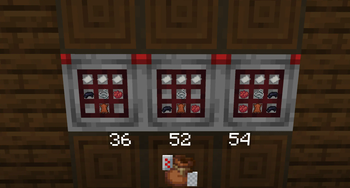
- (https://en.wikipedia.org/wiki/French-suited_playing_cards)**
- 3 different card decks of 36(2-5 excluded), (https://en.wikipedia.org/wiki/Standard_52-card_deck) and 54(+2 jokers) cards
- !(https://cdn.modrinth.com/data/cached_images/b304feb7b1712f4b1f2329f8ade3cc390a40f1e6_0.webp)
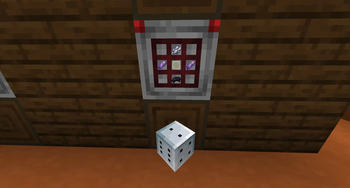
- (https://en.wikipedia.org/wiki/Dice)**
- Stackable to 4 regular D6.
- !(https://cdn.modrinth.com/data/cached_images/9cb79bb393f463fb65a483bbdb86441f361a64c8_0.webp)
- (https://en.wikipedia.org/wiki/Dominoes)**
- !(https://cdn.modrinth.com/data/cached_images/f849f2ff0d1f06a58163ec9057fc4e71fc5d95bd_0.webp)
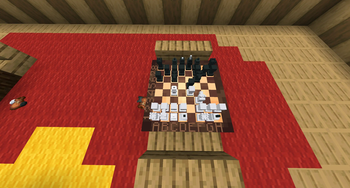
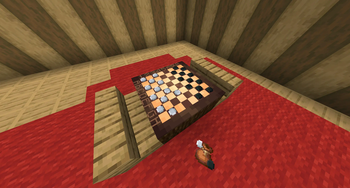
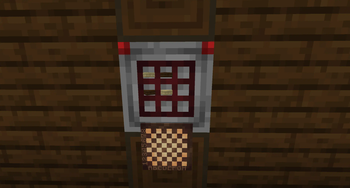
- (https://en.wikipedia.org/wiki/Chessboard)**
!(https://cdn.modrinth.com/data/cached_images/0fd2bfeaceb0ee96298a2d201abe6cf9f8829faf_0.webp)
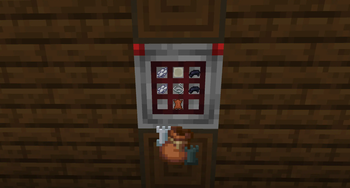
- (https://en.wikipedia.org/wiki/Chess_piece)**
- !(https://cdn.modrinth.com/data/cached_images/fdbcbcabc54d8b40e14697096616f067c7e90005_0.webp)
- (https://en.wikipedia.org/wiki/Checkers)**
!(https://cdn.modrinth.com/data/cached_images/3a6e890fc830cf7c08a13c7512380d62b6182763_0.webp)
- (https://en.wikipedia.org/wiki/Long_Nardy)**
!(https://cdn.modrinth.com/data/cached_images/59e1dd8458c55f7906f732479e1a176d38fc5c33.png)
!(https://cdn.modrinth.com/data/cached_images/15d2179afa445b8f87aecf5858fa08b134852880.png)
- (https://en.wikipedia.org/wiki/Casino_chip)**
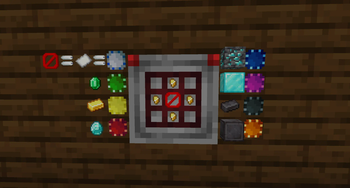
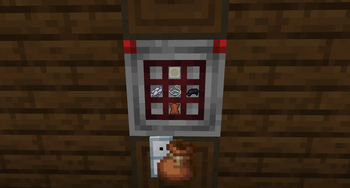
- There are 8 variation of a chip, all of which may be uncrafted to its original material, the default craft is this:
- !(https://cdn.modrinth.com/data/cached_images/6dcf07a7cbd900d2112e88fd2e5984182beb9b2f_0.webp)
To uncraft the chip to its materal you need to place it in the crafting grid, and it will decraft instantly. You can see all 8 variants below:
all chips
!(https://cdn.modrinth.com/data/cached_images/5ac37dba0895647419a60a78c29b0ed469609e9b_0.webp)
- Chip bundles
- Chip bundle allows you to store different chips in one item.
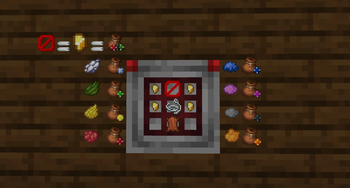
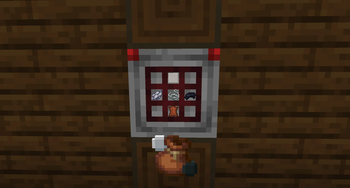
- There are 9 variation of a chip bundle, the default craft is this:
- !(https://cdn.modrinth.com/data/cached_images/ae24421fbce85b9018404eb9a5238c5d2166f83c_0.webp)
You can replace the top nugget with a dye to craft it with different texture:
chip bundles
!(https://cdn.modrinth.com/data/cached_images/7812dd506d4e985e33c31883ebfb507b2d3cc941_0.webp)
## How to use
Click!
The usage depends on the exact item, but in general you can expect the following:
1) Click on block(or board) with an item in the main hand to place it 2) Click on item with empty hand, to pick it up 3) To get item from a bundle you should take it to main hand and click air or block 4) To put item back to bundle you should take the bundle to left hand an item to main hand.
And again, every* item have some specific usage, so I will go over some exceptions to this here:
1) Shift + click on air with a card bundle in hand will hide the value of the card, allowing to play games as poker without worring about players cheating. 2) Shift + click on block or chip with chip in hand to place it without rotating, if you want to align them. 3) Shift + click on block with chess piece of checker in the left hand to place it on the ground, otherwise they are placeable only on the board. 4) To puck up a board you need to click it low part of its hitbox, or just click at the bottom. 5) You can flip cards if you hold shift and click them on the ground, or place them already rotated if you hold shift and place. 6) You can place bundle on the gound if you hold shift. 7) You can change checkers to queens if you hold shift and place.
## Installation & Configuration
Click!
Client side
1. Download the matching resource pack for your version.
For Minecraft 1. 21–1. 21. 3, use the 1. 21. 1 pack; for newer versions (e.g. 1. 21. 4), use the 1. 21. 4 pack
📊 Mod Details
- Game
- Minecraft Plugins
- Author
- miniking1000
- Version
- 3.14159-1
- Downloads
- 1,293
- Endorsements
- 26
- Category
- bukkit
- Created
- 3/22/2025
- Updated
- 7/26/2026
- Game Versions
- 1.21.3, 1.21.4, 1.21.5, 1.21.6, 1.21.7
- Tags
- game-mechanics, minigame, social
🔧 How to Install Minecraft Plugins Mods
Download from Modrinth. Use Prism Launcher or drop into your mods folder.
📖 Full step-by-step install guide for Minecraft Plugins →
Visit the official mod page for specific installation instructions for this mod.
🎮 Need cheat codes or console commands? Check ur gaming wiki for Minecraft Plugins commands, item IDs, and more.
❓ Frequently Asked Questions
Which Minecraft Plugins versions does TablePlays support?
The author lists 1.21.3, 1.21.4, 1.21.5, 1.21.6, 1.21.7, 1.21.8. Other versions may work but are untested by the author.
What is the latest version of TablePlays?
Version 3.14159-1, published 2026-07-26 with 1,293 downloads recorded at the source.
Keep browsing — more Minecraft Plugins mods await