Tub's Status Plugin
🟠 Updated over a year ago🖼️ Gallery (1 images)
🔍 Analysis
- 👍 0.3% endorsement rate
- 🏆 #56 of 131 management mods in this game by downloads
📋 About This Mod
# Tub's Status Plugin !(https://img.shields.io/badge/MC-1.13-green) !(https://img.shields.io/badge/MC-1.21-green) !(https://img.shields.io/modrinth/dt/km0yAITg?logo=Modrinth&style=flat-square) (https://forthebadge.com/images/badges/works-on-my-machine.svg)](https://forthebadge.com) <a href="https://www.buymeacoffee.com/tubyoub"> <img src="https://cdn.modrinth.com/data/cached_images/e940ad7e43691afb850183b570447d83d25405c1.png" alt="buymeacoffee" width="174"> </a> <p align="center"> <a href="https://discord.tubyoub.de"> <img src="https://i.imgur.com/JgDt1Fl.png" width="300"> </a> <br/> <i>Please join the Discord if you have questions!</i> </p> This is a Minecraft plugin for Spigot/Paper servers that allows players to set their own status, which is displayed in the tab list and above their heads in-game. ## Features - Set your own status with `/status <status>` - Remove your status with `/status remove` - Set status with formatting codes (for example to color them) with `/status &3<status>` (/status help colorcodes)` - Set other players' statuses with `/status <player> <status>` (requires `StatusPlugin.admin.setStatus` permission) - Remove other players' statuses with `/status remove <player>` (requires `StatusPlugin.admin.setStatus` permission) - Reload all statuses from file with `/status reload` (requires `StatusPlugin.admin.reload` permission) (Can be executed by console) - View a list of all available color codes with `/status help colors` - View info about the plugin with `/status info` - Set a maximum length for statuses with `/status setmaxlength <length>` (requires StatusPlugin.admin.setMaxlength permission) - Reset the maximum length of statuses to default (`15`) with `/status resetmaxlength` (requires StatusPlugin.admin.resetMaxlength permission) (Color codes in statuses are not counted towards the character limit) - The status of every player is saved to a file, so they will keep their status when they rejoin the server. - The Plugin supports `PlaceholderAPI v2.11.5` - The Plugin reloads statuses every 600 Game Ticks (30seconds) so the Placeholders can update themselves. - The Plugin now got a Placeholder`%tubsstatusplugin_status_playername%` (playname should be changed out for the real Playername, Duuuh.) - %tubsstatusplugin_status% - Groupmode - turn on Group Mode in the Config and preconfigure set Groups for Players - A Player will not be able to set a fully custom status but he can use one of the preconfigured Groups. - Set the opening and closing Characters from the status in the config - The Plugin Supports `LuckPerms v5.4` - The Plugin supports LuckPerms prefix and suffix. - `%LP_prefix&%` - `%LP_suffix%` ## Permissions - `StatusPlugin.setStatus`: Allows a player to set their own status and remove it. (default: `true`) - `StatusPlugin.group.set`: Allows players to set their status as a group status. (default: `true`) - `StatusPlugin.admin.setStatus`: Allows a player to set and remove other players' statuses. (default: `false`) - `StatusPlugin.admin.reload`: Allows a player to reload all statuses.(default: `false`) - `StatusPlugin.admin.setMaxlength:` Allows a player to set the maximum length of statuses. (default: `false`) - `StatusPlugin.admin.resetMaxlength:` Allows a player to reset the maximum length of statuses to default. (default: `false`) - `StatusPlugin.formatting.color`: Allows a player to use color codes in their status. (default: `false`) - `StatusPlugin.formatting.bold`: Allows a player to use bold formatting in their status. (default: `false`) - `StatusPlugin.formatting.italic`: Allows a player to use italic formatting in their status. (default: `false`) - `StatusPlugin.formatting.underlined`: Allows a player to use underlined formatting in their status. (default: `false`) - `StatusPlugin.formatting.strikethrough`: Allows a player to use strikethrough formatting in their status. (default: `false`) - `StatusPlugin.formatting.magic`: Allows a player to use obfuscated formatting in their status. (default: `false`) ## Installation To install the plugin, simply download the .jar file and place it in your server's plugins folder. Then, restart your server. ## Support If you have any issues, please report. And if u have any suggestions, feel free to open an issue. <br> If you have any further plugin suggestions you can contact me via discord: `tubyoub` ## Contributing I currently have no plans to get co-contributer's on this project, but if you have any suggestions, feel free to open an issue ## License This project is licensed under the ((https://github.com/TubYoub/StatusPlugin/blob/master/LICENSE). (https://forthebadge.com/images/badges/powered-by-black-magic.svg)](https://forthebadge.com)
# Tub's Status Plugin !(https://img.shields.io/badge/MC-1. 13-green) !(https://img.shields.io/badge/MC-1. 21-green) !(https://img.shields.io/modrinth/dt/km0yAITg?logo=Modrinth&style=flat-square)
[!(https://forthebadge.com/images/badges/works-on-my-machine.svg)](https://forthebadge.com)


Please join the Discord if you have questions!
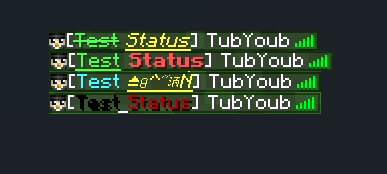
This is a Minecraft plugin for Spigot/Paper servers that allows players to set their own status, which is displayed in the tab list and above their heads in-game. ## Features
- Set your own status with `/status
` - Remove your status with `/status remove`
- Set status with formatting codes (for example to color them) with `/status &3
` (/status help colorcodes)` - Set other players' statuses with `/status
` (requires `StatusPlugin.admin.setStatus` permission) - Remove other players' statuses with `/status remove
` (requires `StatusPlugin.admin.setStatus` permission) - Reload all statuses from file with `/status reload` (requires `StatusPlugin.admin.reload` permission) (Can be executed by console)
- View a list of all available color codes with `/status help colors`
- View info about the plugin with `/status info`
- Set a maximum length for statuses with `/status setmaxlength
` (requires StatusPlugin.admin.setMaxlength permission) - Reset the maximum length of statuses to default (`15`) with `/status resetmaxlength` (requires StatusPlugin.admin.resetMaxlength permission)
- (Color codes in statuses are not counted towards the character limit)
- The status of every player is saved to a file, so they will keep their status when they rejoin the server.
- The Plugin supports `PlaceholderAPI v2. 11. 5`
- - The Plugin reloads statuses every 600 Game Ticks (30seconds) so the Placeholders can update themselves.
- The Plugin now got a Placeholder`%tubsstatusplugin_status_playername%` (playname should be changed out for the real Playername, Duuuh.)
- %tubsstatusplugin_status%
- Groupmode
- - turn on Group Mode in the Config and preconfigure set Groups for Players
- - A Player will not be able to set a fully custom status but he can use one of the preconfigured Groups.
- Set the opening and closing Characters from the status in the config
- The Plugin Supports `LuckPerms v5. 4`
- - The Plugin supports LuckPerms prefix and suffix.
- - `%LP_prefix&%`
- - `%LP_suffix%`
- ## Permissions
- `StatusPlugin.setStatus`: Allows a player to set their own status and remove it. (default: `true`)
- `StatusPlugin.group.set`: Allows players to set their status as a group status. (default: `true`)
- `StatusPlugin.admin.setStatus`: Allows a player to set and remove other players' statuses. (default: `false`)
- `StatusPlugin.admin.reload`: Allows a player to reload all statuses.(default: `false`)
- `StatusPlugin.admin.setMaxlength:` Allows a player to set the maximum length of statuses. (default: `false`)
- `StatusPlugin.admin.resetMaxlength:` Allows a player to reset the maximum length of statuses to default. (default: `false`)
- `StatusPlugin.formatting.color`: Allows a player to use color codes in their status. (default: `false`)
- `StatusPlugin.formatting.bold`: Allows a player to use bold formatting in their status. (default: `false`)
- `StatusPlugin.formatting.italic`: Allows a player to use italic formatting in their status. (default: `false`)
- `StatusPlugin.formatting.underlined`: Allows a player to use underlined formatting in their status. (default: `false`)
- `StatusPlugin.formatting.strikethrough`: Allows a player to use strikethrough formatting in their status. (default: `false`)
- `StatusPlugin.formatting.magic`: Allows a player to use obfuscated formatting in their status. (default: `false`)
## Installation
To install the plugin, simply download the .jar file and place it in your server's plugins folder. Then, restart your server.
If you have any issues, please report. And if u have any suggestions, feel free to open an issue.
If you have any further plugin suggestions you can contact me via discord: `tubyoub`
## Contributing
I currently have no plans to get co-contributer's on this project, but if you have any suggestions, feel free to open an issue
This project is licensed under the ((https://github.com/TubYoub/StatusPlugin/blob/master/LICENSE).
[!(https://forthebadge.com/images/badges/powered-by-black-magic.svg)](https://forthebadge.com)
📊 Mod Details
- Game
- Minecraft Plugins
- Author
- TubYoub
- Version
- 1.6
- Downloads
- 2,639
- Endorsements
- 8
- Category
- management
- Created
- 7/18/2023
- Updated
- 6/4/2025
- Game Versions
- 1.13, 1.13.1, 1.13.2, 1.14, 1.14.1
- Tags
- management, social, utility
🔧 How to Install Minecraft Plugins Mods
Download from Modrinth. Use Prism Launcher or drop into your mods folder.
📖 Full step-by-step install guide for Minecraft Plugins →
Visit the official mod page for specific installation instructions for this mod.
🎮 Need cheat codes or console commands? Check ur gaming wiki for Minecraft Plugins commands, item IDs, and more.
❓ Frequently Asked Questions
Which Minecraft Plugins versions does Tub's Status Plugin support?
The author lists 1.13, 1.13.1, 1.13.2, 1.14, 1.14.1, 1.14.2. Other versions may work but are untested by the author.
What is the latest version of Tub's Status Plugin?
Version 1.6, published 2025-06-04 with 2,639 downloads recorded at the source.
Keep browsing — more Minecraft Plugins mods await