BT Graves
🟠 Updated over a year ago🖼️ Gallery (2 images)
🔍 Analysis
- 👍 0.1% endorsement rate
- 🏆 #105 of 367 adventure mods in this game by downloads
📋 About This Mod
# BT Graves !(https://img.shields.io/badge/MC-1.13-green) !(https://img.shields.io/badge/MC-1.14-green) !(https://img.shields.io/badge/MC-1.15-green) !(https://img.shields.io/badge/MC-1.16-green) !(https://img.shields.io/badge/MC-1.17-green) !(https://img.shields.io/badge/MC-1.18-green) !(https://img.shields.io/badge/MC-1.19-green) !(https://img.shields.io/badge/MC-1.20-green) !(https://img.shields.io/badge/MC-1.21-green) !(https://img.shields.io/modrinth/dt/WGgaXko0?logo=Modrinth&style=flat-square) (https://www.codefactor.io/repository/github/bt-pluginz/graveplugin/badge)](https://www.codefactor.io/repository/github/bt-pluginz/graveplugin) !(https://forthebadge.com/images/badges/works-on-my-machine.svg) <a href="https://www.buymeacoffee.com/tubyoub"> <img src="https://cdn.modrinth.com/data/cached_images/e940ad7e43691afb850183b570447d83d25405c1.png" alt="buymeacoffee" width="174"> </a> <p align="center"> <a href="https://discord.pluginz.dev"> <img src="https://i.imgur.com/JgDt1Fl.png" width="300"> </a> <br> <i>Please join the Discord if you have questions!</i> </p> <br> This Minecraft Plugin spawn a Grave when they die which saves their inventory and also Exp. ## Features - When a player dies the Grave Spawns a Grave, which has a Playerhead on the ground and a name over it. - The Grave will always search for the next option to spawn: - always on top of Liquids - never in the Wall always the next best location - Graves also cant be destroyed by a player. - Liquid proof - Explosion proof - piston proof - Graves Save to a file, so they will retain themselves after a restart or server crash. - Timer for how long should last before dropping everything on the ground. - Grave Names are only updated when a player is in reach of the Grave to prevent unnecessary lag. #### Config - disable/ enable Version checking - change the armor stand which is used by the Plugin. Big/small - change how much of the Level should be retained in the Grave #### Commands - `/grave info`: gives general info from the Plugin - `/grave reload`: reloads the Config ## Permission - `btgraves.reload`: allows a player to reload the config of the plugin ## Stats The Plugin also uses Bstats for basic Stats collection, I just use the basic stats which are automatically collected like player count or Minecraft Version. You can find the Plugin page (https://bstats.org/plugin/bukkit/Bt%20Graves/22622). ## Installation To install the plugin, simply download the latest release file and place it in your server's plugins folder. Then, restart your server. ## Support For Support open an issue or join the (https://discord.pluginz.dev) ## License This project is licensed under the (https://github.com/BT-Pluginz/GravePlugin/blob/master/LICENSE). (https://forthebadge.com/images/badges/powered-by-black-magic.svg)](https://forthebadge.com)
# BT Graves !(https://img.shields.io/badge/MC-1. 13-green) !(https://img.shields.io/badge/MC-1. 14-green) !(https://img.shields.io/badge/MC-1. 15-green) !(https://img.shields.io/badge/MC-1. 16-green) !(https://img.shields.io/badge/MC-1. 17-green) !(https://img.shields.io/badge/MC-1. 18-green) !(https://img.shields.io/badge/MC-1. 19-green) !(https://img.shields.io/badge/MC-1. 20-green) !(https://img.shields.io/badge/MC-1. 21-green) !(https://img.shields.io/modrinth/dt/WGgaXko0?logo=Modrinth&style=flat-square) [!(https://www.codefactor.io/repository/github/bt-pluginz/graveplugin/badge)](https://www.codefactor.io/repository/github/bt-pluginz/graveplugin)
!(https://forthebadge.com/images/badges/works-on-my-machine.svg)


Please join the Discord if you have questions!
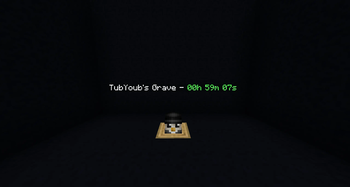
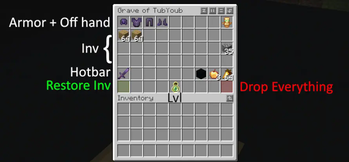
This Minecraft Plugin spawn a Grave when they die which saves their inventory and also Exp. ## Features - When a player dies the Grave Spawns a Grave, which has a Playerhead on the ground and a name over it. - The Grave will always search for the next option to spawn: - always on top of Liquids - never in the Wall always the next best location - Graves also cant be destroyed by a player. - Liquid proof - Explosion proof - piston proof - Graves Save to a file, so they will retain themselves after a restart or server crash. - Timer for how long should last before dropping everything on the ground. - Grave Names are only updated when a player is in reach of the Grave to prevent unnecessary lag. #### Config - disable/ enable Version checking - change the armor stand which is used by the Plugin. Big/small - change how much of the Level should be retained in the Grave #### Commands - `/grave info`: gives general info from the Plugin - `/grave reload`: reloads the Config ## Permission - `btgraves.reload`: allows a player to reload the config of the plugin ## Stats The Plugin also uses Bstats for basic Stats collection, I just use the basic stats which are automatically collected like player count or Minecraft Version. You can find the Plugin page (https://bstats.org/plugin/bukkit/Bt%20Graves/22622). ## Installation To install the plugin, simply download the latest release file and place it in your server's plugins folder. Then, restart your server. ## Support For Support open an issue or join the (https://discord.pluginz.dev) ## License
This project is licensed under the (https://github.com/BT-Pluginz/GravePlugin/blob/master/LICENSE).
[!(https://forthebadge.com/images/badges/powered-by-black-magic.svg)](https://forthebadge.com)
📊 Mod Details
- Game
- Minecraft Plugins
- Author
- TubYoub
- Version
- 1.2.2
- Downloads
- 8,692
- Endorsements
- 7
- Category
- adventure
- Created
- 7/13/2024
- Updated
- 6/23/2025
- Game Versions
- 1.13, 1.13.1, 1.13.2, 1.14, 1.14.1
- Tags
- adventure, social, utility
🔧 How to Install Minecraft Plugins Mods
Download from Modrinth. Use Prism Launcher or drop into your mods folder.
📖 Full step-by-step install guide for Minecraft Plugins →
Visit the official mod page for specific installation instructions for this mod.
🎮 Need cheat codes or console commands? Check ur gaming wiki for Minecraft Plugins commands, item IDs, and more.
❓ Frequently Asked Questions
Which Minecraft Plugins versions does BT Graves support?
The author lists 1.13, 1.13.1, 1.13.2, 1.14, 1.14.1, 1.14.2. Other versions may work but are untested by the author.
What is the latest version of BT Graves?
Version 1.2.2, published 2025-06-23 with 8,692 downloads recorded at the source.
Keep browsing — more Minecraft Plugins mods await