TrackSRV
🟡 Updated this year🖼️ Gallery (4 images)
🔍 Analysis
- 🏆 #64 of 208 management mods in this game by downloads
📋 About This Mod
# **Track SRV** ### **EN:** **Track SRV**—allows server administrators to view information about resource usage. For example: TPS, MSPT, uptime, number of online users, average ping, server kernel, plugins installed on the server, RAM, CPU, and disk. ## Plugin commands: **/tracksrv help** – Help command **/tracksrv tracks 1** – Page 1 with resource usage information **/tracksrv tracks 2** - Page 2 with resource usage information **/tracksrv reload** - Reload the entire plugin <details> <summary>config.yml</summary> ``` # TrackSRV Configuration # Plugin version: 1.0.0 # Permission settings # If use-luckperms is true, permissions are managed via LuckPerms # If false, only operators (op) have access use-luckperms: true # Message prefix prefix: “&8&r ” # TPS warning thresholds tps-warning: 18.0 # Below this value, TPS will be displayed in yellow tps-critical: 15.0 # Below this value, TPS will be displayed in red # MSPT warning thresholds (milliseconds) mspt-warning: 40.0 # Above this value, MSPT will be displayed in yellow mspt-critical: 50.0 # Above this value, MSPT will be displayed in red # RAM warning thresholds (percentage) ram-warning: 75 # Above this percentage, RAM usage will be displayed in yellow ram-critical: 90 # Above this percentage, RAM usage will be displayed in red # ─── Enabling/Disabling Individual Metrics ──────────────────────────────────── # Set to false to hide the metric from the /tracksrv tracks output stats: tps: true # Server TPS (1 minute) mspt: true # Mean Time Per Tick (MSPT) uptime: true # Server uptime online: true # Number of players online ping: true # Average player ping version: true # Server kernel version ram-heap: true # JVM RAM (heap) ram-system: true # System/container RAM cpu: true # CPU load disk: true # Disk usage plugins: true # List of plugins ``` </details> <details> <summary>messages.yml</summary> ``` # TrackSRV Messages # Here you can modify all plugin messages. # Color codes (&a, &b, &c, etc.) and &l (bold), &m (strikethrough), etc. are supported. # Permission denied message no-permission: "&cYou do not have permission to use this command. " no-permission-sub: “&cYou do not have permission for this command.” # Command usage usage: “&7Usage: &b/tracksrv &8<help|tracks|reload>” # Invalid page number invalid-page: “&cInvalid page number. Use 1 or 2.” page-not-found: “&cPage {page} does not exist. Available: &f1&c, &f2” # Reload reload-success: “&aConfiguration successfully reloaded!” # Separator separator: "&8&m-------------------- --------------------" # ─── Help Page ─────────────────────────────────────────────────────────── help-header: “ &b&lTrackSRV &7v{version}” help-description: “ &7A server statistics plugin for administrators.” help-cmd-help: “ &b/tracksrv help &8— &7this help page” help-cmd-tracks: “ &b/tracksrv tracks &8 &8— &7server statistics” help-cmd-tracks-p1: “ &8• &7Page &f1&7: TPS, MSPT, uptime, online, ping” help-cmd-tracks-p2: “ &8• &7Page &f2&7: Plugins, RAM, CPU, Disk” help-cmd-reload: “ &b/tracksrv reload &8— &7Reload configuration” help-luckperms-found: “ &7LuckPerms: &adetected &7(in use)” help-luckperms-not-found: “ &7LuckPerms: &cnot found &7(fallback: op)” # ─── Statistics Page 1 ───────────────────────────────────────────────────── page1-header: “ &b&lTrackSRV &8| &7Server Statistics &8(&fPage 1/2&8)” page1-tps: “ &7TPS (1m) &8: {value}” page1-mspt: “ &7MSPT &8: {value}” page1-uptime: “ &7Uptime &8: &f{value}” page1-online: “ &7Online &8: &f{online} &8/ &f{max}” page1-ping: “ &7Average ping&8: {value}” page1-version: “ &7Kernel &8: &f{value}” page1-next: “ &8▶ &7Next Page: &b/tracksrv tracks 2” # Ping when there are no players page1-ping-no-players: “&7No players” # ─── Statistics Page 2 ───────────────────────────────────── ──────────────── page2-header: “ &b&lTrackSRV &8| &7Server Statistics &8(&fPage 2/2&8)” page2-ram-heap: “ &7RAM (JVM) &8: {value}” page2-ram-system: “ &7RAM (system) &8: {value}” page2-cpu: “ &7CPU (process)&8: {proc} &8| &7system: {sys} &8” page2-disk: “ &7Disk &8: {value}” page2-plugins-header: “ &7Plugins &8({count})&8:” page2-prev: “ &8◀ &7Previous page: &b/tracksrv tracks 1” # When a metric is unavailable unavailable: “&7unavailable” # ─── Labels for disabled metrics ────────────────────────────────────────────────── stat-disabled: “&8” ``` </details> ## Images: !(https://cdn.modrinth.com/data/cached_images/9ec4a40ddcdea6f7c35ecfd9a788a96719448194_0.webp) !(https://cdn.modrinth.com/data/cached_images/cea3191f9d5796987288015bf90c94b539946218_0.webp) ### **RU:** **Track SRV** - даёт возможность администрации
# Track SRV
### EN:
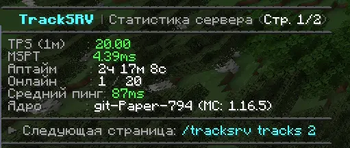
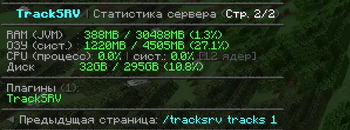
Track SRV—allows server administrators to view information about resource usage. For example: TPS, MSPT, uptime, number of online users, average ping, server kernel, plugins installed on the server, RAM, CPU, and disk.
## Plugin commands:
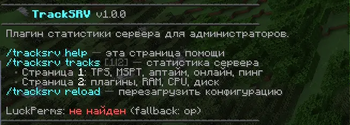
/tracksrv help – Help command
/tracksrv tracks 1 – Page 1 with resource usage information
/tracksrv tracks 2 - Page 2 with resource usage information
/tracksrv reload - Reload the entire plugin
config.yml
``` # TrackSRV Configuration # Plugin version: 1. 0. 0
# Permission settings # If use-luckperms is true, permissions are managed via LuckPerms # If false, only operators (op) have access use-luckperms: true
# Message prefix prefix: “&8[&bTrackSRV&8]&r ”
# TPS warning thresholds tps-warning: 18. 0 # Below this value, TPS will be displayed in yellow tps-critical: 15. 0 # Below this value, TPS will be displayed in red
# MSPT warning thresholds (milliseconds) mspt-warning: 40. 0 # Above this value, MSPT will be displayed in yellow mspt-critical: 50. 0 # Above this value, MSPT will be displayed in red
# RAM warning thresholds (percentage) ram-warning: 75 # Above this percentage, RAM usage will be displayed in yellow ram-critical: 90 # Above this percentage, RAM usage will be displayed in red
# ─── Enabling/Disabling Individual Metrics ──────────────────────────────────── # Set to false to hide the metric from the /tracksrv tracks output stats: tps: true # Server TPS (1 minute) mspt: true # Mean Time Per Tick (MSPT) uptime: true # Server uptime online: true # Number of players online ping: true # Average player ping version: true # Server kernel version ram-heap: true # JVM RAM (heap) ram-system: true # System/container RAM cpu: true # CPU load disk: true # Disk usage plugins: true # List of plugins
messages.yml
``` # TrackSRV Messages # Here you can modify all plugin messages. # Color codes (&a, &b, &c, etc.) and &l (bold), &m (strikethrough), etc. are supported.
# Permission denied message no-permission: "&cYou do not have permission to use this command. " no-permission-sub: “&cYou do not have permission for this command.”
# Command usage
usage: “&7Usage: &b/tracksrv &8
# Invalid page number invalid-page: “&cInvalid page number. Use 1 or 2.” page-not-found: “&cPage {page} does not exist. Available: &f1&c, &f2”
# Reload reload-success: “&aConfiguration successfully reloaded!”
# Separator separator: "&8&m-------------------- --------------------"
# ─── Help Page ─────────────────────────────────────────────────────────── help-header: “ &b&lTrackSRV &7v{version}” help-description: “ &7A server statistics plugin for administrators.” help-cmd-help: “ &b/tracksrv help &8— &7this help page” help-cmd-tracks: “ &b/tracksrv tracks &8 &8— &7server statistics” help-cmd-tracks-p1: “ &8• &7Page &f1&7: TPS, MSPT, uptime, online, ping” help-cmd-tracks-p2: “ &8• &7Page &f2&7: Plugins, RAM, CPU, Disk” help-cmd-reload: “ &b/tracksrv reload &8— &7Reload configuration” help-luckperms-found: “ &7LuckPerms: &adetected &7(in use)” help-luckperms-not-found: “ &7LuckPerms: &cnot found &7(fallback: op)”
# ─── Statistics Page 1 ───────────────────────────────────────────────────── page1-header: “ &b&lTrackSRV &8| &7Server Statistics &8(&fPage 1/2&8)” page1-tps: “ &7TPS (1m) &8: {value}” page1-mspt: “ &7MSPT &8: {value}” page1-uptime: “ &7Uptime &8: &f{value}” page1-online: “ &7Online &8: &f{online} &8/ &f{max}” page1-ping: “ &7Average ping&8: {value}” page1-version: “ &7Kernel &8: &f{value}” page1-next: “ &8▶ &7Next Page: &b/tracksrv tracks 2” # Ping when there are no players page1-ping-no-players: “&7No players”
# ─── Statistics Page 2 ───────────────────────────────────── ──────────────── page2-header: “ &b&lTrackSRV &8| &7Server Statistics &8(&fPage 2/2&8)” page2-ram-heap: “ &7RAM (JVM) &8: {value}” page2-ram-system: “ &7RAM (system) &8: {value}” page2-cpu: “ &7CPU (process)&8: {proc} &8| &7system: {sys} &8[{cores} cores]” page2-disk: “ &7Disk &8: {value}” page2-plugins-header: “ &7Plugins &8({count})&8:” page2-prev: “ &8◀ &7Previous page: &b/tracksrv tracks 1” # When a metric is unavailable unavailable: “&7unavailable”
# ─── Labels for disabled metrics ────────────────────────────────────────────────── stat-disabled: “&8”
!(https://cdn.modrinth.com/data/cached_images/9ec4a40ddcdea6f7c35ecfd9a788a96719448194_0.webp)
!(https://cdn.modrinth.com/data/cached_images/cea3191f9d5796987288015bf90c94b539946218_0.webp)
### RU:
Track SRV - даёт возможность администрации
📊 Mod Details
- Game
- Minecraft Plugins
- Author
- IlyosYT
- Version
- 1.1.0
- Downloads
- 26
- Endorsements
- 0
- Category
- management
- Created
- 6/22/2026
- Updated
- 6/24/2026
- Game Versions
- 1.12, 1.12.1, 1.12.2, 1.13, 1.13.1
- Tags
- management, technology, utility
🔧 How to Install Minecraft Plugins Mods
Download from Modrinth. Use Prism Launcher or drop into your mods folder.
📖 Full step-by-step install guide for Minecraft Plugins →
Visit the official mod page for specific installation instructions for this mod.
🎮 Need cheat codes or console commands? Check ur gaming wiki for Minecraft Plugins commands, item IDs, and more.
❓ Frequently Asked Questions
Which Minecraft Plugins versions does TrackSRV support?
The author lists 1.12, 1.12.1, 1.12.2, 1.13, 1.13.1, 1.13.2. Other versions may work but are untested by the author.
What is the latest version of TrackSRV?
Version 1.1.0, published 2026-06-24 with 26 downloads recorded at the source.
Keep browsing — more Minecraft Plugins mods await