Throwablearrow
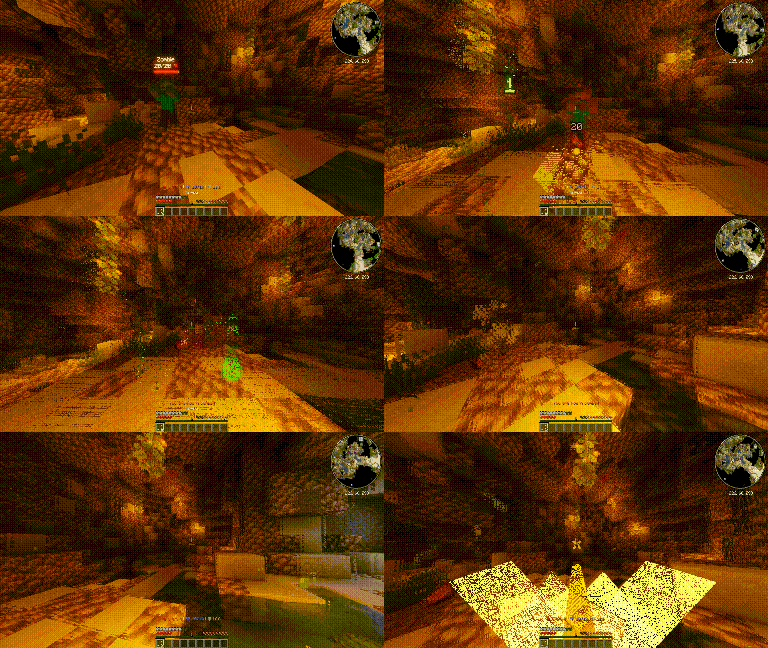
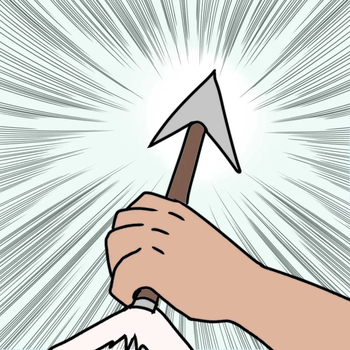
🟡 Updated this year🖼️ Gallery (2 images)
🔍 Analysis
- 🏆 #9 of 25 cursed mods in this game by downloads
📋 About This Mod
# ThrowableArrow ThrowableArrow is a lightweight Paper plugin that adds simple throwable arrow-like items to Minecraft. It was designed for servers that want custom consumable projectiles, such as throwing sticks, spikes, darts, or other RPG-style items. Players can right-click with a configured arrow item to launch it as a projectile. The item is consumed, the projectile deals fixed configurable damage, and it cannot be picked up afterward. ## Features - Create custom throwable arrow items using item models - Configure fixed damage for each throwable item - Optional support for vanilla `minecraft:arrow` - Consume one item on throw - Prevent thrown arrows from being picked up - Automatic despawn after a configurable delay - Cooldown system to avoid spam - Reload command to apply config changes without restarting the server - Startup cleanup for old plugin arrows left in the world after a restart or crash ## Configuration example ```yml arrow-speed: 2.8 despawn-seconds: 30 cooldown-ticks: 4 # If true, vanilla minecraft:arrow can also be thrown by right-clicking it in hand. # You must also define minecraft:arrow in the throwables section. vanilla-arrow: false throwables: minecraft:arrow: damage: 4.0 namespace:name: damage: 6.0 namespace:name2: damage: 12.0 namespace:name3: damage: 20.0 namespace:name4: damage: 40.0 ``` ## Commands ``` /throwablearrow reload ``` ## Permissions ``` throwablearrow.reload: description: Allows reloading the ThrowableArrow config. default: op ``` ## Requirements * Paper server * Minecraft 1.21.4+ * Custom item models if you want custom throwable items ## How do I use item models? You need a texture pack compatible with 1.21.4+ and `item_model`. ThrowableArrow identifies custom throwable items using their Minecraft `item_model`. The model key in your item plugin must match the key in `config.yml`. Example config: ```yml throwables: oom:arrows/coolarrow: damage: 6.0 ``` In your texture pack, you can have something like this: ```yml { "model": { "type": "minecraft:model", "model": "oom:item/arrows/coolarrow" } } ``` Then you can give yourself the item in game with `/minecraft:give @p minecraft:arrow 1`
# ThrowableArrow ThrowableArrow is a lightweight Paper plugin that adds simple throwable arrow-like items to Minecraft.
It was designed for servers that want custom consumable projectiles, such as throwing sticks, spikes, darts, or other RPG-style items. Players can right-click with a configured arrow item to launch it as a projectile. The item is consumed, the projectile deals fixed configurable damage, and it cannot be picked up afterward.
## Features - Create custom throwable arrow items using item models - Configure fixed damage for each throwable item - Optional support for vanilla `minecraft:arrow` - Consume one item on throw - Prevent thrown arrows from being picked up - Automatic despawn after a configurable delay - Cooldown system to avoid spam - Reload command to apply config changes without restarting the server - Startup cleanup for old plugin arrows left in the world after a restart or crash
## Configuration example
```yml arrow-speed: 2. 8 despawn-seconds: 30 cooldown-ticks: 4
# If true, vanilla minecraft:arrow can also be thrown by right-clicking it in hand. # You must also define minecraft:arrow in the throwables section. vanilla-arrow: false
throwables: minecraft:arrow: damage: 4. 0
namespace:name: damage: 6. 0
namespace:name2: damage: 12. 0
namespace:name3: damage: 20. 0
namespace:name4: damage: 40. 0
``` ## Commands ``` /throwablearrow reload ```
## Permissions
``` throwablearrow.reload: description: Allows reloading the ThrowableArrow config. default: op ```
## Requirements Paper server Minecraft 1. 21. 4+ * Custom item models if you want custom throwable items
## How do I use item models? You need a texture pack compatible with 1. 21. 4+ and `item_model`. ThrowableArrow identifies custom throwable items using their Minecraft `item_model`. The model key in your item plugin must match the key in `config.yml`.
Example config:
```yml throwables: oom:arrows/coolarrow: damage: 6. 0 ``` In your texture pack, you can have something like this: ```yml { "model": { "type": "minecraft:model", "model": "oom:item/arrows/coolarrow" } } ``` Then you can give yourself the item in game with `/minecraft:give @p minecraft:arrow 1`
📊 Mod Details
- Game
- Minecraft Plugins
- Author
- Grahnolax
- Version
- 1.0.0
- Downloads
- 24
- Endorsements
- 0
- Category
- cursed
- Created
- 5/30/2026
- Updated
- 5/24/2026
- Game Versions
- 1.21.4, 1.21.5, 1.21.6, 1.21.7, 1.21.8
- Tags
- cursed, equipment, game-mechanics
🔧 How to Install Minecraft Plugins Mods
Download from Modrinth. Use Prism Launcher or drop into your mods folder.
📖 Full step-by-step install guide for Minecraft Plugins →
Visit the official mod page for specific installation instructions for this mod.
🎮 Need cheat codes or console commands? Check ur gaming wiki for Minecraft Plugins commands, item IDs, and more.
❓ Frequently Asked Questions
Which Minecraft Plugins versions does Throwablearrow support?
The author lists 1.21.4, 1.21.5, 1.21.6, 1.21.7, 1.21.8, 1.21.9. Other versions may work but are untested by the author.
What is the latest version of Throwablearrow?
Version 1.0.0, published 2026-05-24 with 24 downloads recorded at the source.
Keep browsing — more Minecraft Plugins mods await