TalkingMobs
⚪ Last updated 2023🖼️ Gallery (1 images)
🔍 Analysis
- 👍 0.4% endorsement rate
- 🏆 #314 of 1452 bukkit mods in this game by downloads
📋 About This Mod
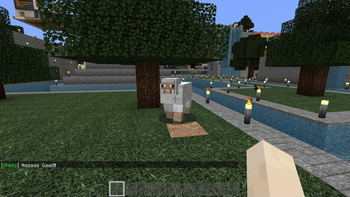
It is simple: It lets mobs talk to the player.
For example if you attack a mob, a random message will be sent to the attacking player.
## Installation
Download the latest release and put the Jar file into your plugins folder Start your Minecraft server to let the plugin generate the initial configuration files Optional: Customize the configuration to fit your needs (use `/talkingmobs reload` to reload)
## Permissions
TalkingMobs knows the following permissions:
`talkingmobs` - Required to access the /talkingmobs command (Default: everyone) `talkingmobs.receive` - Allow to receive messages from mobs (Default: everyone) `talkingmobs.reload` - Allow to reload the configuration (Default: op) `talkingmobs.` - Allow access to all features (Default: op)
## Commands
The `/talkingmobs` command is the one and only command provided by this plugin.
Usage: `/talkingmobs `
The following sub commands are currently available:
`help` - Show the help of the plugin `reload` - Reload the configuration `toggle` - Toggle messages sent by mobs `version` - Show the version of the plugin
## Event types
The following event types are currently available and can be used for the type in the `/talkingmobs toggle
`attacked` - Mob has been attacked by a player `idle` - Mob is idle, for example the mob is just standing/walking/running around (Currently unused) `interacted` - Player interacted with the mob (Right click on mob) `killed_player` - Mob has been killed by a player `killed_other` - Mob has been killed by something else (not a player) `looking` - Mob is looking at the player (and player is looking at the mob) `spawn` - Mob has been spawned (Mob spawner, egg or another plugin by default, but can be configured in config.yml) `tamed` - Mob has been tamed
Additional to those event types, the `killed` event type can be used in the messages configuration to define a message for both types (player and other).
## Configuration
The main configuration can be changed by editing the config.yml file.
All messages can be customized in the messages.yml file.
After changing the configuration, reload it using `/talkingmobs reload`.
# My other plugins
You can find them on (https://selfcoders.com/projects/minecraft-plugins).
📊 Mod Details
- Game
- Minecraft Plugins
- Author
- Programie
- Version
- 1.4
- Downloads
- 812
- Endorsements
- 3
- Category
- bukkit
- Created
- 5/27/2023
- Updated
- 5/26/2023
- Game Versions
- 1.12, 1.12.1, 1.12.2
- Tags
- mobs, social
🔧 How to Install Minecraft Plugins Mods
Download from Modrinth. Use Prism Launcher or drop into your mods folder.
📖 Full step-by-step install guide for Minecraft Plugins →
Visit the official mod page for specific installation instructions for this mod.
🎮 Need cheat codes or console commands? Check ur gaming wiki for Minecraft Plugins commands, item IDs, and more.
❓ Frequently Asked Questions
Which Minecraft Plugins versions does TalkingMobs support?
The author lists 1.12, 1.12.1, 1.12.2. Other versions may work but are untested by the author.
What is the latest version of TalkingMobs?
Version 1.4, published 2023-05-26 with 812 downloads recorded at the source.
Keep browsing — more Minecraft Plugins mods await