SuperFriends
🟡 Updated this year🖼️ Gallery (5 images)




🔍 Analysis
- 🏆 #935 of 1080 bukkit mods in this game by downloads
📋 About This Mod
# SuperFriends **Advanced friends & social plugin — made by Dragon_45_** **Paper • Purpur • Folia • Spigot • Bukkit** **Minecraft 1.20.x – 1.21.x** --- # ✨ Features ## 👥 Friends System - Send, accept, and deny friend requests - Remove a friend at any time - View your friend list with live status and friendship level - Configurable max-friend limit per server --- ## ⭐ Exclusive Best Friend Set one special Best Friend among your friends using: ```text /friend best <player> ``` - Only **one** Best Friend allowed at a time - Setting a new Best Friend automatically demotes the previous one - Highlighted with the ⭐ **Best Friend** tag - Can be removed at any time - Stored in the database and persists across restarts --- ## 📊 Friendship Levels | Level | Requirement | |--------|-------------| | Friend | Just friends | | Good Friend | 10+ interactions | | ⭐ Best Friend | Manually set with `/friend best` | --- ## 🌐 Presence & AFK System - Real-time status: - 🟢 Online - 🌙 AFK - ⛔ DND - 👻 Invisible - Automatic AFK detection based on movement - No per-tick spam (configurable interval) - Optional world name display - DND players receive no notifications --- ## 🔔 Per-Player Notification Preferences Every player controls **their own** notification settings. | Command | Default | |---------|---------| | `/friend notifications join on/off` | ✅ ON | | `/friend notifications leave on/off` | ✅ ON | | `/friend notifications death on/off` | ❌ OFF | | `/friend notifications only_best on/off` | ❌ OFF | --- ## 🔒 Per-Player Privacy Settings Choose who can interact with you. | Command | Default | |---------|---------| | `/friend privacy messages <level>` | Everyone | | `/friend privacy friend_requests <level>` | Everyone | | `/friend privacy see_status <level>` | Everyone | ### Privacy Levels - `all` - `friends_only` - `best_friends_only` - `none` --- # 💾 Storage ### SQLite - Built-in - Zero setup - Database stored in: ```text plugins/SuperFriends/ ``` ### MySQL Optional. Configure everything inside `config.yml`. ### Performance - Fully asynchronous database operations - Zero main-thread lag - Automatic batch save every **5 minutes** - Save on quit - Save on shutdown - Offline player names always available --- # 📋 Commands | Command | Permission | |---------|------------| | `/friend add <player>` | `superfriends.friend` | | `/friend accept <player>` | `superfriends.friend` | | `/friend deny <player>` | `superfriends.friend` | | `/friend remove <player>` | `superfriends.friend` | | `/friend list` | `superfriends.friend` | | `/friend best <player>` | `superfriends.friend` | | `/friend privacy ` | `superfriends.friend` | | `/friend notifications ` | `superfriends.friend` | | `/superfriends info` | `superfriends.admin` | | `/superfriends reload` | `superfriends.admin` | ### Aliases | Alias | Command | |-------|---------| | `/f` | `/friend` | | `/friends` | `/friend` | | `/sf` | `/superfriends` | --- # 🎨 MiniMessage Color Support Every configurable message supports full MiniMessage formatting. ```yaml lang: prefix: "<dark_gray> " friend_accepted: "<green>You are now friends with <white>{player}<green>!" friend_join: "<green>+ <white>{player} <green>is now online." ``` ## Supported Formatting ### Colors ```text <green> <red> <gray> <white> <light_purple> <dark_gray> ``` ### Decorations ```text <bold> <italic> <underlined> <strikethrough> ``` ### Hex Colors ```text <#FF6600> ``` ### Gradients ```text <gradient:#ff0000:#0000ff>Text</gradient> ``` ### Rainbow ```text <rainbow>Text</rainbow> ``` > MiniMessage gradients and hex colors require **Paper**, **Purpur**, or **Folia**. > On **Spigot/Bukkit**, standard named colors continue to work. --- # ⚙️ Configuration ```yaml friends: max_friends: 100 presence: show_world: true afk_timeout_seconds: 300 afk_check_interval_seconds: 10 database: type: sqlite file: "superfriends.db" mysql: host: "localhost" port: 3306 database: "superfriends" username: "root" password: "" lang: prefix: "<dark_gray> " ``` --- # 🌍 Platform Compatibility | Platform | 1.19.x | 1.20.x | 1.21.x | |----------|:------:|:------:|:------:| | Paper | ✅ | ✅ | ✅ | | Purpur | ✅ | ✅ | ✅ | | Folia | ✅ | ✅ | ✅ | | Spigot | ✅ | ✅ | ✅ | | Bukkit | ✅ | ✅ | ✅ | Platform is automatically detected at startup. Folia's region-thread scheduler is loaded through reflection for full compatibility. --- # ⚡ Performance - 🚀 Zero database calls on the main thread - 💾 In-memory player cache - 📝 Dirty-flag batch saving - ⏱️ No per-tick loops - 📡 Event-driven architecture - 📦 SQLite JDBC bundled inside the JAR --- # 📥 Installation 1. Drop `SuperFriends.jar` into your `plugins/` folder. 2. Start or restart your server. 3. Edit `plugins/SuperFriends/config.yml` if needed. 4.
# SuperFriends
Advanced friends & social plugin — made by Dragon_45_ Paper • Purpur • Folia • Spigot • Bukkit Minecraft 1. 20.x – 1. 21.x
# ✨ Features
## 👥 Friends System
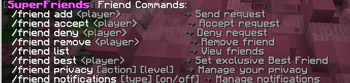
- Send, accept, and deny friend requests
- Remove a friend at any time
- View your friend list with live status and friendship level
- Configurable max-friend limit per server
## ⭐ Exclusive Best Friend
Set one special Best Friend among your friends using:
```text
/friend best
- Only one Best Friend allowed at a time
- Setting a new Best Friend automatically demotes the previous one
- Highlighted with the ⭐ Best Friend tag
- Can be removed at any time
- Stored in the database and persists across restarts
## 📊 Friendship Levels
| Level | Requirement | |--------|-------------| | Friend | Just friends | | Good Friend | 10+ interactions | | ⭐ Best Friend | Manually set with `/friend best` |
## 🌐 Presence & AFK System
- Real-time status:
- - 🟢 Online
- - 🌙 AFK
- - ⛔ DND
- - 👻 Invisible
- Automatic AFK detection based on movement
- No per-tick spam (configurable interval)
- Optional world name display
- DND players receive no notifications
## 🔔 Per-Player Notification Preferences
Every player controls their own notification settings.
| Command | Default | |---------|---------| | `/friend notifications join on/off` | ✅ ON | | `/friend notifications leave on/off` | ✅ ON | | `/friend notifications death on/off` | ❌ OFF | | `/friend notifications only_best on/off` | ❌ OFF |
## 🔒 Per-Player Privacy Settings
Choose who can interact with you.
| Command | Default |
|---------|---------|
| `/friend privacy messages
### Privacy Levels
- `all`
- `friends_only`
- `best_friends_only`
- `none`
# 💾 Storage
- Built-in
- Zero setup
- Database stored in:
```text plugins/SuperFriends/ ```
Configure everything inside `config.yml`.
### Performance
- Fully asynchronous database operations
- Zero main-thread lag
- Automatic batch save every 5 minutes
- Save on quit
- Save on shutdown
- Offline player names always available
# 📋 Commands
| Command | Permission |
|---------|------------|
| `/friend add
### Aliases
| Alias | Command | |-------|---------| | `/f` | `/friend` | | `/friends` | `/friend` | | `/sf` | `/superfriends` |
# 🎨 MiniMessage Color Support
Every configurable message supports full MiniMessage formatting.
```yaml
lang:
prefix: "
friend_accepted: "
friend_join: "
## Supported Formatting
```text
### Decorations
```text
### Hex Colors
```text <#FF6600> ```
### Gradients
```text
### Rainbow
```text
> MiniMessage gradients and hex colors require Paper, Purpur, or Folia. > On Spigot/Bukkit, standard named colors continue to work.
# ⚙️ Configuration
```yaml friends: max_friends: 100
presence: show_world: true afk_timeout_seconds: 300 afk_check_interval_seconds: 10
database: type: sqlite file: "superfriends.db"
mysql: host: "localhost" port: 3306 database: "superfriends" username: "root" password: ""
lang:
prefix: "
# 🌍 Platform Compatibility
| Platform | 1. 19.x | 1. 20.x | 1. 21.x | |----------|:------:|:------:|:------:| | Paper | ✅ | ✅ | ✅ | | Purpur | ✅ | ✅ | ✅ | | Folia | ✅ | ✅ | ✅ | | Spigot | ✅ | ✅ | ✅ | | Bukkit | ✅ | ✅ | ✅ |
Platform is automatically detected at startup.
Folia's region-thread scheduler is loaded through reflection for full compatibility.
# ⚡ Performance
- 🚀 Zero database calls on the main thread
- 💾 In-memory player cache
- 📝 Dirty-flag batch saving
- ⏱️ No per-tick loops
- 📡 Event-driven architecture
- 📦 SQLite JDBC bundled inside the JAR
# 📥 Installation
1. Drop `SuperFriends.jar` into your `plugins/` folder. 2. Start or restart your server. 3. Edit `plugins/SuperFriends/config.yml` if needed. 4.
📊 Mod Details
- Game
- Minecraft Plugins
- Author
- drago_45_
- Version
- Z13o41w1
- Downloads
- 36
- Endorsements
- 0
- Category
- bukkit
- Created
- 7/2/2026
- Updated
- 6/23/2026
- Game Versions
- Z13o41w1
- Tags
- game-mechanics, social, utility
🔧 How to Install Minecraft Plugins Mods
Download from Modrinth. Use Prism Launcher or drop into your mods folder.
📖 Full step-by-step install guide for Minecraft Plugins →
Visit the official mod page for specific installation instructions for this mod.
🎮 Need cheat codes or console commands? Check ur gaming wiki for Minecraft Plugins commands, item IDs, and more.
❓ Frequently Asked Questions
Which Minecraft Plugins versions does SuperFriends support?
The author lists Z13o41w1. Other versions may work but are untested by the author.
What is the latest version of SuperFriends?
Version Z13o41w1, published 2026-06-23 with 36 downloads recorded at the source.
Keep browsing — more Minecraft Plugins mods await