DragonChat
🟡 Updated this year🖼️ Gallery (2 images)

🔍 Analysis
- 🏆 #53 of 55 decoration mods in this game by downloads
📋 About This Mod
# DragonChat **_Technical Documentation_** ## Overview DragonChat is a next-generation chat plugin for **Paper 1.21.11**, designed to completely replace Minecraft's vanilla chat with a modern, fast, and highly configurable communication system. Built with **Java 21**, the **Paper API**, and **Adventure/MiniMessage**, DragonChat delivers rich text formatting, excellent performance, and maximum flexibility while remaining fully compatible with modern Paper servers. Its modular architecture allows every feature to be individually enabled or disabled through the configuration, making it suitable for both small communities and large-scale networks. --- # Main Goals DragonChat has been designed with the following objectives: - Completely replace the vanilla chat system. - Support both modern and legacy formatting simultaneously. - Provide a modular architecture where every feature can be enabled or disabled. - Offer deep integration with LuckPerms and PlaceholderAPI. - Maintain excellent performance on high-player-count servers. - Minimize conflicts with other chat plugins through an advanced chat interception system. --- # Chat System DragonChat uses **Paper's AsyncChatEvent** as its primary chat handler. When `chat.force-chat-handler` is enabled, the plugin completely suppresses the vanilla chat and becomes the only message renderer. To guarantee this behavior—even on servers running multiple chat plugins—DragonChat registers suppression listeners at both: - LOWEST priority - MONITOR priority It also intercepts Paper's legacy chat events, preventing other plugins from restoring the vanilla chat after DragonChat has already processed the message. This ensures DragonChat always remains the active chat handler. --- # Supported Chat Formatting DragonChat supports multiple formatting systems simultaneously. ## MiniMessage ```text <red>Hello</red> ``` ## Legacy Ampersand Colors ```text &cHello ``` ## Legacy Section Sign Colors ```text §cHello ``` ## HEX Colors ```text &#FF0000Hello ``` ## Gradients ```text <gradient:#FFD700:#FF0000>DRAGON</gradient> ``` ## Rainbow ```text <rainbow>Hello</rainbow> ``` ## Text Decorations - Bold - Italic - Underline - Strikethrough - Obfuscated (Magic) - Reset Players can freely use MiniMessage tags, `&` color codes, and `§` color codes when they have the appropriate permissions. --- # Permission-Based Formatting DragonChat automatically removes formatting that the player is not allowed to use. Supported permissions include: ```text chat.color chat.hex chat.gradient chat.rainbow chat.format.bold chat.format.italic chat.format.underline chat.format.strikethrough chat.format.obfuscated ``` Permissions are fully compatible with LuckPerms. --- # Group Formatting DragonChat integrates directly with LuckPerms. The plugin automatically detects each player's primary group and applies a configurable chat format based on that group. Each group may have its own: - Prefix - Suffix - Colors - Chat layout - Placeholder configuration --- # PlaceholderAPI Support If PlaceholderAPI is installed, DragonChat automatically parses placeholders inside every configurable format. No additional setup is required. --- # Reload System DragonChat includes a safe reload command. ```text /dragonchat reload ``` Alias: ```text /dchat reload ``` The reload operation: - Reloads `config.yml` - Clears cached group formats - Reloads formatting settings - Refreshes runtime configuration Required permission: ```text chat.reload ``` --- # Private Messaging DragonChat includes a fully configurable private messaging system. Main command: ```text /msg ``` Aliases: ```text /tell /w /message /pm ``` Configurable options include: ```text msg.sent-format msg.received-format msg.sound.enabled msg.sound.name msg.sound.volume msg.sound.pitch ``` --- # Mention System DragonChat supports player mentions using: ```text @PlayerName ``` When a player is mentioned, the plugin can automatically: - Highlight the player's name - Play a configurable sound - Display an Action Bar - Show a Title - Show a Subtitle All behaviors are configurable. --- # Mute System DragonChat includes a complete moderation system. Commands: ```text /mute /tempmute /unmute /mutelist /checkmute ``` Mute data is stored inside: ```text mutes.yml ``` The plugin keeps mute information cached in memory for fast lookup during chat events. --- # Join, Quit & Death Messages DragonChat fully replaces Minecraft's default server messages. Supported message types include: - Player Join - Player Quit - Death Messages Death messages support multiple causes, including: - PvP - Fall Damage - Lava - Fire - Explosion - Void - Drowning - Lightning - Starvation Every message is fully configurable. --- # Performance DragonChat has been optimized for high-performance Paper servers. Key optimizations include: - Cached group formats - In-memory mute storage - Asynchronous chat processing - Min
# DragonChat _Technical Documentation_
## Overview
DragonChat is a next-generation chat plugin for Paper 1. 21. 11, designed to completely replace Minecraft's vanilla chat with a modern, fast, and highly configurable communication system.
Built with Java 21, the Paper API, and Adventure/MiniMessage, DragonChat delivers rich text formatting, excellent performance, and maximum flexibility while remaining fully compatible with modern Paper servers.
Its modular architecture allows every feature to be individually enabled or disabled through the configuration, making it suitable for both small communities and large-scale networks.
# Main Goals
DragonChat has been designed with the following objectives:
- Completely replace the vanilla chat system.
- Support both modern and legacy formatting simultaneously.
- Provide a modular architecture where every feature can be enabled or disabled.
- Offer deep integration with LuckPerms and PlaceholderAPI.
- Maintain excellent performance on high-player-count servers.
- Minimize conflicts with other chat plugins through an advanced chat interception system.
# Chat System
DragonChat uses Paper's AsyncChatEvent as its primary chat handler.
When `chat.force-chat-handler` is enabled, the plugin completely suppresses the vanilla chat and becomes the only message renderer.
To guarantee this behavior—even on servers running multiple chat plugins—DragonChat registers suppression listeners at both:
- LOWEST priority
- MONITOR priority
It also intercepts Paper's legacy chat events, preventing other plugins from restoring the vanilla chat after DragonChat has already processed the message.
This ensures DragonChat always remains the active chat handler.
# Supported Chat Formatting
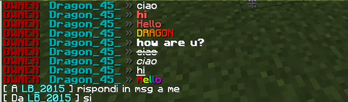
DragonChat supports multiple formatting systems simultaneously.
## MiniMessage
```text
## Legacy Ampersand Colors
```text &cHello ```
## Legacy Section Sign Colors
```text §cHello ```
## HEX Colors
```text &#FF0000Hello ```
## Gradients
```text
```text
## Text Decorations
- Bold
- Italic
- Underline
- Strikethrough
- Obfuscated (Magic)
- Reset
Players can freely use MiniMessage tags, `&` color codes, and `§` color codes when they have the appropriate permissions.
# Permission-Based Formatting
DragonChat automatically removes formatting that the player is not allowed to use.
Supported permissions include:
```text chat.color chat.hex chat.gradient chat.rainbow
chat.format.bold chat.format.italic chat.format.underline chat.format.strikethrough chat.format.obfuscated ```
Permissions are fully compatible with LuckPerms.
# Group Formatting
DragonChat integrates directly with LuckPerms.
The plugin automatically detects each player's primary group and applies a configurable chat format based on that group.
Each group may have its own:
- Prefix
- Suffix
- Colors
- Chat layout
- Placeholder configuration
# PlaceholderAPI Support
If PlaceholderAPI is installed, DragonChat automatically parses placeholders inside every configurable format.
No additional setup is required.
# Reload System
DragonChat includes a safe reload command.
```text /dragonchat reload ```
```text /dchat reload ```
The reload operation:
- Reloads `config.yml`
- Clears cached group formats
- Reloads formatting settings
- Refreshes runtime configuration
Required permission:
```text chat.reload ```
# Private Messaging
DragonChat includes a fully configurable private messaging system.
Main command:
```text /msg ```
```text /tell /w /message /pm ```
Configurable options include:
```text msg.sent-format msg.received-format
msg.sound.enabled msg.sound.name msg.sound.volume msg.sound.pitch ```
# Mention System
DragonChat supports player mentions using:
```text @PlayerName ```
When a player is mentioned, the plugin can automatically:
- Highlight the player's name
- Play a configurable sound
- Display an Action Bar
- Show a Title
- Show a Subtitle
All behaviors are configurable.
# Mute System
DragonChat includes a complete moderation system.
```text /mute /tempmute /unmute /mutelist /checkmute ```
Mute data is stored inside:
```text mutes.yml ```
The plugin keeps mute information cached in memory for fast lookup during chat events.
# Join, Quit & Death Messages
DragonChat fully replaces Minecraft's default server messages.
Supported message types include:
- Player Join
- Player Quit
- Death Messages
Death messages support multiple causes, including:
- PvP
- Fall Damage
- Lava
- Fire
- Explosion
- Void
- Drowning
- Lightning
- Starvation
Every message is fully configurable.
# Performance
DragonChat has been optimized for high-performance Paper servers.
Key optimizations include:
- Cached group formats
- In-memory mute storage
- Asynchronous chat processing
- Min
📊 Mod Details
- Game
- Minecraft Plugins
- Author
- drago_45_
- Version
- 1.0.1
- Downloads
- 33
- Endorsements
- 0
- Category
- decoration
- Created
- 6/24/2026
- Updated
- 6/20/2026
- Game Versions
- 1.21, 1.21.1, 1.21.2, 1.21.3, 1.21.4
- Tags
- decoration, social, utility
🔧 How to Install Minecraft Plugins Mods
Download from Modrinth. Use Prism Launcher or drop into your mods folder.
📖 Full step-by-step install guide for Minecraft Plugins →
Visit the official mod page for specific installation instructions for this mod.
🎮 Need cheat codes or console commands? Check ur gaming wiki for Minecraft Plugins commands, item IDs, and more.
❓ Frequently Asked Questions
Which Minecraft Plugins versions does DragonChat support?
The author lists 1.21, 1.21.1, 1.21.2, 1.21.3, 1.21.4, 1.21.5. Other versions may work but are untested by the author.
What is the latest version of DragonChat?
Version 1.0.1, published 2026-06-20 with 33 downloads recorded at the source.
Keep browsing — more Minecraft Plugins mods await