Sqrilizz Headcam
🟠 Updated over a year ago🖼️ Gallery (3 images)

🔍 Analysis
- 🏆 #981 of 1452 bukkit mods in this game by downloads
📋 About This Mod
# 🎥 sqrilizz HeadCam > **Revolutionary Minecraft mod that allows you to stream your webcam directly into the game!** !(https://img.shields.io/badge/Minecraft-1.8.9--1.21.8-green.svg) !(https://img.shields.io/badge/Server-Paper%20%7C%20Spigot%20%7C%20-blue.svg) !(https://img.shields.io/badge/Java-17+-orange.svg) !(https://img.shields.io/badge/License-MIT-yellow.svg) ### Right now follow me on (https://t.me/Matve1mok1) for news and if you have issues ## ✨ Key Features ### 🎮 Core Functionality - **📹 Real-time Webcam Streaming** - Broadcast your webcam directly into Minecraft - **🌍 In-Game Display** - See webcam feeds floating above players' heads - **⚡ High Performance** - Optimized for smooth 60 FPS streaming - **🔧 Easy Configuration** - Modern settings menu with intuitive controls ### 🎨 Customization Options - **📐 Adjustable Position** - Move webcam display anywhere around your head - **🎯 Camera Indicators** - Visual indicators for other players' cameras - **🔇 Mute System** - Easily mute/unmute other players' webcams - **⚙️ Display Modes** - Choose between different rendering modes - **📏 Scale Control** - Adjust the size of webcam displays ### 🌐 Multiplayer Support - **👥 Server Integration** - Works seamlessly with Spigot/Paper servers - **🔄 Real-time Sync** - Webcam data syncs instantly between players - **🎪 Social Experience** - Perfect for streaming and content creation ## 🎯 Perfect For - **📺 Streamers** - Show your face while streaming Minecraft - **🎬 Content Creators** - Create unique YouTube videos - **👥 Social Servers** - Build communities with face-to-face interaction - **🎮 Entertainment** - Add a new dimension to your server - **🏗️ Unique Experiences** - Stand out from other servers ### Performance - **⚡ Lightweight** - Minimal impact on game performance - **🎯 Optimized** - Efficient network usage - **🔄 Smooth** - 60 FPS webcam streaming - **💾 Low Memory** - Efficient resource usage ## 🎮 How to Use ### Basic Controls - **`. PERIOD`** - Open settings menu - **`, COMMA`** - Open mute menu - **Mouse** - Adjust webcam position and scale ### Settings Menu - **📹 Webcam Selection** - Choose your webcam device - **🎯 Camera Indicators** - Show/hide camera indicators - **🖼️ Display Mode** - Choose rendering mode - **📐 Position** - Adjust X, Y, Z coordinates - **📏 Scale** - Change display size ## 🌟 Screenshots (https://modrinth.com/project/sqrilizz-headcam/gallery) ## 🔧 Configuration ### Client-Side Settings ```json { "webcamEnabled": true, "selectedWebcam": "HD WebCam", "cameraIndicator": "CIRCLE", "displayMode": "FULL_FRAME", "offsetX": 0.0, "offsetY": 100.0, "offsetZ": 0.0, "worldScale": 1.0 } ``` ### Server Requirements - **Spigot/Paper** server with sqrilizz.headcam plugin - **Network bandwidth** for webcam data - **Player permissions** for webcam usage ## 🤝 Community ### Support - **📧 Issues:** Report bugs on GitHub - **💬 Discord:** Join our community (soon) ### Contributing We welcome contributions! Whether it's bug reports, feature suggestions, or code contributions, every bit helps make this mod better. ## 📄 License This project is licensed under the MIT License. Feel free to use, modify, and distribute as needed. --- **🎥 Created with ❤️ by sqrilizz** *Experience Minecraft like never before with real-time webcam streaming!*
# 🎥 sqrilizz HeadCam
> Revolutionary Minecraft mod that allows you to stream your webcam directly into the game!
!(https://img.shields.io/badge/Minecraft-1. 8. 9--1. 21. 8-green.svg) !(https://img.shields.io/badge/Server-Paper%20%7C%20Spigot%20%7C%20-blue.svg) !(https://img.shields.io/badge/Java-17+-orange.svg) !(https://img.shields.io/badge/License-MIT-yellow.svg)
### Right now follow me on (https://t.me/Matve1mok1) for news and if you have issues ## ✨ Key Features
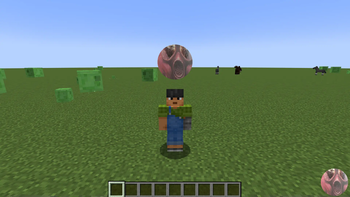
### 🎮 Core Functionality - 📹 Real-time Webcam Streaming - Broadcast your webcam directly into Minecraft - 🌍 In-Game Display - See webcam feeds floating above players' heads - ⚡ High Performance - Optimized for smooth 60 FPS streaming - 🔧 Easy Configuration - Modern settings menu with intuitive controls
### 🎨 Customization Options - 📐 Adjustable Position - Move webcam display anywhere around your head - 🎯 Camera Indicators - Visual indicators for other players' cameras - 🔇 Mute System - Easily mute/unmute other players' webcams - ⚙️ Display Modes - Choose between different rendering modes - 📏 Scale Control - Adjust the size of webcam displays
### 🌐 Multiplayer Support - 👥 Server Integration - Works seamlessly with Spigot/Paper servers - 🔄 Real-time Sync - Webcam data syncs instantly between players - 🎪 Social Experience - Perfect for streaming and content creation
## 🎯 Perfect For
- 📺 Streamers - Show your face while streaming Minecraft
- 🎬 Content Creators - Create unique YouTube videos
- 👥 Social Servers - Build communities with face-to-face interaction
- 🎮 Entertainment - Add a new dimension to your server
- 🏗️ Unique Experiences - Stand out from other servers
### Performance - ⚡ Lightweight - Minimal impact on game performance - 🎯 Optimized - Efficient network usage - 🔄 Smooth - 60 FPS webcam streaming - 💾 Low Memory - Efficient resource usage
## 🎮 How to Use
### Basic Controls - `. PERIOD` - Open settings menu - `, COMMA` - Open mute menu - Mouse - Adjust webcam position and scale
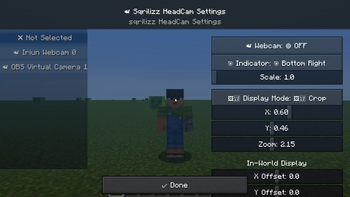
### Settings Menu - 📹 Webcam Selection - Choose your webcam device - 🎯 Camera Indicators - Show/hide camera indicators - 🖼️ Display Mode - Choose rendering mode - 📐 Position - Adjust X, Y, Z coordinates - 📏 Scale - Change display size
## 🌟 Screenshots
(https://modrinth.com/project/sqrilizz-headcam/gallery)
## 🔧 Configuration
### Client-Side Settings ```json { "webcamEnabled": true, "selectedWebcam": "HD WebCam", "cameraIndicator": "CIRCLE", "displayMode": "FULL_FRAME", "offsetX": 0. 0, "offsetY": 100. 0, "offsetZ": 0. 0, "worldScale": 1. 0 } ```
### Server Requirements - Spigot/Paper server with sqrilizz.headcam plugin - Network bandwidth for webcam data - Player permissions for webcam usage
## 🤝 Community
### Support - 📧 Issues: Report bugs on GitHub - 💬 Discord: Join our community (soon)
### Contributing We welcome contributions! Whether it's bug reports, feature suggestions, or code contributions, every bit helps make this mod better.
## 📄 License
This project is licensed under the MIT License. Feel free to use, modify, and distribute as needed.
🎥 Created with ❤️ by sqrilizz
Experience Minecraft like never before with real-time webcam streaming!
📊 Mod Details
- Game
- Minecraft Plugins
- Author
- Sqrilizz
- Version
- 3.1.0
- Downloads
- 489
- Endorsements
- 5
- Category
- bukkit
- Created
- 8/10/2025
- Updated
- 8/15/2025
- Game Versions
- 1.21, 1.21.1, 1.21.2, 1.21.3, 1.21.4
- Tags
- social
🔧 How to Install Minecraft Plugins Mods
Download from Modrinth. Use Prism Launcher or drop into your mods folder.
📖 Full step-by-step install guide for Minecraft Plugins →
Visit the official mod page for specific installation instructions for this mod.
🎮 Need cheat codes or console commands? Check ur gaming wiki for Minecraft Plugins commands, item IDs, and more.
❓ Frequently Asked Questions
Which Minecraft Plugins versions does Sqrilizz Headcam support?
The author lists 1.21, 1.21.1, 1.21.2, 1.21.3, 1.21.4, 1.21.5. Other versions may work but are untested by the author.
What is the latest version of Sqrilizz Headcam?
Version 3.1.0, published 2025-08-15 with 489 downloads recorded at the source.
Keep browsing — more Minecraft Plugins mods await