SmartFurnace
🟡 Updated this year🖼️ Gallery (1 images)
🔍 Analysis
- 🏆 #85 of 222 paper mods in this game by downloads
📋 About This Mod
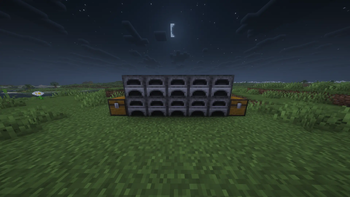
# 🔥 SmartFurnace: The Ultimate Smelting Automation Tired of building massive, lag-inducing hopper chains and redstone setups just to smelt your ores? **SmartFurnace** is a lightweight, Vanilla+ Quality of Life plugin that revolutionizes how you smelt items. Connect a single Input Chest and an Output Chest, and watch as the plugin intelligently distributes your ores and fuels to all furnaces in a massive 48x48 block (3x3 Chunk) area! ## ✨ Key Features * 🚀 **Smart Split Algorithm:** Throw 64 iron ores and some coal into the input chest. The plugin will calculate the math and distribute the items **equally** among all available furnaces in the network. * ⚡ **Zero Lag Performance:** Unlike other plugins that scan every single block (causing TPS drops), SmartFurnace uses native `TileEntity` chunk scanning. It only reads active furnaces, making it incredibly server-friendly. * 🌍 **Massive Range:** The network covers a 3x3 chunk area (the chunk your input chest is in, plus the 8 surrounding chunks). Put your chests in the base and your furnaces in the basement! * 🛡️ **Exploit-Free Setup:** Uses an "Itemless Setup Mode" via commands. No physical setup wands are given to players, completely eliminating free-item exploits. * 📦 **Auto-Collection:** Smelted items are instantly vacuumed into the Output Chest. ## 🛠️ How to Use Setting up your industrial furnace network takes only 5 seconds: 1. Type the command `/smartfurnace` (or `/sf`) to enter Setup Mode. 2. With an **empty hand**, **LEFT CLICK** the chest you want to use as your Input (Put ores and fuel here). 3. **RIGHT CLICK** the chest you want to use as your Output (Cooked items will appear here). 4. *Boom!* The network is established. The setup mode will automatically close. ## 💻 Commands & Permissions * `/smartfurnace` (Aliases: `/sf`): Toggles the setup mode. * *Note: Setup mode resets automatically after a successful connection to prevent accidental clicks.* ## ⚙️ Technical Details * **Version:** Paper 1.21+ (Also works on forks like Purpur). * **Fuel Support:** Automatically detects Vanilla fuels (Coal, Charcoal, Coal Blocks, Dried Kelp Blocks, Blaze Rods, Lava Buckets) and routes them to the fuel slots. --- *Built for survival servers, SMPs, and players who love efficiency without the lag.*
# 🔥 SmartFurnace: The Ultimate Smelting Automation
Tired of building massive, lag-inducing hopper chains and redstone setups just to smelt your ores? SmartFurnace is a lightweight, Vanilla+ Quality of Life plugin that revolutionizes how you smelt items.
Connect a single Input Chest and an Output Chest, and watch as the plugin intelligently distributes your ores and fuels to all furnaces in a massive 48x48 block (3x3 Chunk) area!
## ✨ Key Features
🚀 Smart Split Algorithm: Throw 64 iron ores and some coal into the input chest. The plugin will calculate the math and distribute the items equally among all available furnaces in the network. ⚡ Zero Lag Performance: Unlike other plugins that scan every single block (causing TPS drops), SmartFurnace uses native `TileEntity` chunk scanning. It only reads active furnaces, making it incredibly server-friendly. 🌍 Massive Range: The network covers a 3x3 chunk area (the chunk your input chest is in, plus the 8 surrounding chunks). Put your chests in the base and your furnaces in the basement! 🛡️ Exploit-Free Setup: Uses an "Itemless Setup Mode" via commands. No physical setup wands are given to players, completely eliminating free-item exploits. 📦 Auto-Collection: Smelted items are instantly vacuumed into the Output Chest.
## 🛠️ How to Use
Setting up your industrial furnace network takes only 5 seconds:
1. Type the command `/smartfurnace` (or `/sf`) to enter Setup Mode. 2. With an empty hand, LEFT CLICK the chest you want to use as your Input (Put ores and fuel here). 3. RIGHT CLICK the chest you want to use as your Output (Cooked items will appear here). 4. Boom! The network is established. The setup mode will automatically close.
## 💻 Commands & Permissions
`/smartfurnace` (Aliases: `/sf`): Toggles the setup mode. Note: Setup mode resets automatically after a successful connection to prevent accidental clicks.
## ⚙️ Technical Details Version: Paper 1. 21+ (Also works on forks like Purpur). Fuel Support: Automatically detects Vanilla fuels (Coal, Charcoal, Coal Blocks, Dried Kelp Blocks, Blaze Rods, Lava Buckets) and routes them to the fuel slots.
- --
- Built for survival servers, SMPs, and players who love efficiency without the lag.*
📊 Mod Details
- Game
- Minecraft Plugins
- Author
- Zentraxx
- Version
- 1.0
- Downloads
- 23
- Endorsements
- 0
- Category
- paper
- Created
- 5/22/2026
- Updated
- 5/15/2026
- Game Versions
- 1.21, 1.21.1, 1.21.2, 1.21.3, 1.21.4
- Tags
- storage, technology
🔧 How to Install Minecraft Plugins Mods
Download from Modrinth. Use Prism Launcher or drop into your mods folder.
📖 Full step-by-step install guide for Minecraft Plugins →
Visit the official mod page for specific installation instructions for this mod.
🎮 Need cheat codes or console commands? Check ur gaming wiki for Minecraft Plugins commands, item IDs, and more.
❓ Frequently Asked Questions
Which Minecraft Plugins versions does SmartFurnace support?
The author lists 1.21, 1.21.1, 1.21.2, 1.21.3, 1.21.4, 1.21.5. Other versions may work but are untested by the author.
What is the latest version of SmartFurnace?
Version 1.0, published 2026-05-15 with 23 downloads recorded at the source.
Keep browsing — more Minecraft Plugins mods await