SlimeRanks
🟡 Updated this year🖼️ Gallery (8 images)

🔍 Analysis
- 👍 0.3% endorsement rate
- 🏆 #23 of 70 decoration mods in this game by downloads
📋 About This Mod
<div align="center"> !(https://github.com/user-attachments/assets/f3524319-1fff-40d1-8fe9-9d07833f8887) SlimeRanks is a powerful and flexible Minecraft plugin that allows server owners to create fully customizable ranks. These ranks can be displayed in the tab list, chat, and above players' heads to enhance the gaming experience. <img alt="paper" height="40" src="https://cdn.jsdelivr.net/npm/@intergrav/devins-badges@3/assets/compact/supported/paper_vector.svg"> <img alt="purpur" height="40" src="https://cdn.jsdelivr.net/npm/@intergrav/devins-badges@3/assets/compact/supported/purpur_vector.svg"> </div> ## ✨ Features - 🔹 **Custom Ranks:** Create unlimited ranks with unique names, colors, and styles. - 📜 **Flexible Display Options:** Show ranks in the tab list, chat, and above players' heads. - 🖼️ **Rank Icons:** Optionally assign custom textures or images to represent each rank visually in the game. - 🖥️ **User-Friendly GUI:** Easily manage ranks through an intuitive in-game interface. - 🔝 **Tablist Priority:** Control the order in which players appear in the tab list. - 🚫 **Toggle Display Locations:** Choose where ranks should be visible (e.g. only tab and chat). - ⚙ **Highly Configurable:** Customize nearly everything: mechanics, messages, formats, and more. - 🫥 **Vanish & Invisibility Support:** Name tags are hidden when players are vanished or invisible. - 🛡️ **Permission-Based:** Assign ranks via direct permissions or permission groups. - 🔁 **Multi-Loader Support:** Works seamlessly with Paper, Folia, Purpur, and more. - 🚀 **Always Up-To-Date:** SlimeRanks stays updated with the latest Minecraft versions. - 🎨 **MiniMessage + HEX Colors:** Full support for MiniMessage formatting, including HEX colors. - 🌐 **Multi-Language Ready:** All messages can be translated to match your server’s language. ## 🗺️ Roadmap Want to see what’s planned for the future of SlimeRanks? Check out the public roadmap here: 👉 **(https://app.todoist.com/public/project/roadmap-6f3xwMjFm44225R6?public_key=dbd7eaad-451c-4cd4-8032-2422f12459c7)** ## 🖥️ GUI Preview <img src="https://github.com/user-attachments/assets/d7b7ce32-deed-45e5-a91a-ed0ef10eb640" alt="Rank Overview GUI" /> <img src="https://github.com/user-attachments/assets/2170ffed-6e74-4279-9031-e9ef54aa2ffa" alt="Edit Rank GUI" /> ## 🖼️ Display examples ### 1. **Chat** <p>The first picture doesn't use a custom rank texture, while the second one does.</p> <img src="https://github.com/user-attachments/assets/e8b3ed68-748f-4e10-9456-8172dcf06d36" width="350" alt="Chat example with default rank display" /> <img src="https://github.com/user-attachments/assets/1408daf3-5400-4d5c-ad19-82af7921350a" width="350" alt="Chat example with custom texture" /> ### 2. **Tablist** <p>The first picture doesn't use a custom rank texture, while the second one does.</p> <img src="https://github.com/user-attachments/assets/bb90a14a-8dde-4d51-bbea-d8bfc488b8b3" width="350" alt="Tablist example with default rank display" /> <img src="https://github.com/user-attachments/assets/e07e2261-56f6-4a59-aedb-84b31fa02fc9" width="350" alt="Tablist example with custom texture" /> ### 3. **Nametag** <p>The first picture doesn't use a custom rank texture, while the second one does.</p> <img src="https://github.com/user-attachments/assets/00ed1f42-817d-4e00-8fa2-ade9dbd348d8" width="350" alt="Nametag example with default rank display" /> <img src="https://github.com/user-attachments/assets/bc83e09d-e3af-4294-9340-2e31a65ed8be" width="350" alt="Nametag example with custom texture" /> ## 📥 Installation 1. Download the latest version of `SlimeRanks`. 2. Move the `.jar` file into your server’s `plugins` folder. 3. Restart the server to load the plugin. 4. Create and configure your ranks using the in-game GUI or configuration files. <p>You can find more detailed information in our documentation:</p> (https://cdn.jsdelivr.net/npm/@intergrav/devins-badges@3/assets/compact/documentation/gitbook_vector.svg)](https://slimeventure.gitbook.io/slimeventure-plugins/slimeranks/getting-started#how-to-configure-slimeranks) ## 🛠 Commands & Permissions | Command | Description | Permission | | -------- | ------- | ------- | | `/slimeranks about` | Displays information about SlimeRanks. | `slimeranks.admin` | | `/slimeranks gui` | Opens the GUI to manage all ranks. | `slimeranks.admin` | | `/slimeranks help` | Shows all available commands. | `slimeranks.admin` | | `/slimeranks reload` | Reloads the plugin configurations. | `slimeranks.admin` | ## 🫱 Partner (https://github.com/user-attachments/assets/6b9f5e63-dead-4228-98f7-e75dbe442c06)](https://zap-hosting.com/slimeranks)
SlimeRanks is a powerful and flexible Minecraft plugin that allows server owners to create fully customizable ranks. These ranks can be displayed in the tab list, chat, and above players' heads to enhance the gaming experience.


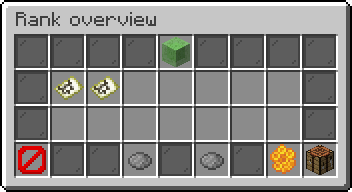
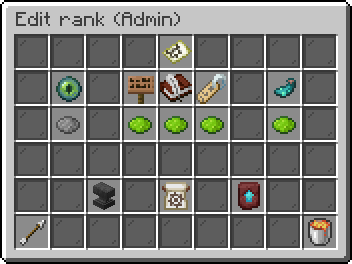
## ✨ Features - 🔹 Custom Ranks: Create unlimited ranks with unique names, colors, and styles. - 📜 Flexible Display Options: Show ranks in the tab list, chat, and above players' heads. - 🖼️ Rank Icons: Optionally assign custom textures or images to represent each rank visually in the game. - 🖥️ User-Friendly GUI: Easily manage ranks through an intuitive in-game interface. - 🔝 Tablist Priority: Control the order in which players appear in the tab list. - 🚫 Toggle Display Locations: Choose where ranks should be visible (e.g. only tab and chat). - ⚙ Highly Configurable: Customize nearly everything: mechanics, messages, formats, and more. - 🫥 Vanish & Invisibility Support: Name tags are hidden when players are vanished or invisible. - 🛡️ Permission-Based: Assign ranks via direct permissions or permission groups. - 🔁 Multi-Loader Support: Works seamlessly with Paper, Folia, Purpur, and more. - 🚀 Always Up-To-Date: SlimeRanks stays updated with the latest Minecraft versions. - 🎨 MiniMessage + HEX Colors: Full support for MiniMessage formatting, including HEX colors. - 🌐 Multi-Language Ready: All messages can be translated to match your server’s language.
## 🗺️ Roadmap
Want to see what’s planned for the future of SlimeRanks? Check out the public roadmap here:
👉 (https://app.todoist.com/public/project/roadmap-6f3xwMjFm44225R6?public_key=dbd7eaad-451c-4cd4-8032-2422f12459c7)**
## 🖥️ GUI Preview
## 🖼️ Display examples
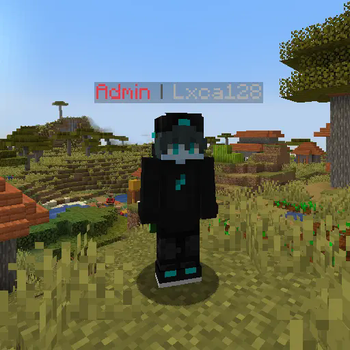
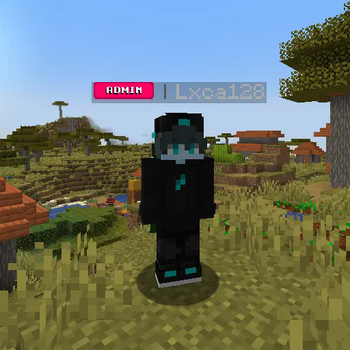
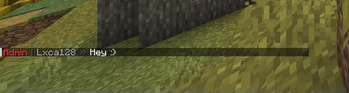
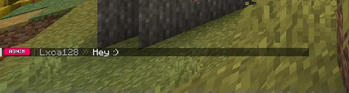
### 1. Chat
The first picture doesn't use a custom rank texture, while the second one does.
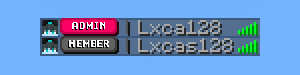
### 2. Tablist
The first picture doesn't use a custom rank texture, while the second one does.
### 3. Nametag**
The first picture doesn't use a custom rank texture, while the second one does.
## 📥 Installation 1. Download the latest version of `SlimeRanks`. 2. Move the `.jar` file into your server’s `plugins` folder. 3. Restart the server to load the plugin. 4. Create and configure your ranks using the in-game GUI or configuration files.
You can find more detailed information in our documentation:
[!(https://cdn.jsdelivr.net/npm/@intergrav/devins-badges@3/assets/compact/documentation/gitbook_vector.svg)](https://slimeventure.gitbook.io/slimeventure-plugins/slimeranks/getting-started#how-to-configure-slimeranks)
## 🛠 Commands & Permissions | Command | Description | Permission | | -------- | ------- | ------- | | `/slimeranks about` | Displays information about SlimeRanks. | `slimeranks.admin` | | `/slimeranks gui` | Opens the GUI to manage all ranks. | `slimeranks.admin` | | `/slimeranks help` | Shows all available commands. | `slimeranks.admin` | | `/slimeranks reload` | Reloads the plugin configurations. | `slimeranks.admin` |
## 🫱 Partner [!(https://github.com/user-attachments/assets/6b9f5e63-dead-4228-98f7-e75dbe442c06)](https://zap-hosting.com/slimeranks)
📊 Mod Details
- Game
- Minecraft Plugins
- Author
- Lxca128
- Version
- 1.3.2
- Downloads
- 11,544
- Endorsements
- 35
- Category
- decoration
- Created
- 3/11/2025
- Updated
- 12/13/2025
- Game Versions
- 1.21.8, 1.21.9, 1.21.10, 1.21.11
- Tags
- decoration, social, utility
🔧 How to Install Minecraft Plugins Mods
Download from Modrinth. Use Prism Launcher or drop into your mods folder.
📖 Full step-by-step install guide for Minecraft Plugins →
Visit the official mod page for specific installation instructions for this mod.
🎮 Need cheat codes or console commands? Check ur gaming wiki for Minecraft Plugins commands, item IDs, and more.
❓ Frequently Asked Questions
Which Minecraft Plugins versions does SlimeRanks support?
The author lists 1.21.8, 1.21.9, 1.21.10, 1.21.11. Other versions may work but are untested by the author.
What is the latest version of SlimeRanks?
Version 1.3.2, published 2025-12-13 with 11,544 downloads recorded at the source.
Keep browsing — more Minecraft Plugins mods await