InteractiveChat
🟡 Updated this yearPreview

🔍 Analysis
- 👍 0.2% endorsement rate
- 🏆 #11 of 48 bungeecord mods in this game by downloads
📋 About This Mod
## About The chat is great, players can socialize with each other. But here's the thing, why not make it even more interact-able? With this plugin, you will be able to show your item in hand, inventory content and ender chest content with your friends! Even across servers in your global bungeecord chat! This plugin also allows you to create your own interactive keywords for your players to use in chat! **InteractiveChat is designed to work on top of your existing chat formatting plugin, not as a replacement!** *** ### !(https://resources.loohpjames.com/spigot/assets/interactivechat/1.png) Using (https://modrinth.com/plugin/discordsrv/)? Check out (https://modrinth.com/plugin/interactivechat-discordsrv-addon/) which lets you show placeholders and show inventories from InteractiveChat on discord! You can also have images sent from discord previewed on maps and have attachments beautified into clickable and hoverable text in-game! *** ## Features Video by (https://www.youtube.com/channel/UCeQW27n9FmeYcMJrUjusnHg) featuring **an outdated version of InteractiveChat (v2)** <iframe width="630" height="354" src="https://www.youtube.com/embed/rNMCGzPJhyw"></iframe> ### 1. Item Display Functions - Type **** in chat to show off the item in your hand! - Type **** in chat to show off your inventory - Type **** and you guessed it! Show your ender chest! <br>*(Each of them can be toggled in the config as well as changing their keyword)* !(https://resources.loohpjames.com/spigot/assets/interactivechat/2.png) !(https://resources.loohpjames.com/spigot/assets/interactivechat/3.png) !(https://resources.loohpjames.com/spigot/assets/interactivechat/4.png) *^ The two types of inventory display layout you can choose from (Layout 0 & 1)* ### 2. Custom Interactive Chat Keywords - You can create whatever placeholder you want and have them replace keywords in the chat - Or simply just add a hover message as well as click actions to keywords - Or both! - Supports multiple lines of hover text *v is one of the default example custom interactive keyword* !(https://resources.loohpjames.com/spigot/assets/interactivechat/5.png) *v The default custom placeholders that comes with the default config, can be removed or changed (1 - 3 are item display placeholders)* !(https://resources.loohpjames.com/spigot/assets/interactivechat/6.png) <br> ### 3. Interactive Player Names - Replace all player names that appear in the chat with interactive content, such as hover messages and click actions! *(Supports Essentials Nicknames! You can create an addon through the API if you need support for your own nicknaming plugins.)* !(https://resources.loohpjames.com/spigot/assets/interactivechat/7.png) ### 4. Player Mentioning - If a player's name is mentioned by another player, they will be notified with a sound and a message! - Notify the player with a Title/SubTitle/ActionBar/BossBar/Toast, if the version of Minecraft supports it (Each can be disabled in the config) *(Togglable in the config of course!)* !(https://resources.loohpjames.com/spigot/assets/interactivechat/8.png) ### 5. Bungeecord and Velocity Supported! Everything works across your network! If you use chat managing plugins that support bungeecord or velocity, you can enable bungeecord mode by installing the plugin on spigot and bungeecord/velocity and having the bungeecord option enabled in the config on all spigot servers! With bungeecord enabled, all placeholders, including , etc. and custom ones will work across servers. Mentioning and everything else will also work between servers! ### 6. Easy RGB and Font** You can use RGB code in any part of the config that support colors! You can even use them in _chat_! ``` &x&f&f&f&f&f&f ``` or ``` ``` or ``` &#fe34d5 ``` If you have a custom resource pack that has different fonts, you can even use them like color codes! _Works with any messages in the chat, even chat messages from other plugins._ ``` ``` ### 7. Languages! And of course! You will be able to modify all the messages that are sent to players to suit your server as well! Item material names will be automatically translated into each user's client language! **The plugin changes messages on a packet level, so it should work on top of other chat plugins** *(that doesn't also do this)*. ## Dependencies *(These dependencies are not required on Proxies)* - (https://www.spigotmc.org/resources/protocollib.1997/) or (https://modrinth.com/plugin/packetevents)+(https://modrinth.com/plugin/interactivechat-packetevents) *(Please install the latest version that is compatible with your server version)* - (https://www.spigotmc.org/resources/placeholderapi.6245/) - (https://www.spigotmc.org/resources/vault.34315/) ##
## About The chat is great, players can socialize with each other. But here's the thing, why not make it even more interact-able? With this plugin, you will be able to show your item in hand, inventory content and ender chest content with your friends! Even across servers in your global bungeecord chat!
This plugin also allows you to create your own interactive keywords for your players to use in chat!
InteractiveChat is designed to work on top of your existing chat formatting plugin, not as a replacement!
###  Using (https://modrinth.com/plugin/discordsrv/)? Check out [this addon](https://modrinth.com/plugin/interactivechat-discordsrv-addon/) which lets you show placeholders and show inventories from InteractiveChat on discord! You can also have images sent from discord previewed on maps and have attachments beautified into clickable and hoverable text in-game!
## Features Video by (https://www.youtube.com/channel/UCeQW27n9FmeYcMJrUjusnHg) featuring an outdated version of InteractiveChat (v2)
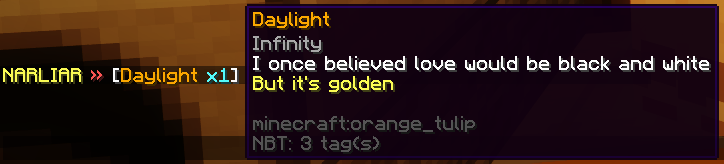
### 1. Item Display Functions - Type in chat to show off the item in your hand! - Type in chat to show off your inventory - Type and you guessed it! Show your ender chest!
(Each of them can be toggled in the config as well as changing their keyword)
 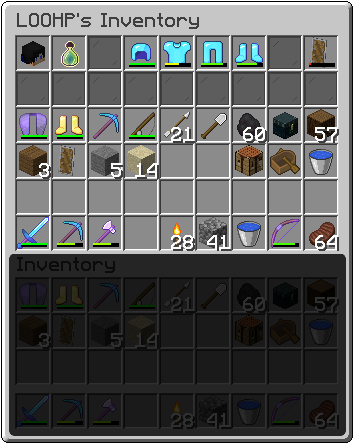 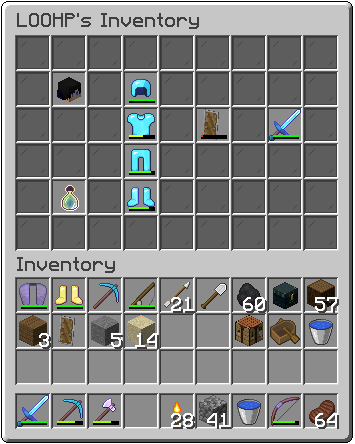
^ The two types of inventory display layout you can choose from (Layout 0 & 1)
### 2. Custom Interactive Chat Keywords - You can create whatever placeholder you want and have them replace keywords in the chat - Or simply just add a hover message as well as click actions to keywords - Or both! - Supports multiple lines of hover text v is one of the default example custom interactive keyword
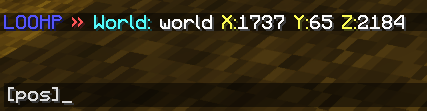
v The default custom placeholders that comes with the default config, can be removed or changed (1 - 3 are item display placeholders)
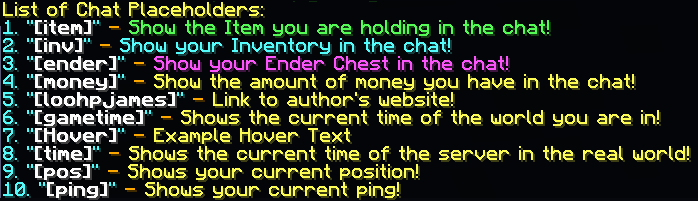
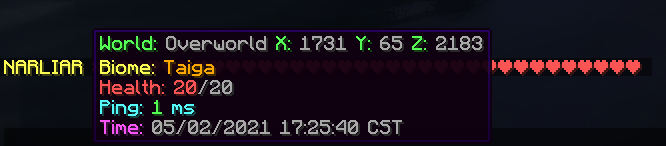
### 3. Interactive Player Names - Replace all player names that appear in the chat with interactive content, such as hover messages and click actions! (Supports Essentials Nicknames! You can create an addon through the API if you need support for your own nicknaming plugins.)
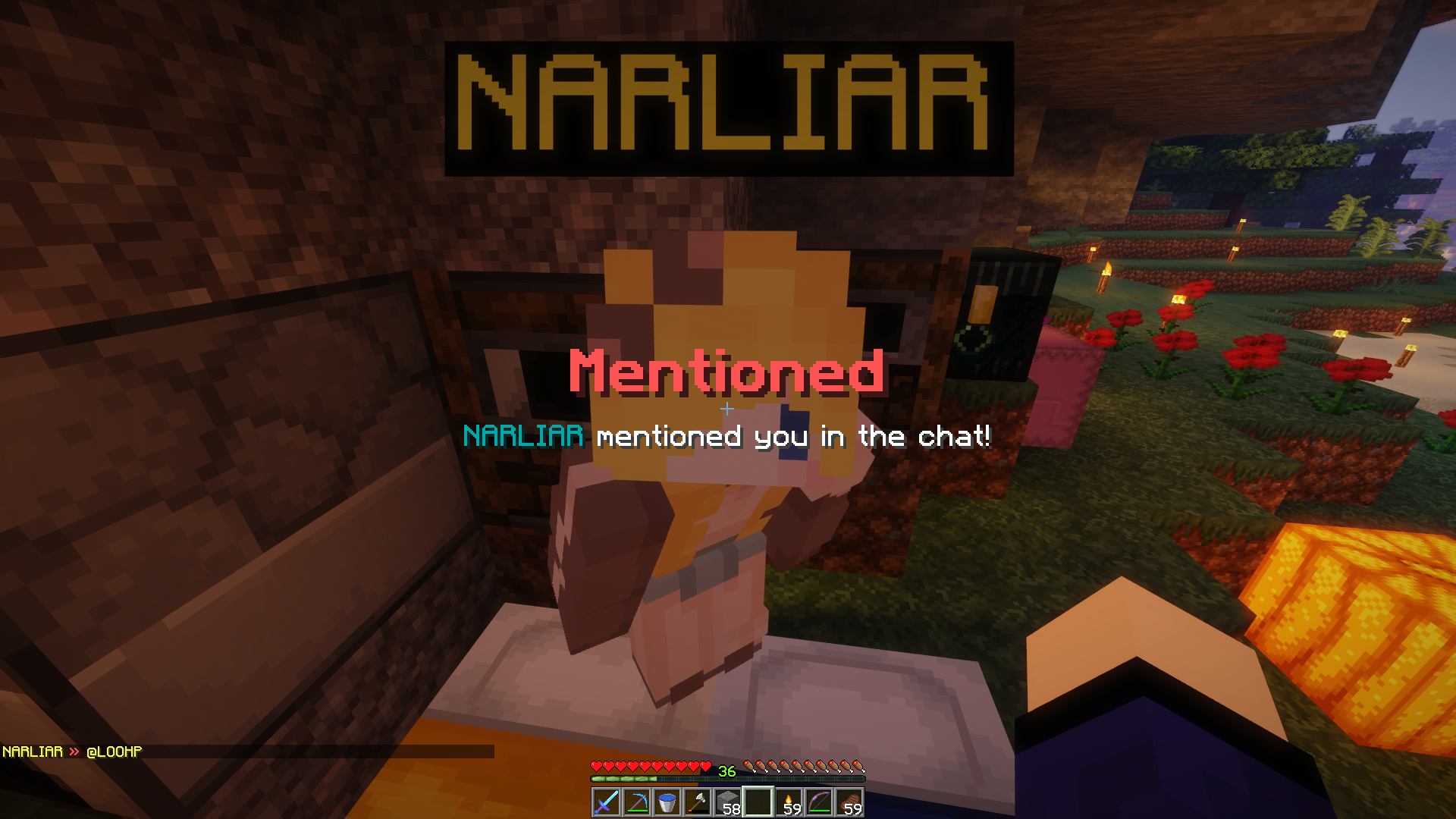
### 4. Player Mentioning - If a player's name is mentioned by another player, they will be notified with a sound and a message! - Notify the player with a Title/SubTitle/ActionBar/BossBar/Toast, if the version of Minecraft supports it (Each can be disabled in the config) (Togglable in the config of course!)
### 5. Bungeecord and Velocity Supported! Everything works across your network!
If you use chat managing plugins that support bungeecord or velocity, you can enable bungeecord mode by installing the plugin on spigot and bungeecord/velocity and having the bungeecord option enabled in the config on all spigot servers!
With bungeecord enabled, all placeholders, including , etc. and custom ones will work across servers. Mentioning and everything else will also work between servers!
### 6. Easy RGB and Font You can use RGB code in any part of the config that support colors! You can even use them in _chat_!
``` &x&f&f&f&f&f&f ```
``` &#fe34d5 ```
If you have a custom resource pack that has different fonts, you can even use them like color codes! _Works with any messages in the chat, even chat messages from other plugins._
### 7. Languages! And of course! You will be able to modify all the messages that are sent to players to suit your server as well! Item material names will be automatically translated into each user's client language!
The plugin changes messages on a packet level, so it should work on top of other chat plugins (that doesn't also do this).
## Dependencies (These dependencies are not required on Proxies) - (https://www.spigotmc.org/resources/protocollib. 1997/) or (https://modrinth.com/plugin/packetevents)+(https://modrinth.com/plugin/interactivechat-packetevents) (Please install the latest version that is compatible with your server version) - (https://www.spigotmc.org/resources/placeholderapi. 6245/) - (https://www.spigotmc.org/resources/vault. 34315/)
📊 Mod Details
- Game
- Minecraft Plugins
- Author
- LOOHP
- Version
- 2026.1.1
- Downloads
- 88,466
- Endorsements
- 213
- Category
- bungeecord
- Created
- 12/16/2022
- Updated
- 7/1/2026
- Game Versions
- 1.8, 1.8.1, 1.8.2, 1.8.3, 1.8.4
- Tags
- decoration, social, utility
🔧 How to Install Minecraft Plugins Mods
Download from Modrinth. Use Prism Launcher or drop into your mods folder.
📖 Full step-by-step install guide for Minecraft Plugins →
Visit the official mod page for specific installation instructions for this mod.
🎮 Need cheat codes or console commands? Check ur gaming wiki for Minecraft Plugins commands, item IDs, and more.
❓ Frequently Asked Questions
Which Minecraft Plugins versions does InteractiveChat support?
The author lists 1.8, 1.8.1, 1.8.2, 1.8.3, 1.8.4, 1.8.5. Other versions may work but are untested by the author.
What is the latest version of InteractiveChat?
Version 2026.1.1, published 2026-07-01 with 88,466 downloads recorded at the source.
Keep browsing — more Minecraft Plugins mods await