Server Waypoint
🟡 Updated this year🖼️ Gallery (7 images)


🔍 Analysis
- 👍 0.1% endorsement rate
- 🏆 #25 of 99 fabric mods in this game by downloads
📋 About This Mod
# Server Waypoint (https://github.com/2676959/server_waypoint/blob/master/README_zh.md) (https://img.shields.io/badge/license-MIT-blue?style=flat-square)](https://opensource.org/licenses/MIT) !(https://img.shields.io/modrinth/v/server_waypoint?style=flat-square&label=Version) !(https://img.shields.io/badge/Environment-Server%26Client-4caf50?style=flat-square) (https://img.shields.io/modrinth/dt/server_waypoint?style=flat-square&logo=modrinth&logoColor=%2300AF5C&label=Modrinth%20Downloads&color=%2300AF5C)](https://modrinth.com/plugin/server_waypoint) (https://img.shields.io/curseforge/dt/1416929?style=flat-square&logo=curseforge&logoColor=%23F16436&label=CurseForge%20Downloads&color=%23F16436)](https://www.curseforge.com/minecraft/mc-mods/server-waypoint) (https://img.shields.io/badge/1.20.x%20%201.21.x%20%2026.1--26.2-555555?style=flat-square&label=Fabric&labelColor=dbb69b)](https://modrinth.com/plugin/server_waypoint/versions?l=fabric) (https://img.shields.io/badge/1.20.x%20%201.21.x%20%2026.1--26.2-555555?style=flat-square&label=Forge&labelColor=959eef)](https://modrinth.com/plugin/server_waypoint/versions?l=forge) (https://img.shields.io/badge/1.20.2--1.20.6%20%201.21.x%20%2026.1--26.2-555555?style=flat-square&label=NeoForge&labelColor=f99e6b)](https://modrinth.com/plugin/server_waypoint/versions?l=neoforge) (https://img.shields.io/badge/1.21.x%20%2026.1--26.2-555555?style=flat-square&label=Paper&labelColor=eeaaaa)](https://modrinth.com/plugin/server_waypoint/versions?l=paper) (https://cdn.jsdelivr.net/npm/@intergrav/devins-badges@3/assets/cozy/social/discord-singular_vector.svg)](https://discord.com/invite/tKtSSYDkHx) (https://cdn.jsdelivr.net/npm/@intergrav/devins-badges@3/assets/cozy/translate/crowdin_vector.svg)](https://crowdin.com/project/server-waypoint) Manage waypoints and sync them to other players' clients automatically. Compatible with Xaero's minimap. ## Features - Syncing waypoints from the server automatically. - Customizable waypoints rendering. - Allow players to manage waypoints by both GUI (need client installation) and commands (only need server installation). - Commands auto-completion. - Custom permission for `/wp <options>` commands. Compatible with (https://modrinth.com/plugin/luckperms). - Support adding waypoint conveniently from Xaero's minimap waypoint chat sharing message without requiring client side installation. ## Dependencies Required: - (https://modrinth.com/mod/fabric-api) Optional: - (https://modrinth.com/plugin/luckperms) - (https://modrinth.com/mod/xaeros-minimap) ## Keybinds - Press `Right Shift` (default keybind) or use `/wp_gui` to open the waypoint manager screen in game. - In the waypoint manager screen, hover over a waypoint and press `T` to teleport (requires `/wp tp` command permission). - In the waypoint manager screen, press `C` to open client configuration screen. ## Commands - `/wp add` add a new waypoint. No duplicate name allowed. Prompts user to use `/wp edit` to replace the existing one. - `/wp add <dimension> <list>` add a waypoint list. - `/wp download` download waypoints and add to Xaero's Minimap (will not work without client installation). - `/wp edit` edit a waypoint. - `/wp list` list all waypoints. Shows all waypoints in a tree hierarchy. Allowing user to click to teleport, edit and remove the waypoint. - `/wp reload` reload `config.json` and translation files in `/config/server_waypoint/lang`, feature `sendXaerosWorldId` requires restarting to take effect. - `/wp remove` remove a waypoint by name. Shows the removed waypoint and click it to restore that waypoint. - `/wp remove <dimension> <list>` remove an empty waypoint list. - `/wp tp` teleport the executor player to a waypoint ## Server-side Translations Messages and command feedbacks sent by this mod will be automatically translated based on the language setting on the receiver's client. This works entirely on the server-side; players can see the translated message without client-side installation of this mod. Right now, the mod comes with translations for English and Simplified Chinese. If you’re interested, you can help out by adding translations on (https://crowdin.com/project/server-waypoint)! - ### Add translations Place the lang files under the directory: `<config-path>/server_waypoint/lang/`. This mod will load them on server starting, use `/wp reload` if the server is already running. - ### Create a lang file Follow the format used in (./common/src/main/resources/lang/en_us.json), (./common/src/main/resources/lang/zh_cn.json). Name the lang file with a (https://minecraft.wiki/w/Language#Languages). - ### Translation order If the translation you’ve added uses the same language c
# Server Waypoint
[中文](https://github.com/2676959/server_waypoint/blob/master/README_zh.md)
[!(https://img.shields.io/badge/license-MIT-blue?style=flat-square)](https://opensource.org/licenses/MIT) !(https://img.shields.io/modrinth/v/server_waypoint?style=flat-square&label=Version) !(https://img.shields.io/badge/Environment-Server%26Client-4caf50?style=flat-square) [!(https://img.shields.io/modrinth/dt/server_waypoint?style=flat-square&logo=modrinth&logoColor=%2300AF5C&label=Modrinth%20Downloads&color=%2300AF5C)](https://modrinth.com/plugin/server_waypoint) [!(https://img.shields.io/curseforge/dt/1416929?style=flat-square&logo=curseforge&logoColor=%23F16436&label=CurseForge%20Downloads&color=%23F16436)](https://www.curseforge.com/minecraft/mc-mods/server-waypoint)
[!(https://img.shields.io/badge/1. 20.x%20%201. 21.x%20%2026. 1--26. 2-555555?style=flat-square&label=Fabric&labelColor=dbb69b)](https://modrinth.com/plugin/server_waypoint/versions?l=fabric) [!(https://img.shields.io/badge/1. 20.x%20%201. 21.x%20%2026. 1--26. 2-555555?style=flat-square&label=Forge&labelColor=959eef)](https://modrinth.com/plugin/server_waypoint/versions?l=forge) [!(https://img.shields.io/badge/1. 20. 2--1. 20. 6%20%201. 21.x%20%2026. 1--26. 2-555555?style=flat-square&label=NeoForge&labelColor=f99e6b)](https://modrinth.com/plugin/server_waypoint/versions?l=neoforge) [!(https://img.shields.io/badge/1. 21.x%20%2026. 1--26. 2-555555?style=flat-square&label=Paper&labelColor=eeaaaa)](https://modrinth.com/plugin/server_waypoint/versions?l=paper)
[!(https://cdn.jsdelivr.net/npm/@intergrav/devins-badges@3/assets/cozy/social/discord-singular_vector.svg)](https://discord.com/invite/tKtSSYDkHx) [!(https://cdn.jsdelivr.net/npm/@intergrav/devins-badges@3/assets/cozy/translate/crowdin_vector.svg)](https://crowdin.com/project/server-waypoint)
Manage waypoints and sync them to other players' clients automatically. Compatible with Xaero's minimap.
## Features
- Syncing waypoints from the server automatically.
- Customizable waypoints rendering.
- Allow players to manage waypoints by both GUI (need client installation) and commands (only need server installation).
- Commands auto-completion.
- Custom permission for `/wp
## Dependencies Required: - (https://modrinth.com/mod/fabric-api) Optional: - (https://modrinth.com/plugin/luckperms) - (https://modrinth.com/mod/xaeros-minimap)
## Keybinds - Press `Right Shift` (default keybind) or use `/wp_gui` to open the waypoint manager screen in game. - In the waypoint manager screen, hover over a waypoint and press `T` to teleport (requires `/wp tp` command permission). - In the waypoint manager screen, press `C` to open client configuration screen.
## Commands
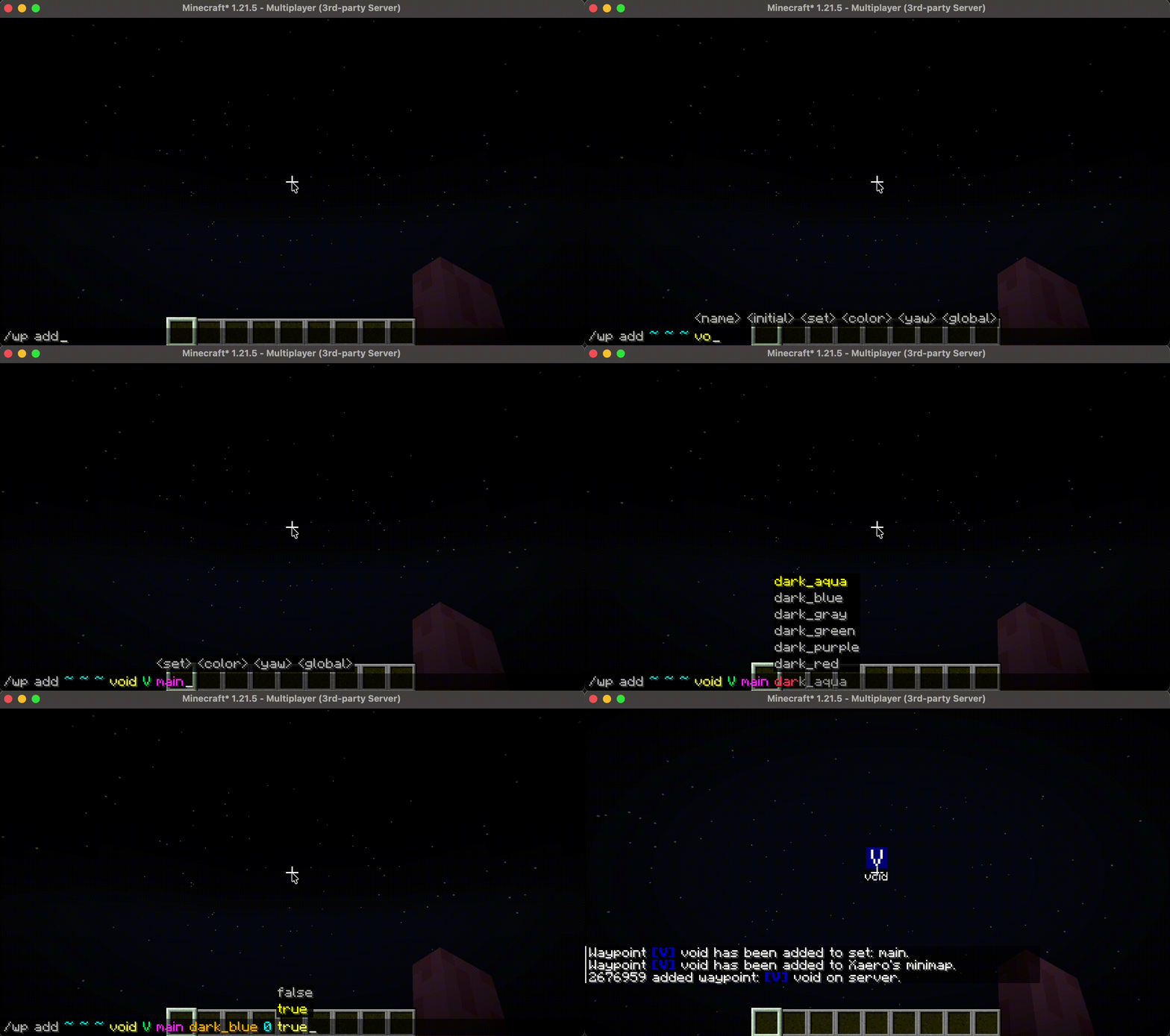
- `/wp add` add a new waypoint. No duplicate name allowed. Prompts user to use `/wp edit` to replace the existing one.
- `/wp add ` add a waypoint list.
- `/wp download` download waypoints and add to Xaero's Minimap (will not work without client installation).
- `/wp edit` edit a waypoint.
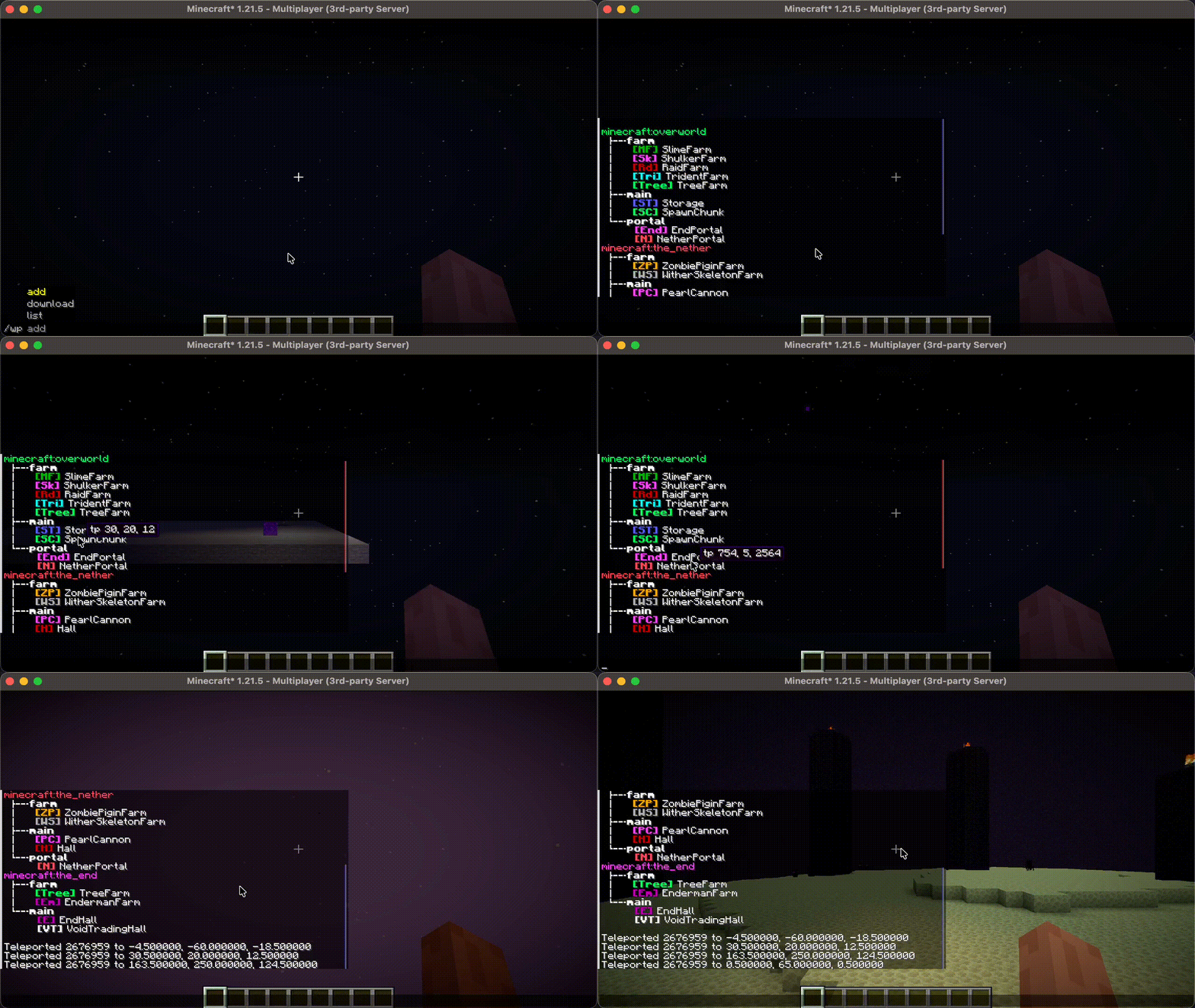
- `/wp list` list all waypoints. Shows all waypoints in a tree hierarchy. Allowing user to click to teleport, edit and remove the waypoint.
- `/wp reload` reload `config.json` and translation files in `/config/server_waypoint/lang`, feature `sendXaerosWorldId` requires restarting to take effect.
- `/wp remove` remove a waypoint by name. Shows the removed waypoint and click it to restore that waypoint.
- `/wp remove
` remove an empty waypoint list.
- `/wp tp` teleport the executor player to a waypoint
## Server-side Translations Messages and command feedbacks sent by this mod will be automatically translated based on the language setting on the receiver's client. This works entirely on the server-side; players can see the translated message without client-side installation of this mod. Right now, the mod comes with translations for English and Simplified Chinese. If you’re interested, you can help out by adding translations on (https://crowdin.com/project/server-waypoint)!
- ### Add translations
- Place the lang files under the directory: `
/server_waypoint/lang/`. This mod will load them on server starting, use `/wp reload` if the server is already running. - ### Create a lang file
- Follow the format used in [`en_us.json`](./common/src/main/resources/lang/en_us.json), [`zh_cn.json`](./common/src/main/resources/lang/zh_cn.json).
Name the lang file with a (https://minecraft.wiki/w/Language#Languages).
- ### Translation order
- If the translation you’ve added uses the same language c
📊 Mod Details
- Game
- Minecraft Plugins
- Author
- 2676959
- Version
- 3.0.4
- Downloads
- 31,984
- Endorsements
- 36
- Category
- fabric
- Created
- 6/23/2025
- Updated
- 8/24/2026
- Game Versions
- 1.21, 1.21.1, 1.21.2, 1.21.3, 1.21.4
- Tags
- management, utility
🔧 How to Install Minecraft Plugins Mods
Download from Modrinth. Use Prism Launcher or drop into your mods folder.
📖 Full step-by-step install guide for Minecraft Plugins →
Visit the official mod page for specific installation instructions for this mod.
🎮 Need cheat codes or console commands? Check ur gaming wiki for Minecraft Plugins commands, item IDs, and more.
❓ Frequently Asked Questions
Which Minecraft Plugins versions does Server Waypoint support?
The author lists 1.21, 1.21.1, 1.21.2, 1.21.3, 1.21.4, 1.21.5. Other versions may work but are untested by the author.
What is the latest version of Server Waypoint?
Version 3.0.4, published 2026-08-24 with 31,984 downloads recorded at the source.
Keep browsing — more Minecraft Plugins mods await