S-PlayerWarps
🟡 Updated this year🖼️ Gallery (3 images)
🔍 Analysis
- 👍 0.4% endorsement rate
- 🏆 #82 of 171 management mods in this game by downloads
📋 About This Mod
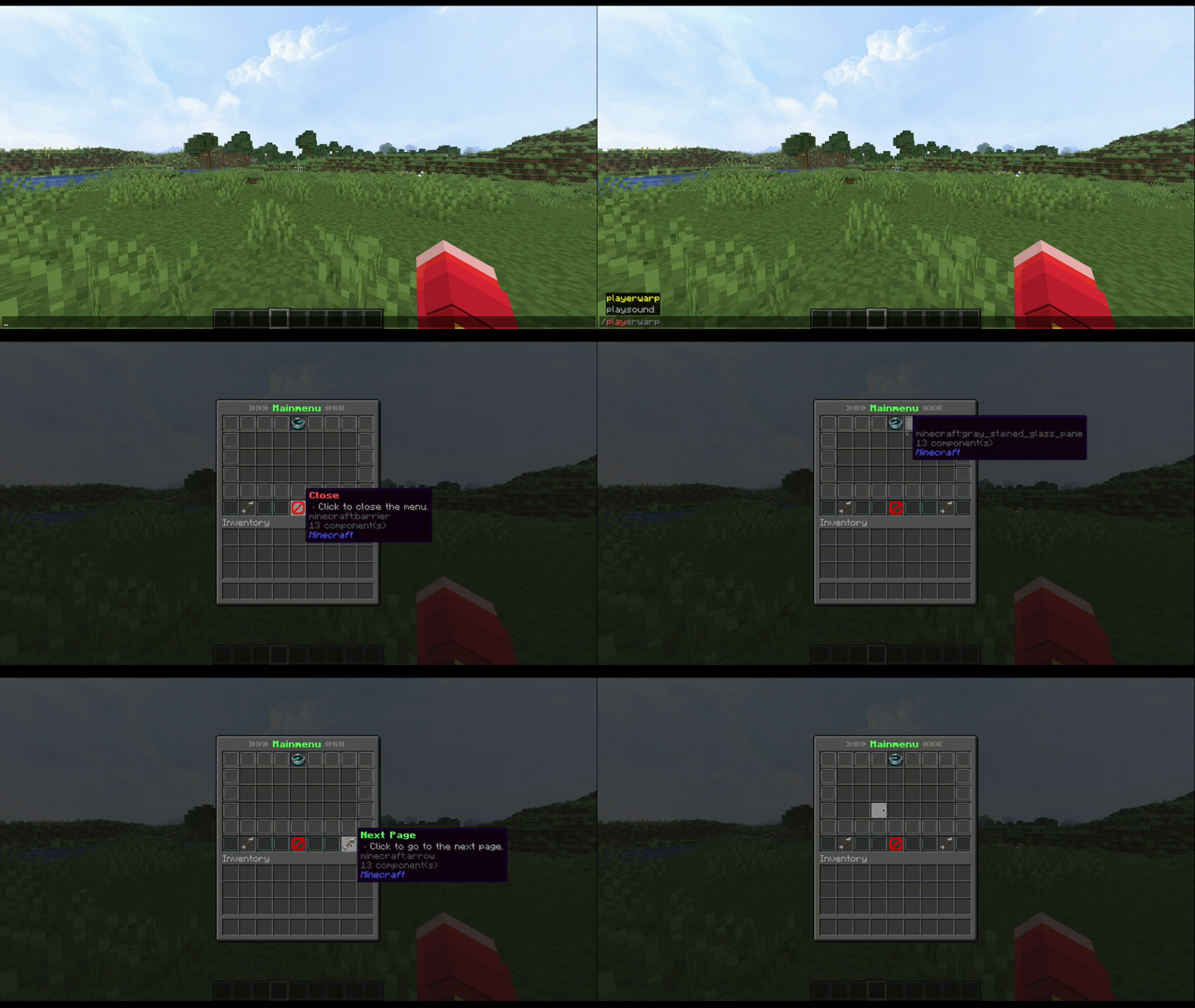
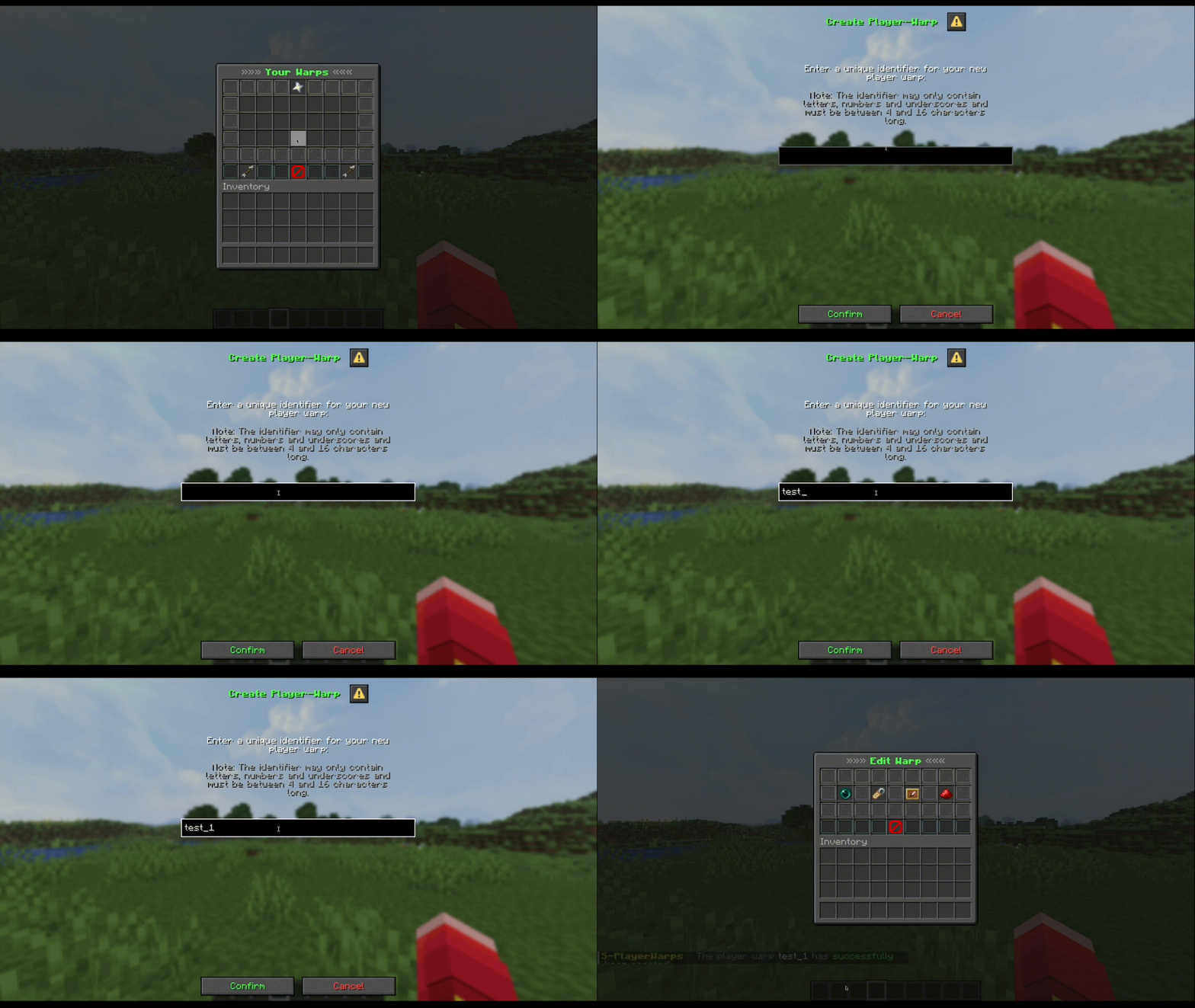
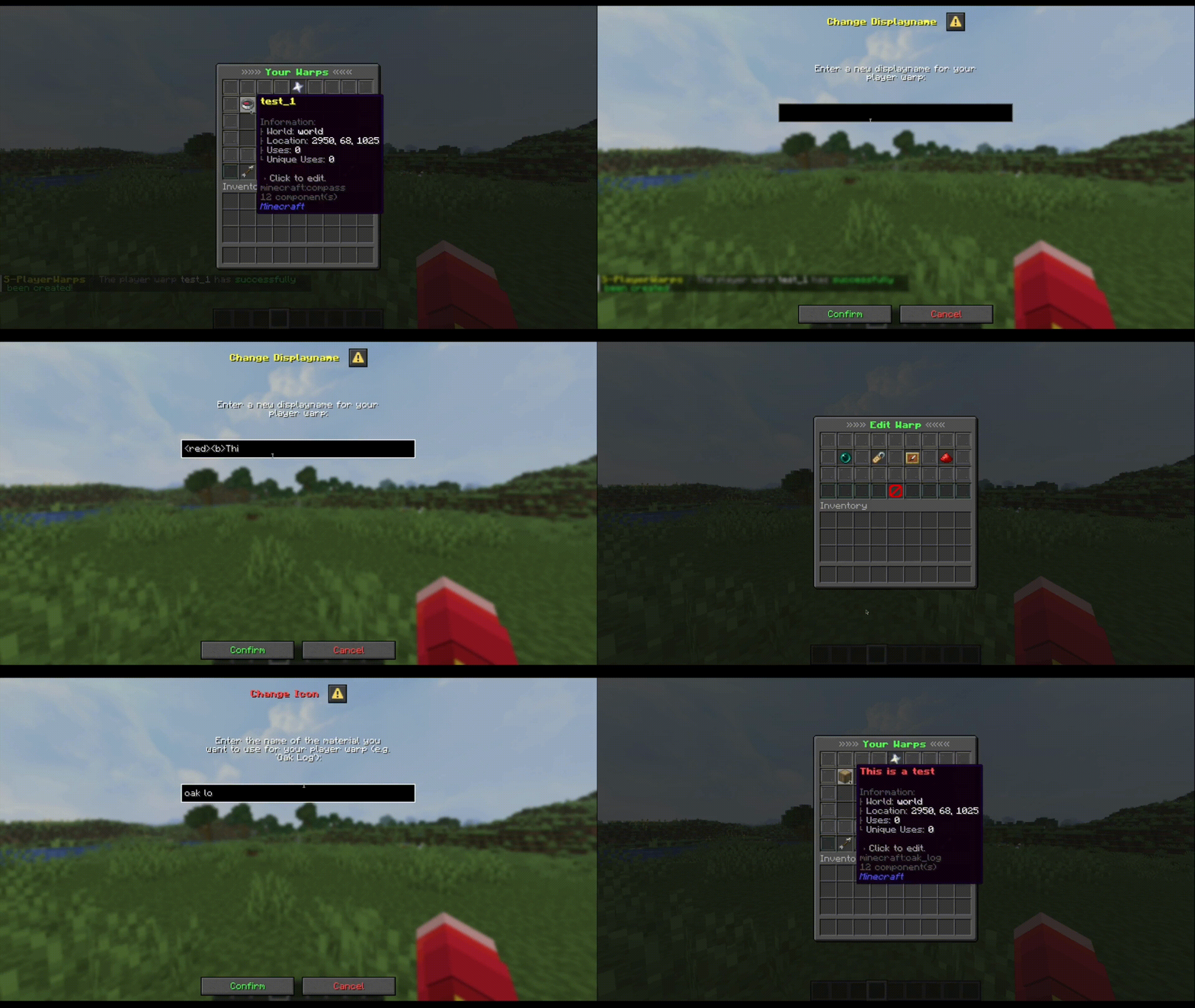
## Overview S-PlayerWarps is a simple Paper plugin that lets players create personal warps and teleport to them. ## Features - Reload the plugin directly in-game. - Teleport with optional delay and cancel-on-move. - Customizable messages (english.yml & german.yml, you can add more). - Sound effects for teleportation events. - Cancel teleportation due to movement. - Configurable GUIs. - Customizable player warps (displayname, material). - Tracking visits and unique visits. - More features in development ... ## Commands - /s-playerwarps about - Receive information about the plugin (name, version & author). - /s-playerwarps reload - Reload the plugin to update config files. - /playerwarp - Opens the menu if the player has permission, else it will show the usage message. - /playerwarp menu - Opens the playerwarps menu. - /playerwarp create <identifier> - Creates a playerwarp with the given identifier. - /playerwarp teleport <identifier> - Teleports to the givien playerwarp. - /playerwarp delete <identifier> - Deletes the given playerwarp. - /playerwarp edit <identifier> displayname <value> - Changes the displayname of the given warp. - /playerwarp edit <identifier> icon <material> - Changes the icon of the given warp. ## Permissions - s-playerwarps.admin.about = Allows access to the about command. - s-playerwarps.admin.reload = Allows access to the reload command. - s-playerwarps.admin.notifyUpdate = Allows receiving update notifications. Player Permissions - s-playerwarps.commands.playerwarp.use = Allows access to the playerwarp command. - s-playerwarps.commands.playerwarp.help = Allows access to the help command. - s-playerwarps.commands.playerwarp.create = Allows creating player warps. - s-playerwarps.commands.playerwarp.teleport = Allows teleporting to player warps. - s-playerwarps.commands.playerwarp.menu = Allows opening the player warps menu. - s-playerwarps.commands.playerwarp.delete = Allows deleting playerwarps. - s-playerwarps.commands.playerwarp.edit = Allows editing playerwarps. ## Documentation GitBook docu: (https://s-projects.gitbook.io/s-projects/s-playerwarps/home) ## Configs <details> <summary>View config.yml</summary> ```yml # This plugin utilizes MiniMessage for messages. # For more information, visit https://docs.adventure.kyori.net/minimessage.html file-version: 1 # The prefix before every message prefix: "<#D1E332><b>S-PlayerWarps</b> <dark_gray>⚡ <gray>" # The messages file to use langFile: 'english' # Settings for the update checker updateChecker: # Send a message to the console when a new version is available consoleMessage: true # Send a message to the player when a new version is available # This requires the permission 's-playerwarps.admin.notifyUpdate' or to be an OP playerMessage: true # Settings for data saving saving: # Whether to save player warps asynchronously async: true # The delay between autosaves in seconds # delay: 1200 # Settings for all sounds sounds: teleportSound: # Whether to play a sound when teleporting enabled: true # The sound to play when teleporting sound: 'ENTITY.ENDERMAN.TELEPORT' # The volume of the sound volume: 1.0 # The pitch of the sound pitch: 1.0 delaySound: # Whether to play a sound during the teleportation delay enabled: true # The sound to play during the teleportation delay sound: 'BLOCK.NOTE_BLOCK.BASS' # The volume of the sound volume: 1.0 # The pitch of the sound pitch: 1.0 cancelSound: # Whether to play a sound if the teleportation is canceled enabled: true # The sound to play if the teleportation is canceled sound: 'ENTITY.VILLAGER.NO' # The volume of the sound volume: 1.0 # The pitch of the sound pitch: 1.0 # Settings for player warps playerwarps: # The maximum amount of player warps a player can create # Set to 0 to make permission based (max. 100) | Set to -1 for unlimited # Permission: s-playerwarps.limit.<amount> maxWarpsPerPlayer: 5 # The default icon for player warps (Material name) defaultWarpIcon: 'COMPASS' # The maximum length for warp display names displayNameMaxLength: 40 # Settings for warp identifiers # I would recommend to NOT change these settings unless you know what you're doing; This does not effect the display name identifier: # The regex pattern that warp identifiers must match regex: '^+$' # The minimum length for warp identifiers minLength: 4 # The maximum length for warp identifiers maxLength: 16 # Settings for teleportation teleportation: # The delay before teleporting (in seconds) delay: # Whether to enable a delay before teleporting enabled: true # The length of the delay in seconds delay: 3 # Whether to cancel the teleportation if the player moves cancelOnMove: true ``` </details> <details> <summary>View english.yml</summary> ```yml #
## Overview S-PlayerWarps is a simple Paper plugin that lets players create personal warps and teleport to them.
## Features - Reload the plugin directly in-game. - Teleport with optional delay and cancel-on-move. - Customizable messages (english.yml & german.yml, you can add more). - Sound effects for teleportation events. - Cancel teleportation due to movement. - Configurable GUIs. - Customizable player warps (displayname, material). - Tracking visits and unique visits. - More features in development ...
## Commands
- /s-playerwarps about - Receive information about the plugin (name, version & author).
- /s-playerwarps reload - Reload the plugin to update config files.
- /playerwarp - Opens the menu if the player has permission, else it will show the usage message.
- /playerwarp menu - Opens the playerwarps menu.
- /playerwarp create
## Permissions - s-playerwarps.admin.about = Allows access to the about command. - s-playerwarps.admin.reload = Allows access to the reload command. - s-playerwarps.admin.notifyUpdate = Allows receiving update notifications. Player Permissions - s-playerwarps.commands.playerwarp.use = Allows access to the playerwarp command. - s-playerwarps.commands.playerwarp.help = Allows access to the help command. - s-playerwarps.commands.playerwarp.create = Allows creating player warps. - s-playerwarps.commands.playerwarp.teleport = Allows teleporting to player warps. - s-playerwarps.commands.playerwarp.menu = Allows opening the player warps menu. - s-playerwarps.commands.playerwarp.delete = Allows deleting playerwarps. - s-playerwarps.commands.playerwarp.edit = Allows editing playerwarps.
## Documentation GitBook docu: (https://s-projects.gitbook.io/s-projects/s-playerwarps/home)
## Configs
View config.yml
```yml # This plugin utilizes MiniMessage for messages. # For more information, visit https://docs.adventure.kyori.net/minimessage.html
file-version: 1
# The prefix before every message
prefix: "<#D1E332>S-PlayerWarps
# The messages file to use langFile: 'english'
# Settings for the update checker updateChecker: # Send a message to the console when a new version is available consoleMessage: true # Send a message to the player when a new version is available # This requires the permission 's-playerwarps.admin.notifyUpdate' or to be an OP playerMessage: true
# Settings for data saving saving: # Whether to save player warps asynchronously async: true # The delay between autosaves in seconds # [ Default = 1200 (20 minutes) ] delay: 1200
# Settings for all sounds sounds: teleportSound: # Whether to play a sound when teleporting enabled: true # The sound to play when teleporting sound: 'ENTITY. ENDERMAN. TELEPORT' # The volume of the sound volume: 1. 0 # The pitch of the sound pitch: 1. 0 delaySound: # Whether to play a sound during the teleportation delay enabled: true # The sound to play during the teleportation delay sound: 'BLOCK. NOTE_BLOCK. BASS' # The volume of the sound volume: 1. 0 # The pitch of the sound pitch: 1. 0 cancelSound: # Whether to play a sound if the teleportation is canceled enabled: true # The sound to play if the teleportation is canceled sound: 'ENTITY. VILLAGER. NO' # The volume of the sound volume: 1. 0 # The pitch of the sound pitch: 1. 0
# Settings for player warps
playerwarps:
# The maximum amount of player warps a player can create
# Set to 0 to make permission based (max. 100) | Set to -1 for unlimited
# Permission: s-playerwarps.limit.View english.yml
📊 Mod Details
- Game
- Minecraft Plugins
- Author
- Losterixx
- Version
- 1.1
- Downloads
- 571
- Endorsements
- 2
- Category
- management
- Created
- 11/2/2025
- Updated
- 1/2/2026
- Game Versions
- 1.21.8, 1.21.9, 1.21.10, 1.21.11, 26.1
- Tags
- management, social, utility
🔧 How to Install Minecraft Plugins Mods
Download from Modrinth. Use Prism Launcher or drop into your mods folder.
📖 Full step-by-step install guide for Minecraft Plugins →
Visit the official mod page for specific installation instructions for this mod.
🎮 Need cheat codes or console commands? Check ur gaming wiki for Minecraft Plugins commands, item IDs, and more.
❓ Frequently Asked Questions
Which Minecraft Plugins versions does S-PlayerWarps support?
The author lists 1.21.8, 1.21.9, 1.21.10, 1.21.11, 26.1, 26.1.1. Other versions may work but are untested by the author.
What is the latest version of S-PlayerWarps?
Version 1.1, published 2026-01-02 with 571 downloads recorded at the source.
Keep browsing — more Minecraft Plugins mods await