IDoTheBlacklist
🟠 Updated over a year ago🖼️ Gallery (1 images)
🔍 Analysis
- 👍 0.0% endorsement rate
- 🏆 #430 of 1452 bukkit mods in this game by downloads
📋 About This Mod
# IDoTheBlacklist ## Overview IDoTheBlacklist is a Minecraft server-side mod that enhances server security by integrating with a centralized blacklist API. This mod automatically checks connecting players against a list of known problematic users, preventing them from joining the server. It is part of a broader ecosystem managed by IDoTheBot and IDoTheAPI, which is used to manage and maintain community integrity across multiple Minecraft communities and related Discord servers. ## The Blacklist System The blacklist is a critical tool used to maintain a positive and secure environment across the Minecraft communities associated with IDoTheBot. Here's how it works: * **Centralized API:** The blacklist data is stored and managed through a centralized API endpoint. This ensures that all participating servers have access to the most up-to-date information. * **IDoTheAPI Integration:** IDoTheAPI is used to manage this blacklist. Authorized users can add or remove entries from the blacklist via specific commands within the Discord server. * **Minecraft Mod Integration:** The IDoTheBlacklist mod reads this blacklist data and denies entry to any player found on the list. ### Transparency and Collaborative Management One of the key principles behind the IDoTheBlacklist system is transparency and collaborative management. * **Open Source Code:** Because this code is open source, the workings of the blacklist system are visible to the public. This allows for scrutiny and improvement by the community. * **Authorized Users:** A specific set of Discord users is authorized to modify the blacklist. The list of authorized users is also transparent, providing accountability. * **Community Review:** Any proposed changes to this mod, particularly those related to the blacklist functionality, must be reviewed and approved by `@IDoTheHax` on Discord before being implemented. This ensures that changes are carefully considered and aligned with community standards. ## Features - **Automated Blacklist Checks:** Automatically checks connecting players against a centralized blacklist upon joining the server. - **Centralized Ban Management:** Uses an external API to retrieve blacklist data, enabling a network-wide ban system. - **Operator Notifications:** Notifies server operators about blacklist checks and any resulting actions. - **Configuration:** API key can be set and stored securely to access the blacklist API. - **Customizable Disconnect Message:** Displays a clear and informative disconnect message to blacklisted players, including the reason and timestamp. - **Logging:** Logs blacklist checks, API responses, and any errors encountered for debugging purposes. ## Setup ### Prerequisites - A Minecraft server running Fabric. - Fabric Loader installed. - An API key from the IDoTheHax Discord server. ### Installation 1. **Download the Mod:** Obtain the latest release of IDoTheBlacklist from your distribution source (e.g., Modrinth, GitHub Releases). 2. **Place the Mod:** Place the downloaded `.jar` file into the `mods` folder of your Minecraft server. * If you don't have a `mods` folder, create one in the same directory as your `minecraft_server.jar` file. 3. **Start the Server:** Start your Minecraft server. Fabric Loader will load the IDoTheBlacklist mod. ## Usage ### Setting the API Key The IDoTheBlacklist mod requires an API key to communicate with the blacklist API. To set the API key: 1. **Log in as an Operator:** Join your Minecraft server as an operator. You must have permission level 4 to execute the `/setapikey` command. 2. **Use the Command:** Use the `/setapikey` command followed by your API key: ``` /setapikey <your_api_key> ``` * Replace `<your_api_key>` with the API key you obtained from the IDoTheHax Discord server. 3. **Confirmation:** The server will display a message confirming that the API key has been set successfully. * The API key is stored in the `config/idotheblacklist.json` file on the server. ### Blacklist Checks - Once the API key is set, the mod will automatically check players against the blacklist when they join the server. - If a player is blacklisted, they will be disconnected with a message indicating the reason and timestamp of the ban. - Server operators will be notified of the blacklist check and any disconnects. ## Configuration The configuration file for IDoTheBlacklist is located at `config/idotheblacklist.json`. ### `idotheblacklist.json` - `api_key`: Your API key obtained from the IDoTheHax Discord server. Set this using the `/setapikey` command or manually by editing the file. Keep this key secure! ## Troubleshooting ### API Key Not Set - If the API key is not set, the mod will skip the blacklist check and allow players to join. - Server operators will receive a warning message indicating that the API key is not set. - Set the API key using the `/setapikey` command as describ
# IDoTheBlacklist
## Overview
IDoTheBlacklist is a Minecraft server-side mod that enhances server security by integrating with a centralized blacklist API. This mod automatically checks connecting players against a list of known problematic users, preventing them from joining the server. It is part of a broader ecosystem managed by IDoTheBot and IDoTheAPI, which is used to manage and maintain community integrity across multiple Minecraft communities and related Discord servers.
## The Blacklist System
The blacklist is a critical tool used to maintain a positive and secure environment across the Minecraft communities associated with IDoTheBot. Here's how it works:
Centralized API: The blacklist data is stored and managed through a centralized API endpoint. This ensures that all participating servers have access to the most up-to-date information. IDoTheAPI Integration: IDoTheAPI is used to manage this blacklist. Authorized users can add or remove entries from the blacklist via specific commands within the Discord server. Minecraft Mod Integration: The IDoTheBlacklist mod reads this blacklist data and denies entry to any player found on the list.
### Transparency and Collaborative Management
One of the key principles behind the IDoTheBlacklist system is transparency and collaborative management.
Open Source Code: Because this code is open source, the workings of the blacklist system are visible to the public. This allows for scrutiny and improvement by the community. Authorized Users: A specific set of Discord users is authorized to modify the blacklist. The list of authorized users is also transparent, providing accountability. Community Review: Any proposed changes to this mod, particularly those related to the blacklist functionality, must be reviewed and approved by `@IDoTheHax` on Discord before being implemented. This ensures that changes are carefully considered and aligned with community standards.
## Features
- Automated Blacklist Checks: Automatically checks connecting players against a centralized blacklist upon joining the server.
- Centralized Ban Management: Uses an external API to retrieve blacklist data, enabling a network-wide ban system.
- Operator Notifications: Notifies server operators about blacklist checks and any resulting actions.
- Configuration: API key can be set and stored securely to access the blacklist API.
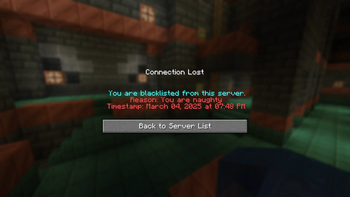
- Customizable Disconnect Message: Displays a clear and informative disconnect message to blacklisted players, including the reason and timestamp.
- Logging: Logs blacklist checks, API responses, and any errors encountered for debugging purposes.
### Prerequisites
- A Minecraft server running Fabric.
- Fabric Loader installed.
- An API key from the IDoTheHax Discord server.
### Installation
1. Download the Mod: Obtain the latest release of IDoTheBlacklist from your distribution source (e.g., Modrinth, GitHub Releases).
2. Place the Mod: Place the downloaded `.jar` file into the `mods` folder of your Minecraft server.
If you don't have a `mods` folder, create one in the same directory as your `minecraft_server.jar` file.
3. Start the Server: Start your Minecraft server. Fabric Loader will load the IDoTheBlacklist mod.
### Setting the API Key
The IDoTheBlacklist mod requires an API key to communicate with the blacklist API. To set the API key:
1. Log in as an Operator: Join your Minecraft server as an operator. You must have permission level 4 to execute the `/setapikey` command.
2. Use the Command: Use the `/setapikey` command followed by your API key:
```
/setapikey
Replace `
3. Confirmation: The server will display a message confirming that the API key has been set successfully.
* The API key is stored in the `config/idotheblacklist.json` file on the server.
### Blacklist Checks
- Once the API key is set, the mod will automatically check players against the blacklist when they join the server.
- If a player is blacklisted, they will be disconnected with a message indicating the reason and timestamp of the ban.
- Server operators will be notified of the blacklist check and any disconnects.
## Configuration
The configuration file for IDoTheBlacklist is located at `config/idotheblacklist.json`.
### `idotheblacklist.json` - `api_key`: Your API key obtained from the IDoTheHax Discord server. Set this using the `/setapikey` command or manually by editing the file. Keep this key secure!
## Troubleshooting
### API Key Not Set
- If the API key is not set, the mod will skip the blacklist check and allow players to join.
- Server operators will receive a warning message indicating that the API key is not set.
- Set the API key using the `/setapikey` command as describ
📊 Mod Details
- Game
- Minecraft Plugins
- Author
- IDoTheHax
- Version
- v1.21.3-1.0.0
- Downloads
- 744
- Endorsements
- 0
- Category
- bukkit
- Created
- 3/8/2025
- Updated
- 3/8/2025
- Game Versions
- 1.21.3
- Tags
- management, social, utility
🔧 How to Install Minecraft Plugins Mods
Download from Modrinth. Use Prism Launcher or drop into your mods folder.
📖 Full step-by-step install guide for Minecraft Plugins →
Visit the official mod page for specific installation instructions for this mod.
🎮 Need cheat codes or console commands? Check ur gaming wiki for Minecraft Plugins commands, item IDs, and more.
❓ Frequently Asked Questions
Which Minecraft Plugins versions does IDoTheBlacklist support?
The author lists 1.21.3. Other versions may work but are untested by the author.
What is the latest version of IDoTheBlacklist?
Version v1.21.3-1.0.0, published 2025-03-08 with 744 downloads recorded at the source.
Keep browsing — more Minecraft Plugins mods await