Remote Stasis Chambers
🟡 Updated this year🖼️ Gallery (7 images)

🔍 Analysis
- 🏆 #1217 of 1452 bukkit mods in this game by downloads
📋 About This Mod
# 🎣 RemoteStasisChambers > Give your players magic fishing rods that teleport them anywhere on the map! --- ## 🤔 What is this plugin? You know how in Minecraft you can throw an ender pearl to teleport? Imagine having a **fishing rod** that does the same thing — except it teleports you to a place that was set up ahead of time, from anywhere in the world, no matter how far away you are. That's what this plugin does! Server owners can hand out special fishing rods to players. Each rod is connected to a specific spot on the map. When a player uses it, they get sent straight there — then the rod disappears. Think of it like a **one-time fast travel ticket**, but as a fishing rod. --- ## ✨ Features ### 🎣 The Stasis Rod - A custom fishing rod item that teleports you when you use it - Each rod is linked to a specific location on the map - The rod **disappears after one use** so it can't be used over and over - You can customize the name and description (lore) of the rod - The rod can show who it belongs to and where it teleports you - Optionally has a cool enchantment glow on it ### 💥 Cool Effects When Teleporting When someone uses a rod, a bunch of cool stuff happens: - A **snap/break sound** plays - A **pearl whoosh sound** plays - **Particles shoot out** around you - You get **teleported** to the linked spot - A **teleport sound** plays when you arrive - The rod vanishes from your hand All of these effects can be changed or turned off in the config files! ### ⚙️ Personal Settings Menu Every player can open their own settings menu by typing `/rodsettings`. It opens a chest menu with three toggles: - **Show Coordinates** — choose if your rod shows where it teleports you - **Show Your Name** — choose if your rod shows that it belongs to you - **Let Others Use Your Rods** — choose if other players are allowed to use rods you own The menu looks great and everything in it (the item names, descriptions, colors) can be edited by the server owner. ### 📋 Commands | Command | What it does | |---|---| | `/stasischamber give <amount> <player> <x> <y> <z>` | Give a player one or more rods linked to a location | | `/stasischamber reload` | Reload all the config files without restarting the server | | `/stasischamber admin check <player>` | See what rods a player has, even if they are offline | | `/stasischamber admin clearallrods` | Delete all rod records from everyone | | `/rodsettings` | Open your personal settings menu | When you type commands, the game will suggest options for you automatically so you don't have to memorize anything! ### 🔒 Permissions | Permission | Who has it by default | What it allows | |---|---|---| | `stasis.command.use` | Admins only | Give rods to players | | `stasis.reload` | Admins only | Reload the plugin | | `stasis.rod.use` | Everyone | Use a rod someone else gave you | | `stasis.rod.admin` | Admins only | Use the admin commands | ### 📁 Config Files Everything is split into neat separate files so it's easy to find what you want to change: - **config.yml** — rod appearance, sounds, particles, and default settings - **messages.yml** — every message the plugin sends to players - **gui.yml** — everything about the settings menu (colors, item names, layout) - **data.yml** — automatically saved player data, don't touch this one! --- ## 🖥️ Works On | Server Version | Supported? | |---|---| | Paper 1.21.11 | ✅ Yes | | Paper 26.1 | ✅ Yes | Requires **Java 21** or newer. --- ## 🚀 How to Set It Up 1. Put the plugin file in your server's `plugins` folder 2. Start or restart your server 3. Open `plugins/RemoteStasisChambers/config.yml` to customize things 4. Give someone a rod with `/stasischamber give 1 Steve 100 64 200` 5. Have Steve right click with the rod to teleport to that spot! --- ## ❓ Common Questions **Can players cheat with the rods?** Nope! Every rod has a secret ID stored inside it. Once it is used, the plugin marks it as spent and removes it. No duplicating, no reusing. **Does it work with permission plugins like LuckPerms?** Yes! All permissions work with any standard permissions plugin. **What if the world the rod points to gets deleted?** The plugin will warn the player and stop the teleport safely. No crashes! **Can I let anyone use my rod?** Yes! Just turn on "Let Others Use Your Rods" in your `/rodsettings` menu.
# 🎣 RemoteStasisChambers
> Give your players magic fishing rods that teleport them anywhere on the map!
## 🤔 What is this plugin?
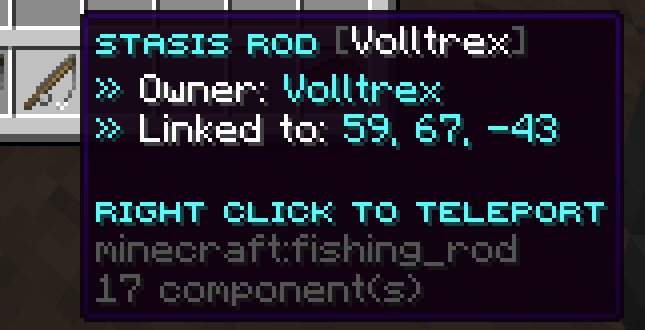
You know how in Minecraft you can throw an ender pearl to teleport? Imagine having a fishing rod that does the same thing — except it teleports you to a place that was set up ahead of time, from anywhere in the world, no matter how far away you are.
That's what this plugin does! Server owners can hand out special fishing rods to players. Each rod is connected to a specific spot on the map. When a player uses it, they get sent straight there — then the rod disappears.
Think of it like a one-time fast travel ticket, but as a fishing rod.
## ✨ Features
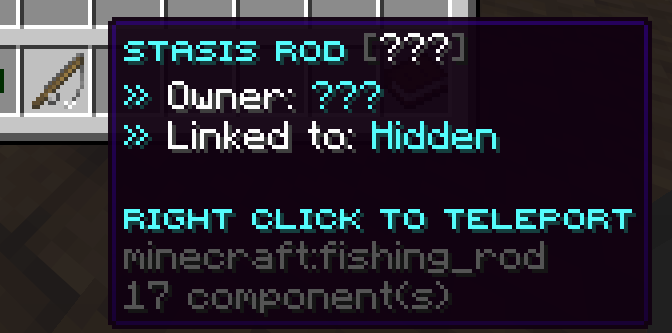
### 🎣 The Stasis Rod - A custom fishing rod item that teleports you when you use it - Each rod is linked to a specific location on the map - The rod disappears after one use so it can't be used over and over - You can customize the name and description (lore) of the rod - The rod can show who it belongs to and where it teleports you - Optionally has a cool enchantment glow on it
### 💥 Cool Effects When Teleporting When someone uses a rod, a bunch of cool stuff happens: - A snap/break sound plays - A pearl whoosh sound plays - Particles shoot out around you - You get teleported to the linked spot - A teleport sound plays when you arrive - The rod vanishes from your hand
All of these effects can be changed or turned off in the config files!
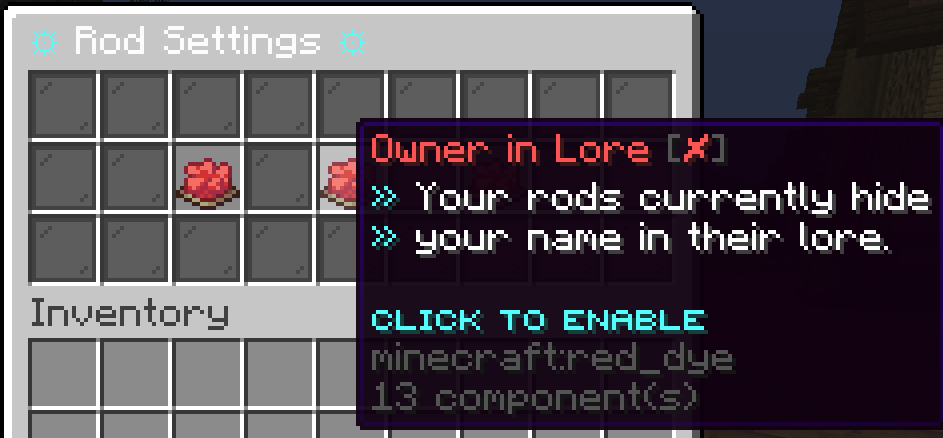
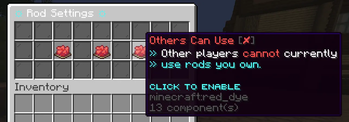
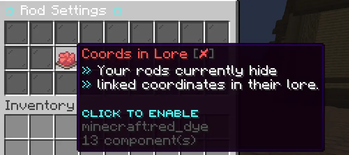
### ⚙️ Personal Settings Menu Every player can open their own settings menu by typing `/rodsettings`. It opens a chest menu with three toggles:
- Show Coordinates — choose if your rod shows where it teleports you
- Show Your Name — choose if your rod shows that it belongs to you
- Let Others Use Your Rods — choose if other players are allowed to use rods you own
The menu looks great and everything in it (the item names, descriptions, colors) can be edited by the server owner.
### 📋 Commands
| Command | What it does |
|---|---|
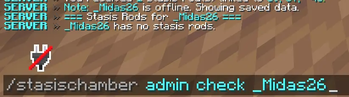
| `/stasischamber give
When you type commands, the game will suggest options for you automatically so you don't have to memorize anything!
### 🔒 Permissions
| Permission | Who has it by default | What it allows | |---|---|---| | `stasis.command.use` | Admins only | Give rods to players | | `stasis.reload` | Admins only | Reload the plugin | | `stasis.rod.use` | Everyone | Use a rod someone else gave you | | `stasis.rod.admin` | Admins only | Use the admin commands |
### 📁 Config Files Everything is split into neat separate files so it's easy to find what you want to change:
- config.yml — rod appearance, sounds, particles, and default settings
- messages.yml — every message the plugin sends to players
- gui.yml — everything about the settings menu (colors, item names, layout)
- data.yml — automatically saved player data, don't touch this one!
## 🖥️ Works On
| Server Version | Supported? | |---|---| | Paper 1. 21. 11 | ✅ Yes | | Paper 26. 1 | ✅ Yes |
Requires Java 21 or newer.
## 🚀 How to Set It Up
1. Put the plugin file in your server's `plugins` folder 2. Start or restart your server 3. Open `plugins/RemoteStasisChambers/config.yml` to customize things 4. Give someone a rod with `/stasischamber give 1 Steve 100 64 200` 5. Have Steve right click with the rod to teleport to that spot!
## ❓ Common Questions
Can players cheat with the rods? Nope! Every rod has a secret ID stored inside it. Once it is used, the plugin marks it as spent and removes it. No duplicating, no reusing.
Does it work with permission plugins like LuckPerms? Yes! All permissions work with any standard permissions plugin.
What if the world the rod points to gets deleted? The plugin will warn the player and stop the teleport safely. No crashes!
Can I let anyone use my rod? Yes! Just turn on "Let Others Use Your Rods" in your `/rodsettings` menu.
📊 Mod Details
- Game
- Minecraft Plugins
- Author
- Voltrex
- Version
- 1.0.0
- Downloads
- 417
- Endorsements
- 1
- Category
- bukkit
- Created
- 5/24/2026
- Updated
- 5/17/2026
- Game Versions
- 1.21, 1.21.1, 1.21.2, 1.21.3, 1.21.4
- Tags
- game-mechanics, magic, transportation
🔧 How to Install Minecraft Plugins Mods
Download from Modrinth. Use Prism Launcher or drop into your mods folder.
📖 Full step-by-step install guide for Minecraft Plugins →
Visit the official mod page for specific installation instructions for this mod.
🎮 Need cheat codes or console commands? Check ur gaming wiki for Minecraft Plugins commands, item IDs, and more.
❓ Frequently Asked Questions
Which Minecraft Plugins versions does Remote Stasis Chambers support?
The author lists 1.21, 1.21.1, 1.21.2, 1.21.3, 1.21.4, 1.21.5. Other versions may work but are untested by the author.
What is the latest version of Remote Stasis Chambers?
Version 1.0.0, published 2026-05-17 with 417 downloads recorded at the source.
Keep browsing — more Minecraft Plugins mods await