SoundPlayer
🟡 Updated this year🖼️ Gallery (3 images)
🔍 Analysis
- 👍 1.2% endorsement rate — high engagement, a strong quality signal
- 🏆 #126 of 351 adventure mods in this game by downloads
📋 About This Mod
--- # **SoundPlayer** *Version: 1.1* *Author: XCaNiNeX* # See it in action on caninecraft.reviverealm.net ## **Overview** SoundPlayer is a plugin that lets you create custom sound regions on your server. Play immersive sounds when players enter specific areas like hubs, spawn points, or mini-games. Regions can now be configured with different playback modes, loop timing, volume, and pitch for more control over how sounds behave. ## **Commands** > **Primary command:** `/player` > **Aliases:** `/looper`, `/spl` ### **Set Region Corners** * **`/player pos1`** Set the first corner of the region at your location. * **Example:** `/player pos1` * **`/player pos2`** Set the second corner of the region at your location. * **Example:** `/player pos2` ## **Sound Formats** * **Minecraft sound example:** `entity.player.levelup` * **Minecraft Sound List:** (https://www.digminecraft.com/lists/sound_list_pc.php) * **Sounds and Music Discs now added to tab completion!** * **Custom sound example:** `iamusic:music_disc.mozart` *(Example of a custom sound provided by ItemsAdder or a resource pack)* ### **Create and Manage Regions** * **`/player set <name> <sound> `** Create a region with a name, sound, and an optional enter message. * **Example:** `/player set spawn_area entity.player.levelup &6Welcome to spawn!` * **`/player setmode <region> <mode> <loop-delay>`** Change how a region plays its sound. * **Long sounds or music discs need delay to match duration** * **Modes:** `ON_ENTER`, `LOOP`, `INTERVAL` * **Example:** `/player setmode spawn_area LOOP <ticks>` * **`/player play <name>`** Activate the region. * **Example:** `/player play spawn_area` * **`/player stop <name>`** Deactivate the region. * **Example:** `/player stop spawn_area` * **`/player remove <name>`** Delete the region permanently. * **Example:** `/player remove spawn_area` ### **Player Controls** * **`/player toggle`** Enable or disable region sounds for yourself. * Useful for players who prefer silence in hubs or busy areas. ### **Plugin Management** * **`/player reload`** Reloads the plugin’s configuration and region data. * **Example:** `/player reload` ## **How It Works** 1. **Define a region:** Use `/player pos1` and `/player pos2` to set corners. 2. **Create a region:** Use `/player set <name> <sound> ` to save it. 3. **Choose playback behavior:** Use `/player setmode` to control how the sound plays. 4. **Activate:** Use `/player play <name>` to enable the region. 5. **Manage:** Use `/player stop` to deactivate or `/player remove` to delete. ## **Configuration** * **`regions.yml`** Stores region bounds, sounds, messages, playback mode, volume, pitch, and loop timing. * **`active_regions.yml`** Tracks which regions are active across restarts. ## **Compatibility** * **Minecraft Version:** 1.21+ * **Dependencies:** None Enjoy creating immersive soundscapes on your server with **SoundPlayer**. ---
# SoundPlayer
Version: 1. 1 Author: XCaNiNeX
# See it in action on caninecraft.reviverealm.net
## Overview
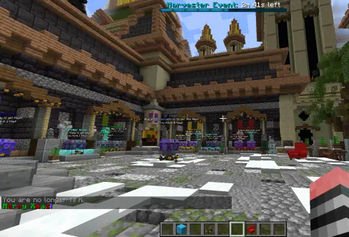
SoundPlayer is a plugin that lets you create custom sound regions on your server. Play immersive sounds when players enter specific areas like hubs, spawn points, or mini-games. Regions can now be configured with different playback modes, loop timing, volume, and pitch for more control over how sounds behave.
## Commands
> Primary command: `/player` > Aliases: `/looper`, `/spl`
### Set Region Corners
`/player pos1` Set the first corner of the region at your location.
Example: `/player pos1`
`/player pos2` Set the second corner of the region at your location.
Example: `/player pos2`
## Sound Formats
Minecraft sound example: `entity.player.levelup` Minecraft Sound List: (https://www.digminecraft.com/lists/sound_list_pc.php) Sounds and Music Discs now added to tab completion! Custom sound example: `iamusic:music_disc.mozart` (Example of a custom sound provided by ItemsAdder or a resource pack)
### Create and Manage Regions
`/player set `
Create a region with a name, sound, and an optional enter message.
Example: `/player set spawn_area entity.player.levelup &6Welcome to spawn!`
`/player setmode
Modes: `ON_ENTER`, `LOOP`, `INTERVAL`
Example:
`/player setmode spawn_area LOOP
`/player play `
Activate the region.
Example: `/player play spawn_area`
`/player stop `
Deactivate the region.
Example: `/player stop spawn_area`
`/player remove `
Delete the region permanently.
Example: `/player remove spawn_area`
### Player Controls
`/player toggle` Enable or disable region sounds for yourself.
Useful for players who prefer silence in hubs or busy areas.
### Plugin Management
`/player reload` Reloads the plugin’s configuration and region data.
Example: `/player reload`
## How It Works
1. Define a region: Use `/player pos1` and `/player pos2` to set corners.
2. Create a region: Use `/player set
## Configuration
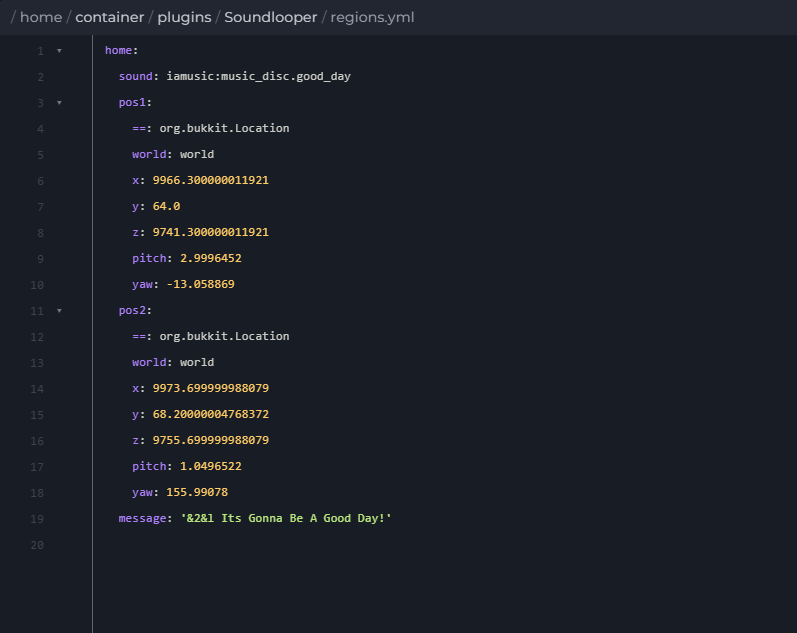
`regions.yml` Stores region bounds, sounds, messages, playback mode, volume, pitch, and loop timing.
`active_regions.yml` Tracks which regions are active across restarts.
## Compatibility
Minecraft Version: 1. 21+ Dependencies: None
Enjoy creating immersive soundscapes on your server with SoundPlayer.
📊 Mod Details
- Game
- Minecraft Plugins
- Author
- xcaninex
- Version
- 1.1.2
- Downloads
- 674
- Endorsements
- 8
- Category
- adventure
- Created
- 12/6/2024
- Updated
- 12/22/2025
- Game Versions
- 1.21, 1.21.1, 1.21.2, 1.21.3, 1.21.4
- Tags
- adventure, game-mechanics, utility
🔧 How to Install Minecraft Plugins Mods
Download from Modrinth. Use Prism Launcher or drop into your mods folder.
📖 Full step-by-step install guide for Minecraft Plugins →
Visit the official mod page for specific installation instructions for this mod.
🎮 Need cheat codes or console commands? Check ur gaming wiki for Minecraft Plugins commands, item IDs, and more.
❓ Frequently Asked Questions
Which Minecraft Plugins versions does SoundPlayer support?
The author lists 1.21, 1.21.1, 1.21.2, 1.21.3, 1.21.4, 1.21.5. Other versions may work but are untested by the author.
What is the latest version of SoundPlayer?
Version 1.1.2, published 2025-12-22 with 674 downloads recorded at the source.
Keep browsing — more Minecraft Plugins mods await