RC CoolDown
🟡 Updated this year🖼️ Gallery (3 images)


🔍 Analysis
- 👍 0.0% endorsement rate
- 🏆 #714 of 1452 bukkit mods in this game by downloads
📋 About This Mod
# RC Cooldown - Advanced Item Cooldown Management Plugin ## 📋 Overview **RC Cooldown** is a powerful and flexible Spigot plugin that allows server administrators to set custom cooldowns on any Minecraft items, weapons, and enchantments. With support for multiple languages, visual cooldown animations, and intelligent use detection, this plugin provides a comprehensive solution for balancing gameplay and preventing item spam. ## ✨ Features - **Universal Item Support**: Set cooldowns on any Minecraft item, weapon, or enchantment - **Smart Use Detection**: Automatically detects item usage type (interact, consume, attack) and applies cooldowns accordingly - **Visual Cooldown Animation**: Native Minecraft cooldown animation (like Ender Pearls) that matches your configured duration - **Enchantment Support**: Set cooldowns on enchantments like Riptide, Channeling, and more - **Multi-Language Support**: Built-in translations for English, Russian, Ukrainian, Spanish, and German - **Click Type Configuration**: Choose between right-click or left-click activation for each item - **Anti-Spam Protection**: Cooldown messages are rate-limited to prevent chat spam (max once per 3 seconds) - **Easy Configuration**: Simple YAML configuration with default examples - **Admin Commands**: Full command suite for managing cooldowns without editing config files - **Automatic Reload**: Hot-reload configuration without server restart ## 🎯 Use Cases - **PvP Servers**: Balance powerful items like Golden Apples, Ender Pearls, and weapons - **Survival Servers**: Prevent item spam and create strategic gameplay - **Minigame Servers**: Control item usage in custom game modes - **KitPvP**: Balance kit items with custom cooldowns - **Any Server**: Add cooldowns to any item for better gameplay balance ## 📦 Installation 1. Download the latest version of **RC Cooldown** from the releases page 2. Place the `.jar` file into your server's `plugins` folder 3. Restart your server or use `/reload` command 4. Configure the plugin by editing `plugins/RCCooldown/config.yml` 5. Use `/rccd reload` to apply changes ## ⚙️ Config ### Basic Configuration Open `plugins/RCCooldown/config.yml`: ```yaml # Language: EN, RU, UA, ES, DE lang: EN items: # Enchantments enchantment:riptide: enable: true cooldown: 15 click_type: right_click # Items ENDER_PEARL: enable: true cooldown: 20 click_type: right_click GOLDEN_APPLE: enable: true cooldown: 5 click_type: right_click ``` ### Configuration Options - **lang**: Language for plugin messages (EN, RU, UA, ES, DE) - **enable**: Enable or disable cooldown for this item (true/false) - **cooldown**: Cooldown duration in seconds - **click_type**: Mouse click type (`right_click` or `left_click`) ## 📝 Adding Items ### Method 1: Edit Config File 1. Open `plugins/RCCooldown/config.yml` 2. Add your item under the `items:` section: ```yaml items: DIAMOND_SWORD: enable: true cooldown: 10 click_type: right_click ``` 3. Save the file and run `/rccd reload` ### Method 2: Use Commands (Recommended) Use the `/rccd add` command to add items directly in-game: ``` /rccd add <item_id> <click_type> <seconds> ``` **Examples:** ``` /rccd add DIAMOND_SWORD right_click 10 /rccd add riptide right_click 15 /rccd add BOW left_click 5 ``` ### Adding Enchantments To add enchantments, simply use the enchantment name: ``` /rccd add riptide right_click 15 /rccd add channeling right_click 10 ``` The plugin automatically detects if an ID is an item or enchantment - no prefix needed! ### Finding Item IDs - Use `/rccd list` to see all active cooldowns - Minecraft item IDs are in UPPERCASE_WITH_UNDERSCORES format (e.g., `DIAMOND_SWORD`, `GOLDEN_APPLE`) - Enchantment names are lowercase (e.g., `riptide`, `channeling`) ## 🎮 Commands | Command | Description | Permission | |---------|-------------|------------| | `/rccd reload` | Reload plugin configuration | `rccd.admin` (OP by default) | | `/rccd list` | List all active cooldowns | `rccd.admin` (OP by default) | | `/rccd add <id> <click_type> <seconds>` | Add a new cooldown | `rccd.admin` (OP by default) | | `/rccd delete <id>` | Remove a cooldown | `rccd.admin` (OP by default) | ### Command Examples ``` /rccd reload # Reload configuration /rccd list # Show all active cooldowns /rccd add MACE right_click 5 # Add 5-second cooldown to Mace /rccd delete ENDER_PEARL # Remove Ender Pearl cooldown ``` ## 🌍 Languages The plugin supports 5 languages: - **EN** - English - **RU** - Russian (Русский) - **UA** - Ukrainian (Українська) - **ES** - Spanish (Español) - **DE** - German (Deutsch) Change language in `config.yml`: ```yaml lang: RU # Change to your preferred language ``` Language files are automatically created in `plugins/RCCooldown/lang/` folder. ## 🔧 Mechanics ### Smart Use Detection The plugin automatically detects how items are used: - **Food/Consumabl
# RC Cooldown - Advanced Item Cooldown Management Plugin
## 📋 Overview
RC Cooldown is a powerful and flexible Spigot plugin that allows server administrators to set custom cooldowns on any Minecraft items, weapons, and enchantments. With support for multiple languages, visual cooldown animations, and intelligent use detection, this plugin provides a comprehensive solution for balancing gameplay and preventing item spam.
## ✨ Features
- Universal Item Support: Set cooldowns on any Minecraft item, weapon, or enchantment
- Smart Use Detection: Automatically detects item usage type (interact, consume, attack) and applies cooldowns accordingly
- Visual Cooldown Animation: Native Minecraft cooldown animation (like Ender Pearls) that matches your configured duration
- Enchantment Support: Set cooldowns on enchantments like Riptide, Channeling, and more
- Multi-Language Support: Built-in translations for English, Russian, Ukrainian, Spanish, and German
- Click Type Configuration: Choose between right-click or left-click activation for each item
- Anti-Spam Protection: Cooldown messages are rate-limited to prevent chat spam (max once per 3 seconds)
- Easy Configuration: Simple YAML configuration with default examples
- Admin Commands: Full command suite for managing cooldowns without editing config files
- Automatic Reload: Hot-reload configuration without server restart
## 🎯 Use Cases
- PvP Servers: Balance powerful items like Golden Apples, Ender Pearls, and weapons
- Survival Servers: Prevent item spam and create strategic gameplay
- Minigame Servers: Control item usage in custom game modes
- KitPvP: Balance kit items with custom cooldowns
- Any Server: Add cooldowns to any item for better gameplay balance
## 📦 Installation
1. Download the latest version of RC Cooldown from the releases page 2. Place the `.jar` file into your server's `plugins` folder 3. Restart your server or use `/reload` command 4. Configure the plugin by editing `plugins/RCCooldown/config.yml` 5. Use `/rccd reload` to apply changes
## ⚙️ Config
### Basic Configuration
Open `plugins/RCCooldown/config.yml`:
```yaml # Language: EN, RU, UA, ES, DE lang: EN
items: # Enchantments enchantment:riptide: enable: true cooldown: 15 click_type: right_click # Items ENDER_PEARL: enable: true cooldown: 20 click_type: right_click GOLDEN_APPLE: enable: true cooldown: 5 click_type: right_click ```
### Configuration Options
- lang: Language for plugin messages (EN, RU, UA, ES, DE)
- enable: Enable or disable cooldown for this item (true/false)
- cooldown: Cooldown duration in seconds
- click_type: Mouse click type (`right_click` or `left_click`)
## 📝 Adding Items
### Method 1: Edit Config File
1. Open `plugins/RCCooldown/config.yml` 2. Add your item under the `items:` section:
```yaml items: DIAMOND_SWORD: enable: true cooldown: 10 click_type: right_click ```
3. Save the file and run `/rccd reload`
### Method 2: Use Commands (Recommended)
Use the `/rccd add` command to add items directly in-game:
```
/rccd add
Examples: ``` /rccd add DIAMOND_SWORD right_click 10 /rccd add riptide right_click 15 /rccd add BOW left_click 5 ```
### Adding Enchantments
To add enchantments, simply use the enchantment name:
``` /rccd add riptide right_click 15 /rccd add channeling right_click 10 ```
The plugin automatically detects if an ID is an item or enchantment - no prefix needed!
### Finding Item IDs
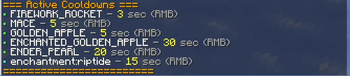
- Use `/rccd list` to see all active cooldowns
- Minecraft item IDs are in UPPERCASE_WITH_UNDERSCORES format (e.g., `DIAMOND_SWORD`, `GOLDEN_APPLE`)
- Enchantment names are lowercase (e.g., `riptide`, `channeling`)
## 🎮 Commands
| Command | Description | Permission |
|---------|-------------|------------|
| `/rccd reload` | Reload plugin configuration | `rccd.admin` (OP by default) |
| `/rccd list` | List all active cooldowns | `rccd.admin` (OP by default) |
| `/rccd add
### Command Examples
``` /rccd reload # Reload configuration /rccd list # Show all active cooldowns /rccd add MACE right_click 5 # Add 5-second cooldown to Mace /rccd delete ENDER_PEARL # Remove Ender Pearl cooldown ```
## 🌍 Languages
The plugin supports 5 languages:
- EN - English
- RU - Russian (Русский)
- UA - Ukrainian (Українська)
- ES - Spanish (Español)
- DE - German (Deutsch)
Change language in `config.yml`: ```yaml lang: RU # Change to your preferred language ```
Language files are automatically created in `plugins/RCCooldown/lang/` folder.
## 🔧 Mechanics
### Smart Use Detection
The plugin automatically detects how items are used:
- **Food/Consumabl
📊 Mod Details
- Game
- Minecraft Plugins
- Author
- rocketsops
- Version
- 1.0.1
- Downloads
- 594
- Endorsements
- 0
- Category
- bukkit
- Created
- 1/24/2026
- Updated
- 3/14/2026
- Game Versions
- 1.21, 1.21.1, 1.21.2, 1.21.3, 1.21.4
- Tags
- management, optimization, technology
🔧 How to Install Minecraft Plugins Mods
Download from Modrinth. Use Prism Launcher or drop into your mods folder.
📖 Full step-by-step install guide for Minecraft Plugins →
Visit the official mod page for specific installation instructions for this mod.
🎮 Need cheat codes or console commands? Check ur gaming wiki for Minecraft Plugins commands, item IDs, and more.
❓ Frequently Asked Questions
Which Minecraft Plugins versions does RC CoolDown support?
The author lists 1.21, 1.21.1, 1.21.2, 1.21.3, 1.21.4, 1.21.5. Other versions may work but are untested by the author.
What is the latest version of RC CoolDown?
Version 1.0.1, published 2026-03-14 with 594 downloads recorded at the source.
Keep browsing — more Minecraft Plugins mods await