PriorChat
⚪ Last updated 2023🖼️ Gallery (2 images)
🔍 Analysis
- 👍 1.6% endorsement rate — high engagement, a strong quality signal
- 🏆 #77 of 143 paper mods in this game by downloads
📋 About This Mod
# PriorChat Plugin (https://img.shields.io/github/v/release/certainly1182/PriorChat?include_prereleases)](https://github.com/certainly1182/PriorChat/releases) (https://img.shields.io/modrinth/dt/JMSHw1n4)](https://modrinth.com/plugin/priorchat) Simple plugin for (https://papermc.io) servers that stores and displays a history of chat messages for players when they join the server. ## Features - Stores a configurable number of past chat messages in a queue. - Displays past chat messages to players when they join the server. - Stores join, chat, quit, death, broadcast, advancement and kick messages. ## Installation To install PriorChat, follow these steps: 1. Download the plugin JAR file from (https://modrinth.com/plugin/priorchat) or the (https://github.com/certainly1182/PriorChat/releases) page. 2. Place the JAR file in the plugins folder of your Paper (or Paper fork) server. 3. Start the server and verify that the plugin loaded successfully. ## Configuration The plugin can be configured via the `config.yml` file located in `plugins/PriorChat`. The following configuration options are available: - `debug_mode` (default: false) - Debug mode toggle. - `number_of_messages_to_store` (default: 50) - The maximum number of chat messages to store in the queue. - `enabled_message_types` (default: all types) - List of message types to store. Valid values are `CHAT`, `JOIN`, `QUIT`, `DEATH`, `BROADCAST`, `ADVANCEMENT` and `KICK`. ### Default Config ```yml debug_mode: false number_of_messages_to_store: 50 enabled_message_types: - CHAT - JOIN - QUIT - DEATH - BROADCAST - ADVANCEMENT - KICK ``` ## Usage The PriorChat plugin does not *yet* have any commands or permissions. Simply install the plugin on your server to start using it. When a player joins the server, the plugin will display a configurable number of past chat messages to the player.
# PriorChat Plugin [!(https://img.shields.io/github/v/release/certainly1182/PriorChat?include_prereleases)](https://github.com/certainly1182/PriorChat/releases) [!(https://img.shields.io/modrinth/dt/JMSHw1n4)](https://modrinth.com/plugin/priorchat)
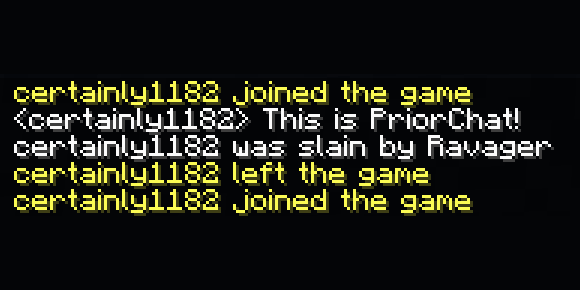
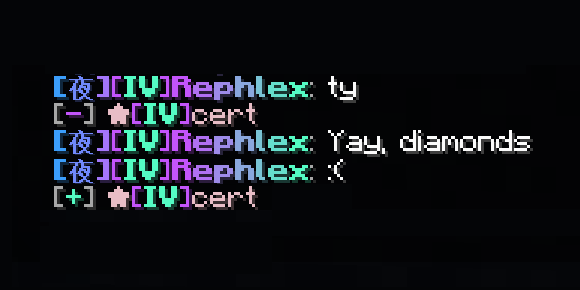
Simple plugin for (https://papermc.io) servers that stores and displays a history of chat messages for players when they join the server.
## Features - Stores a configurable number of past chat messages in a queue. - Displays past chat messages to players when they join the server. - Stores join, chat, quit, death, broadcast, advancement and kick messages. ## Installation To install PriorChat, follow these steps: 1. Download the plugin JAR file from (https://modrinth.com/plugin/priorchat) or the (https://github.com/certainly1182/PriorChat/releases) page. 2. Place the JAR file in the plugins folder of your Paper (or Paper fork) server. 3. Start the server and verify that the plugin loaded successfully. ## Configuration The plugin can be configured via the `config.yml` file located in `plugins/PriorChat`.
The following configuration options are available: - `debug_mode` (default: false) - Debug mode toggle. - `number_of_messages_to_store` (default: 50) - The maximum number of chat messages to store in the queue. - `enabled_message_types` (default: all types) - List of message types to store. Valid values are `CHAT`, `JOIN`, `QUIT`, `DEATH`, `BROADCAST`, `ADVANCEMENT` and `KICK`. ### Default Config ```yml debug_mode: false number_of_messages_to_store: 50 enabled_message_types: - CHAT - JOIN - QUIT - DEATH - BROADCAST - ADVANCEMENT - KICK ``` ## Usage The PriorChat plugin does not yet have any commands or permissions. Simply install the plugin on your server to start using it.
When a player joins the server, the plugin will display a configurable number of past chat messages to the player.
📊 Mod Details
- Game
- Minecraft Plugins
- Author
- certainly1182
- Version
- v1.2.0
- Downloads
- 512
- Endorsements
- 8
- Category
- paper
- Created
- 3/6/2023
- Updated
- 3/26/2023
- Game Versions
- 1.19, 1.19.1, 1.19.2, 1.19.3, 1.19.4
- Tags
- utility
🔧 How to Install Minecraft Plugins Mods
Download from Modrinth. Use Prism Launcher or drop into your mods folder.
📖 Full step-by-step install guide for Minecraft Plugins →
Visit the official mod page for specific installation instructions for this mod.
🎮 Need cheat codes or console commands? Check ur gaming wiki for Minecraft Plugins commands, item IDs, and more.
❓ Frequently Asked Questions
Which Minecraft Plugins versions does PriorChat support?
The author lists 1.19, 1.19.1, 1.19.2, 1.19.3, 1.19.4. Other versions may work but are untested by the author.
What is the latest version of PriorChat?
Version v1.2.0, published 2023-03-26 with 512 downloads recorded at the source.
Keep browsing — more Minecraft Plugins mods await