Paper Fight Bot
🟢 Updated this month🖼️ Gallery (5 images)

🔍 Analysis
- 👍 0.4% endorsement rate
- 🏆 #2 of 1452 bukkit mods in this game by downloads
📋 About This Mod
The most advanced combat bot for Paper Servers.
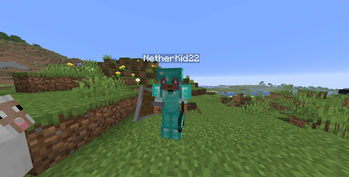
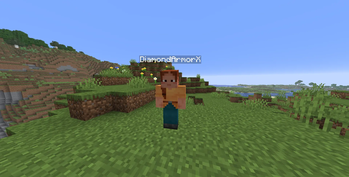
!(https://cdn.modrinth.com/data/cached_images/bf64720da1f6e7c9a9b074e7fdaf40a849dac4ac_0.webp) # What Is Paper Fight Bot Paper Fight Bot is the most advanced Pvp bots for Paper, Bukkit, Purpur, and Spigot Servers. For The Versions 1. 16+. It Spawns Zobmies that looks like player using the free version of (https://www.spigotmc.org/resources/libs-disguises-free. 81/). Then the bots use an path finding to track and fights players.
## Dependencies
Paper Fight Bot Uses requires Paper, Bukkit, Purpur, or Spigot on version 1. 16+ This Mod Also requires the free version of (https://www.spigotmc.org/resources/libs-disguises-free. 81/).
## Features
- Critical hits
- Sprint attacks
- Dodge
- Surround formationsides
- Retreat and heal
- Lava and void detection
- Bridge building
- Roam
- Group
- Auto Toteming
- Eating
- Placing Cobwebs
- Anti Cobwebs
- Water Bucket Clutching
- Using Ender Pearls
- Group
- Full Equipment System
- Death Events
- Bot Names
- Names In Tab
- Advanced Combat AI
- A Ton More Features
## installation
1. Dowload The Newest Version Of Paper Fight Bot (Not Beta) 2. Dowload The Newest Version Of (https://www.spigotmc.org/resources/libs-disguises-free. 81/) 3. Install Both PLugins Into Your Servers Plugin Folder 4. Restart Your Server 5. Join And Run Command "/fightbot spawn --random 1" 6. Righ-click bot in creative mode 7. Customize its inventory Or Not 8. Run The Command "/fightbot fight {Bot Name} {Your Username}" 9. And fight The Bot
## FightBot Commands
Main command: `/fightbot` (alias: `/fb`) — Permission: `fightbot.use` (default: OP)
### Spawning
- `/fightbot spawn
### Fighting
- `/fightbot fight
### Managing bots
- `/fightbot list` — List all active bots and groups
- `/fightbot remove
### Groups
- `/fightbot group create
### Roaming
- `/fightbot roam
### Teleporting
- `/fightbot tp
### Patrolling
- `/fightbot patrol add
### Config - `/fightbot reload` — Re-read config.yml and botnames.yml without restarting the server. (Health, speed, and damage values apply to newly spawned bots.)
## Equipment GUI
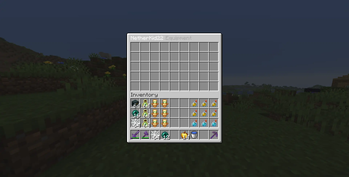
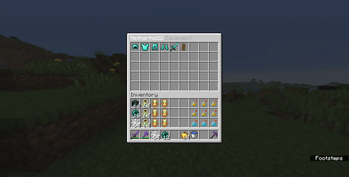
Right-click any bot in Creative mode to open its equipment screen:
| Slots | Contents | |-------|----------| | 1–4 | Helmet, chestplate, leggings, boots | | 5 | Offhand (totem / shield) | | 6 | Main hand (weapon) | | 7 | Axe (breaks raised shields) | | 8 | Food (eating & regen) | | 9 | Cobwebs | | 10 | Ender pearls | | 11 | Water bucket | | 12–14 | Reserved for future features | | 15+ | Storage (picked-up items land here) |
Empty hotbar slots automatically refill from storage. All slot positions and item behaviors can be changed in `config.yml`.
## Other Information
This plugin is tested on paper 1. 21. 11 so please report any bugs to the discord server.
## Future Updates
The plan for this bot is to have slots 12 - 14 be for mace or crystal gear. And up it will use those items. Another thing for this bot is for it to auto pot itself and have a clearer GUI for commands and other reladed GUI stuff IDK. Please Don't Hate This Project.
📊 Mod Details
- Game
- Minecraft Plugins
- Author
- nboyer585
- Version
- 26.2
- Downloads
- 1,128
- Endorsements
- 4
- Category
- bukkit
- Created
- 5/16/2026
- Updated
- 9/6/2026
- Game Versions
- 1.21, 1.21.1, 1.21.2, 1.21.3, 1.21.4
- Tags
- game-mechanics, mobs, technology
🔧 How to Install Minecraft Plugins Mods
Download from Modrinth. Use Prism Launcher or drop into your mods folder.
📖 Full step-by-step install guide for Minecraft Plugins →
Visit the official mod page for specific installation instructions for this mod.
🎮 Need cheat codes or console commands? Check ur gaming wiki for Minecraft Plugins commands, item IDs, and more.
❓ Frequently Asked Questions
Which Minecraft Plugins versions does Paper Fight Bot support?
The author lists 1.21, 1.21.1, 1.21.2, 1.21.3, 1.21.4, 1.21.5. Other versions may work but are untested by the author.
What is the latest version of Paper Fight Bot?
Version 26.2, published 2026-09-06 with 1,128 downloads recorded at the source.
Keep browsing — more Minecraft Plugins mods await