Orbis
🟡 Updated this year🖼️ Gallery (3 images)

🔍 Analysis
- 👍 0.5% endorsement rate
- 🏆 #86 of 99 fabric mods in this game by downloads
📋 About This Mod
<div align="center"> <img src="https://raw.githubusercontent.com/EmpireWar/Orbis/main/images/orbis-logo-black.png" alt="Orbis Logo"> <p>A modern, multi-platform region protection plugin.</p> </div> (https://img.shields.io/discord/282242806695591938?color=7289da&label=Discord&logo=discord&logoColor=white)](https://discord.gg/fh62mxU) ### Orbis is still in the early stages of development. There will likely be protection bypasses and other bugs. Please report any bugs or issues to the (https://github.com/EmpireWar/Orbis/issues). If there is a feature you would like to see, please open an (https://github.com/EmpireWar/Orbis/issues/new/choose). Orbis is a modern region protection plugin for Minecraft, supporting the latest version and most platforms: Paper, Fabric, NeoForge, and Sponge. It is not compatible with Spigot; please use Paper instead. ## What makes Orbis different? These are the key features that makes Orbis stand out against other similar plugins: - Modern, user-friendly interface/commands. - Support for Cuboids, Polygons, Polyhedrons, and Spherical region area types. - Region and selection visualisation using particles for all region types. - Multi-platform support for Paper, Fabric, NeoForge and Sponge. - Advanced API that lets you perform a set of queries on a world or region. - No external dependencies. ### Migrating from another plugin? Orbis has an inbuilt migration tool that allows you to migrate your regions from other plugins. Simply run `/orbis migrate <plugin>` on a server with Orbis and the other plugin installed, and your regions will be migrated to Orbis (as well as they can be). For more information, please check the (https://github.com/EmpireWar/Orbis/wiki/Migration-from-another-plugin) and find the section for the plugin you want to migrate from. ## 📆 Supported versions Orbis aims to always support the latest version of Minecraft. For modded versions, we always target the latest version, which is currently 1.21.10. For Paper and Sponge we target 1.21.4-1.21.11 (Sponge API 14-18). Newer or older versions may work, but are not tested. ## 🚀 Getting Started 1. **⬇️ Download** the plugin for your platform. 2. **📂 Drop** the `.jar` file into your server's `plugins` or `mods` folder. 3. **🔄 Restart** your server. Orbis will generate its config and be ready to use! ### Creating a region See the (https://github.com/EmpireWar/Orbis/wiki/Tutorial%3A-Creating-a-Region). ### Setting flags For a list of all currently available flags, check the wiki page: https://github.com/EmpireWar/Orbis/wiki/Flags. - Prevent block breaking in a region: - `/rg flag set spawn orbis:can_break false` - Permit damaging only zombies and husks: - `/rg flag set arena orbis:damageable_entities ` - Custom entry/exit messages: - `/rg flag set plaza orbis:entry_message "<green>Welcome to the Plaza!"` - `/rg flag set plaza orbis:exit_message "<gray>Leaving Plaza..."` - Make players invulnerable in an area: - `/rg flag set lobby orbis:invulnerability true` - Lock time to noon: - `/rg flag set museum orbis:time 6000` ### Futher setup For more information, please take a look at the wiki contents: https://github.com/EmpireWar/Orbis/wiki. ## 📚 API & Integration Replace `PLATFORM` with your server type (e.g., `paper`, `fabric`, `sponge`). Replace `VERSION` with the latest Orbis version. For snapshots, use the `/snapshots` repo and append `-SNAPSHOT`. ```kts repositories { maven("https://repo.empirewar.org/releases") } dependencies { compileOnly("org.empirewar.orbis:PLATFORM-api:VERSION") } ``` ### Using the API To find out how to utilise the API, take a look at the wiki page: https://github.com/EmpireWar/Orbis/wiki/API. ### Events Orbis fires events for every platform: - **RegionEnterEvent** - **RegionLeaveEvent** ### 📖 Javadocs Full documentation is available at: (https://repo.empirewar.org/javadoc/releases/org/empirewar/orbis/common/latest)

A modern, multi-platform region protection plugin.
[!(https://img.shields.io/discord/282242806695591938?color=7289da&label=Discord&logo=discord&logoColor=white)](https://discord.gg/fh62mxU)
### Orbis is still in the early stages of development. There will likely be protection bypasses and other bugs. Please report any bugs or issues to the (https://github.com/EmpireWar/Orbis/issues). If there is a feature you would like to see, please open an (https://github.com/EmpireWar/Orbis/issues/new/choose).
Orbis is a modern region protection plugin for Minecraft, supporting the latest version and most platforms: Paper, Fabric, NeoForge, and Sponge. It is not compatible with Spigot; please use Paper instead.
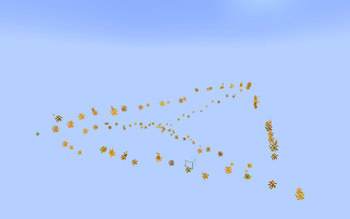
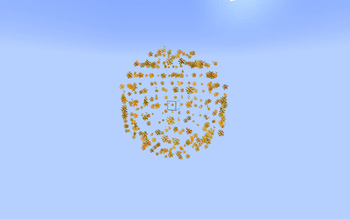
## What makes Orbis different? These are the key features that makes Orbis stand out against other similar plugins: - Modern, user-friendly interface/commands. - Support for Cuboids, Polygons, Polyhedrons, and Spherical region area types. - Region and selection visualisation using particles for all region types. - Multi-platform support for Paper, Fabric, NeoForge and Sponge. - Advanced API that lets you perform a set of queries on a world or region. - No external dependencies.
### Migrating from another plugin? Orbis has an inbuilt migration tool that allows you to migrate your regions from other plugins.
Simply run `/orbis migrate
For more information, please check the (https://github.com/EmpireWar/Orbis/wiki/Migration-from-another-plugin) and find the section for the plugin you want to migrate from.
## 📆 Supported versions Orbis aims to always support the latest version of Minecraft.
For modded versions, we always target the latest version, which is currently 1. 21. 10.
For Paper and Sponge we target 1. 21. 4-1. 21. 11 (Sponge API 14-18).
Newer or older versions may work, but are not tested.
## 🚀 Getting Started
1. ⬇️ Download the plugin for your platform. 2. 📂 Drop the `.jar` file into your server's `plugins` or `mods` folder. 3. 🔄 Restart your server. Orbis will generate its config and be ready to use!
### Creating a region
See the (https://github.com/EmpireWar/Orbis/wiki/Tutorial%3A-Creating-a-Region).
### Setting flags
For a list of all currently available flags, check the wiki page: https://github.com/EmpireWar/Orbis/wiki/Flags.
- Prevent block breaking in a region:
- - `/rg flag set spawn orbis:can_break false`
- Permit damaging only zombies and husks:
- - `/rg flag set arena orbis:damageable_entities ["minecraft:zombie","minecraft:husk"]`
- Custom entry/exit messages:
- - `/rg flag set plaza orbis:entry_message "
Welcome to the Plaza!"` - - `/rg flag set plaza orbis:exit_message "
Leaving Plaza..."` - Make players invulnerable in an area:
- - `/rg flag set lobby orbis:invulnerability true`
- Lock time to noon:
- - `/rg flag set museum orbis:time 6000`
### Futher setup
For more information, please take a look at the wiki contents: https://github.com/EmpireWar/Orbis/wiki.
## 📚 API & Integration
Replace `PLATFORM` with your server type (e.g., `paper`, `fabric`, `sponge`).
Replace `VERSION` with the latest Orbis version. For snapshots, use the `/snapshots` repo and append `-SNAPSHOT`.
```kts repositories { maven("https://repo.empirewar.org/releases") }
dependencies { compileOnly("org.empirewar.orbis:PLATFORM-api:VERSION") } ```
### Using the API To find out how to utilise the API, take a look at the wiki page: https://github.com/EmpireWar/Orbis/wiki/API.
### Events Orbis fires events for every platform: - RegionEnterEvent - RegionLeaveEvent
### 📖 Javadocs Full documentation is available at: (https://repo.empirewar.org/javadoc/releases/org/empirewar/orbis/common/latest)
📊 Mod Details
- Game
- Minecraft Plugins
- Author
- SamB440
- Version
- 1.0.2-SNAPSHOT+9a52ec8
- Downloads
- 1,729
- Endorsements
- 8
- Category
- fabric
- Created
- 9/1/2025
- Updated
- 8/20/2026
- Game Versions
- 1.21.9, 1.21.10, 1.21.11, 26.1, 26.1.1
- Tags
- game-mechanics, management, utility
🔧 How to Install Minecraft Plugins Mods
Download from Modrinth. Use Prism Launcher or drop into your mods folder.
📖 Full step-by-step install guide for Minecraft Plugins →
Visit the official mod page for specific installation instructions for this mod.
🎮 Need cheat codes or console commands? Check ur gaming wiki for Minecraft Plugins commands, item IDs, and more.
❓ Frequently Asked Questions
Which Minecraft Plugins versions does Orbis support?
The author lists 1.21.9, 1.21.10, 1.21.11, 26.1, 26.1.1, 26.1.2. Other versions may work but are untested by the author.
What is the latest version of Orbis?
Version 1.0.2-SNAPSHOT+9a52ec8, published 2026-08-20 with 1,729 downloads recorded at the source.
Keep browsing — more Minecraft Plugins mods await