NoodlesCD
🟡 Updated this year🖼️ Gallery (2 images)

🔍 Analysis
- 🏆 #134 of 135 folia mods in this game by downloads
📋 About This Mod
NoodlesDiscs Custom YouTube music discs for Minecraft using Simple Voice Chat NoodlesDiscs lets server owners create custom music discs from YouTube or direct audio links and play them through jukeboxes using Simple Voice Chat. No resource pack is required. Players can insert a custom disc into a jukebox, hear the song around the jukebox location, and remove the disc to stop the music just like a normal Minecraft music disc. Features Create custom discs from YouTube links Supports direct audio links Plays music through Simple Voice Chat No resource pack required Jukebox-style behavior Insert disc into jukebox to play Remove disc from jukebox to stop Saves YouTube title and creator when available Custom disc names and lore OP-only by default LuckPerms-compatible permissions Folia-ready Auto-managed downloader tools No manual ffmpeg, yt-dlp, or Deno setup needed Requirements You only need: Simple Voice Chat Commands /noodlescd create <name> <url> /noodlescd give <player> <name> /noodlescd list /noodlescd info <name> /noodlescd delete <name> /noodlescd stop /noodlescd reload /noodlescd help Permissions By default, only OPs can use the commands. noodlesdiscs.admin noodlesdiscs.create noodlesdiscs.give noodlesdiscs.list noodlesdiscs.delete noodlesdiscs.stop noodlesdiscs.reload How It Works An admin creates a custom disc: The plugin downloads and prepares the audio. An admin gives the disc: The player right-clicks a jukebox with the disc. The disc is inserted and the song plays around the jukebox using Simple Voice Chat. Right-click the jukebox with an empty hand to eject the disc and stop the song. Installation Stop your server. Install Simple Voice Chat. Put NoodlesDiscs.jar in your plugins folder. Start your server. Create your first disc. Notes YouTube support is handled automatically by the plugin. The first YouTube disc may take longer to create because the plugin sets up its helper tools. Players need Simple Voice Chat installed on their client. Only upload or use songs you own or have permission to use. Very long songs or many jukeboxes playing at the same time may use more server resources. Supported Server Software Built for Folia ShreddedPaper Credits Created by Noodles / ggnoods find me at ggnoods.com Powered by: Simple Voice Chat yt-dlp ffmpeg Deno
NoodlesDiscs
Custom YouTube music discs for Minecraft using Simple Voice Chat
NoodlesDiscs lets server owners create custom music discs from YouTube or direct audio links and play them through jukeboxes using Simple Voice Chat. No resource pack is required.
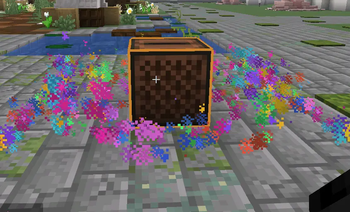
Players can insert a custom disc into a jukebox, hear the song around the jukebox location, and remove the disc to stop the music just like a normal Minecraft music disc.
Features Create custom discs from YouTube links Supports direct audio links Plays music through Simple Voice Chat No resource pack required Jukebox-style behavior Insert disc into jukebox to play Remove disc from jukebox to stop Saves YouTube title and creator when available Custom disc names and lore OP-only by default LuckPerms-compatible permissions Folia-ready Auto-managed downloader tools No manual ffmpeg, yt-dlp, or Deno setup needed
Requirements
You only need: Simple Voice Chat
Commands
/noodlescd create
Permissions
By default, only OPs can use the commands. noodlesdiscs.admin noodlesdiscs.create noodlesdiscs.give noodlesdiscs.list noodlesdiscs.delete noodlesdiscs.stop noodlesdiscs.reload
How It Works An admin creates a custom disc: The plugin downloads and prepares the audio. An admin gives the disc: The player right-clicks a jukebox with the disc. The disc is inserted and the song plays around the jukebox using Simple Voice Chat. Right-click the jukebox with an empty hand to eject the disc and stop the song.
Installation Stop your server. Install Simple Voice Chat. Put NoodlesDiscs.jar in your plugins folder. Start your server. Create your first disc.
Notes YouTube support is handled automatically by the plugin. The first YouTube disc may take longer to create because the plugin sets up its helper tools. Players need Simple Voice Chat installed on their client. Only upload or use songs you own or have permission to use. Very long songs or many jukeboxes playing at the same time may use more server resources.
Supported Server Software
Built for Folia ShreddedPaper Credits
Created by Noodles / ggnoods find me at ggnoods.com
Powered by: Simple Voice Chat yt-dlp ffmpeg Deno
📊 Mod Details
- Game
- Minecraft Plugins
- Author
- ggnoods
- Version
- 1.0.36-Paper-26.1.1
- Downloads
- 79
- Endorsements
- 0
- Category
- folia
- Created
- 6/6/2026
- Updated
- 8/22/2026
- Game Versions
- 26.1.1
- Tags
- social, technology, utility
🔧 How to Install Minecraft Plugins Mods
Download from Modrinth. Use Prism Launcher or drop into your mods folder.
📖 Full step-by-step install guide for Minecraft Plugins →
Visit the official mod page for specific installation instructions for this mod.
🎮 Need cheat codes or console commands? Check ur gaming wiki for Minecraft Plugins commands, item IDs, and more.
❓ Frequently Asked Questions
Which Minecraft Plugins versions does NoodlesCD support?
The author lists 26.1.1. Other versions may work but are untested by the author.
What is the latest version of NoodlesCD?
Version 1.0.36-Paper-26.1.1, published 2026-08-22 with 79 downloads recorded at the source.
Keep browsing — more Minecraft Plugins mods await