nonchat
🟡 Updated this year🖼️ Gallery (6 images)





🔍 Analysis
- 👍 0.4% endorsement rate
- 🏆 #455 of 1560 bukkit mods in this game by downloads
📋 About This Mod
The most elegant chat solution for your Minecraft server
## ✨ Features
- 🎨 Custom Chat Formats - Fully customizable chat messages with HEX color support
- 💬 Private Messaging - Enhanced private chat system with spy functionality
- 🔔 Player Pings - Mention players in chat with customizable sounds and highlights
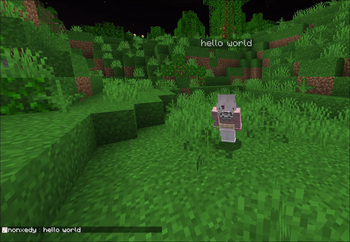
- 💭 Chat Bubbles - Display messages above players' heads
- 📢 Auto Broadcasting - Schedule automatic server announcements
- ⚰️ Custom Death Messages - Stylish death announcements
- 🎭 Roleplay Commands - Enhanced RP experience with /me and /roll commands
- 🔒 Staff Chat - Private communication for staff members
- 💡 Hover Messages - Interactive hover text with additional information
- 🔗 DiscordSRV Integration - Seamless chat synchronization between Minecraft and Discord
- 📱 Interactive Chat Placeholders - Dynamic placeholders for enhanced chat experience:
- - `` - Display your current ping with color-coded status
- - `` - Show your held item with detailed hover information
- 🛡️ Advanced Chat Filters - Comprehensive protection systems:
- - Anti-Advertisement - Blocks server advertisements with customizable sensitivity
- - Caps Filter - Prevents excessive use of capital letters
- - Word Filter - Blocks inappropriate content and regex patterns
## 🎮 Commands
| Command | Description | |---------|-------------| | `/broadcast` | Send server-wide announcements | | `/msg` | Send private messages | | `/reply` | Reply to the last private message | | `/clear` | Clear chat history | | `/ignore` | Ignore specific players | | `/spy` | Toggle private message spy mode | | `/me` | Send a first-person message | | `/roll` | RP roll dice | | `/channel` | Channel management commands | | `/nonchat help` | View plugin help | | `/nonchat reload` | Reload plugin configuration |
## 🔧 Interactive Chat Placeholders
nonchat supports dynamic placeholders that make your chat more interactive and informative:
### 📊 Ping Placeholder Use `` in your messages to display your current connection latency: - Green (< 100ms) - Excellent connection - Gold (100-300ms) - Good connection - Red (> 300ms) - Poor connection
Example: `My ping is ` → `My ping is 45ms`
### 🎒 Item Placeholder Use `` in your messages to showcase the item you're currently holding: - Displays item name with rarity-based coloring - Hover over the item name to see detailed information - Shows enchantments, durability, and other item properties - Automatically detects if you're not holding anything
Example: `Check out this !` → `Check out this Diamond Sword!` (with hover details)
## 🚀 Quick Start
1. Download nonchat from (https://modrinth.com/plugin/nonchat) 2. Place the .jar file in your server's `plugins` folder 3. Start/restart your server 4. Configure in `plugins/nonchat/config.yml`
## 📚 Documentation
Visit our (https://github.com/utophii/nonchat/wiki) for detailed setup instructions and configuration guides.
## 🌟 Why nonchat?
- Performance Optimized - Built with efficiency in mind
- Modern Features - Supports latest Minecraft versions (1. 16. 5-26. 2)
- Interactive Elements - Dynamic placeholders for enhanced player experience
- Easy Configuration - Simple YAML configuration with messages.yml support
- Active Development - Regular updates and feature additions
## 📋 Development Roadmap
| Status | Task | |:------:|------| | 🔜 | Rewrite code to Kotlin | | ✅ | Make channel names clickable to switch to them | | ✅ | Refactor code to modular type for mc version support |
Legend: - ✅ Completed - ⏳ In Progress - 🔜 Planned
## 🔧 Support
- (https://discord.gg/NAWsxe3J3R)
- (https://github.com/utophii/nonchat/issues)
- (https://github.com/utophii/nonchat/wiki)
## 💝 Support the Development
If you enjoy nonchat, consider supporting its development: - (https://boosty.to/nonxedy)
## 📸 Screenshots
📊 Mod Details
- Game
- Minecraft Plugins
- Author
- utophii
- Version
- 1.6.4
- Downloads
- 6,390
- Endorsements
- 25
- Category
- bukkit
- Created
- 1/7/2025
- Updated
- 8/15/2026
- Game Versions
- 1.16.5, 1.17, 1.17.1, 1.18, 1.18.1
- Tags
- social
🔧 How to Install Minecraft Plugins Mods
Download from Modrinth. Use Prism Launcher or drop into your mods folder.
📖 Full step-by-step install guide for Minecraft Plugins →
Visit the official mod page for specific installation instructions for this mod.
🎮 Need cheat codes or console commands? Check ur gaming wiki for Minecraft Plugins commands, item IDs, and more.
❓ Frequently Asked Questions
Which Minecraft Plugins versions does nonchat support?
The author lists 1.16.5, 1.17, 1.17.1, 1.18, 1.18.1, 1.18.2. Other versions may work but are untested by the author.
What is the latest version of nonchat?
Version 1.6.4, published 2026-08-15 with 6,390 downloads recorded at the source.
Keep browsing — more Minecraft Plugins mods await