Nea Chat free
🟡 Updated this year🖼️ Gallery (2 images)
🔍 Analysis
- 🏆 #114 of 183 adventure mods in this game by downloads
📋 About This Mod
!(https://cdn.modrinth.com/data/cached_images/63002f9f84596dc7e3d2dbbe78189126c698269c.png)
# NeaChat-Free — Essential Chat Engine for Paper 1. 21+
The most visually immersive free chat system for modern Minecraft servers.
NeaChat-Free transforms your server's chat from plain text into a rich, interactive experience powered by native Minecraft sprites, Adventure API, and MiniMessage formatting. No resource packs. No client-side mods. Everything renders using Minecraft's own texture atlas — the exact same icons players see in their inventory, crafting table, and achievements.
> Built for Paper 1. 21+ · Fully asynchronous · Zero-dependency core · 100% Free
## ⚡ Why NeaChat-Free?
Most chat plugins give you plain colored text. NeaChat-Free brings visual language to your server for free.
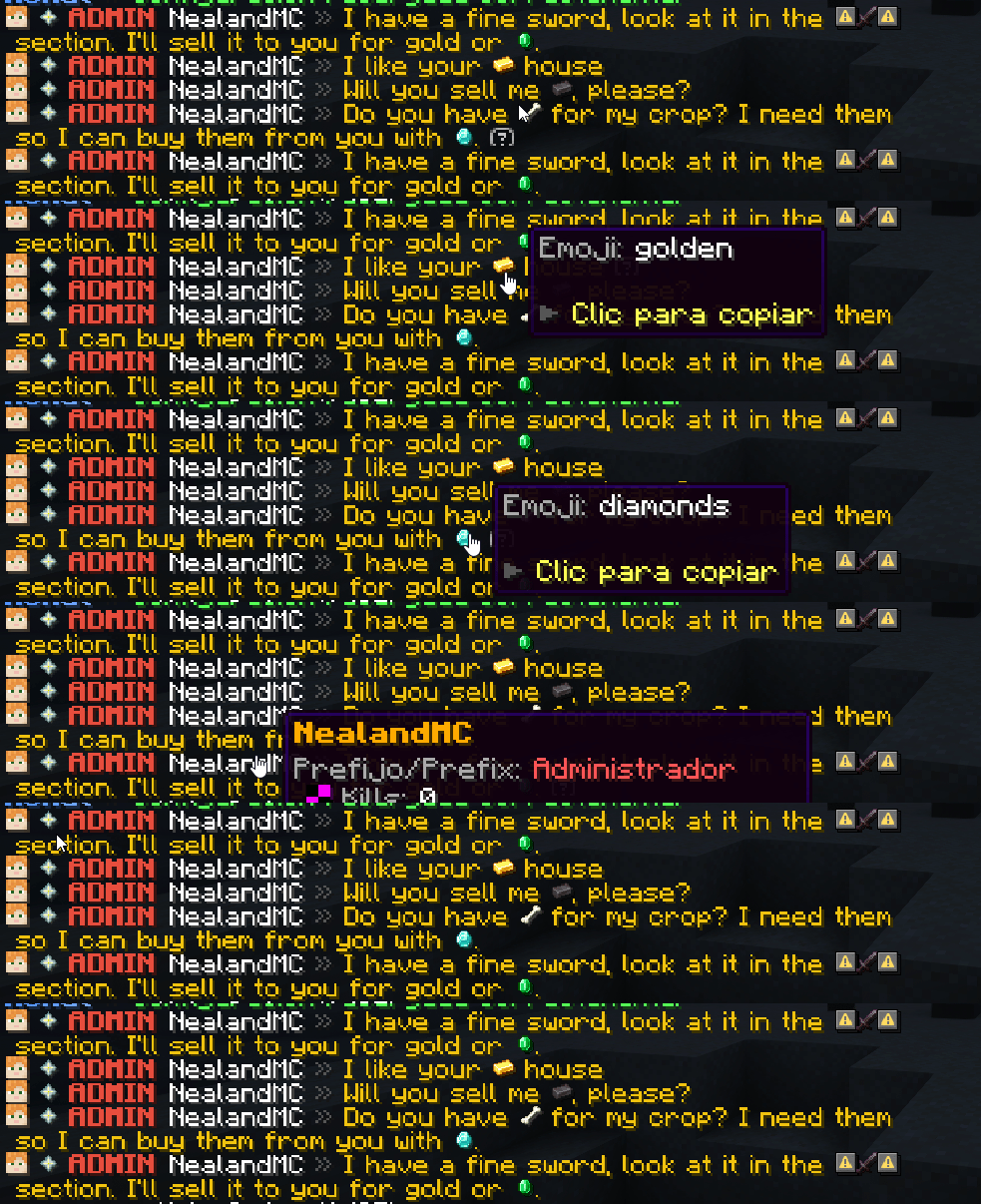
Every chat message becomes a canvas: player heads rendered inline, Minecraft item and block sprites embedded directly in text, interactive hover cards that reveal player profiles, click-to-copy chat emojis, and click events that trigger commands — all without a single resource pack file.
Your players will hover over a rank tag and see a profile card with stats and rank info. They'll type a word like `:diamante:` and see the actual 100% color-vibrant diamond block texture appear in their message. They'll type `` and showcase their held item or block as a clickable sprite with full tooltip.
Upgrade your server's chat today with zero cost.
!(https://cdn.modrinth.com/data/cached_images/792da048bdc35c2b6dfb0a510b2f8cd0f67daa71.png)
## 🧩 Features Included in NeaChat-Free
### 🎨 Advanced Format System
Unlimited chat formats with priority-based assignment (`HIGHER_FIRST` or `LOWER_FIRST`)
Each format is a multi-part composition: player head, tags, rank badge, nickname — each segment independently configurable
Per-part hover tooltips: design profile cards with sprites, stats, gradients, and custom layouts
Per-part click events: `SUGGEST` commands, `RUN` commands, `OPEN_URL`, or `COPY_TO_CLIPBOARD`
Per-format chat colors: each rank gets its own message color (hex, gradient, or legacy)
Full MiniMessage support: `
### 📜 Interactive Chat Emoji System (`/emoji`) Interactive Paginated Chat Menu (`/emoji `): Browse all available emojis directly in chat with pagination buttons (`[« Anterior]` ``) One-Click Copy: Click on any emoji or the `` button to copy the exact keyword to your clipboard! Single Config File (`emojis.yml`): Pre-packaged with clean Spanish emoji keywords Color Isolation (Glitch-Free Sprites): Emojis render in their authentic 100% full-color resolution — they never get tinted or faded by chat formatting colors!
### ⚔️ Universal Item Showcase (``)
Show Anything in Hand: Supports both items AND blocks! Netherite swords, enchanted books, or custom blocks — all display instantly
Dual Atlas Resolution: Automatically detects whether an item belongs to the `items` or `blocks` atlas (`
### 🖼️ Native Minecraft Sprites (14 Atlases Loaded) Renders real textures directly from 14 built-in Paper/Minecraft texture atlases: `blocks`, `items`, `gui`, `particles`, `paintings`, `map_decorations`, `banner_patterns`, `shield_patterns`, `armor_trims`, `beds`, `chest`, `decorated_pot`, `shulker_boxes`, `signs` Smart Filtering: only loads sprites ≤16×16px that can actually render as chat glyphs Atlas browser command: `/neachat sprites ` — browse every available sprite with live preview and pagination
### 👤 Player Head Rendering
Displays the player's actual skin head inline in chat using `
## ⚡ Free vs Premium Comparison
| Feature | NeaChat-Free | NeaChat-Premium |
|---|---|---|
| MiniMessage & Format System | ✅ Included | ✅ Included |
| 14 Minecraft Atlases & Sprites | ✅ Included | ✅ Included |
| Item & Block Showcase `` | ✅ Included | ✅ Included |
| Player Head Skins `
📊 Mod Details
- Game
- Minecraft Plugins
- Author
- NeaStudios
- Version
- 1.0.0
- Downloads
- 15
- Endorsements
- 1
- Category
- adventure
- Created
- 8/8/2026
- Updated
- 7/20/2026
- Game Versions
- 1.21, 1.21.1, 1.21.2, 1.21.3, 1.21.4
- Tags
- adventure, equipment, management
🔧 How to Install Minecraft Plugins Mods
Download from Modrinth. Use Prism Launcher or drop into your mods folder.
📖 Full step-by-step install guide for Minecraft Plugins →
Visit the official mod page for specific installation instructions for this mod.
🎮 Need cheat codes or console commands? Check ur gaming wiki for Minecraft Plugins commands, item IDs, and more.
❓ Frequently Asked Questions
Which Minecraft Plugins versions does Nea Chat free support?
The author lists 1.21, 1.21.1, 1.21.2, 1.21.3, 1.21.4, 1.21.5. Other versions may work but are untested by the author.
What is the latest version of Nea Chat free?
Version 1.0.0, published 2026-07-20 with 15 downloads recorded at the source.
Keep browsing — more Minecraft Plugins mods await